JavaScript toggle code

I’m just saving this for myself for future design possibilities… The script that goes in the head:

<script type="text/javascript">
<!-- 
// toggle visibility 

function toggle( targetId ){ 
  if (document.getElementById){ 
        target = document.getElementById( targetId ); 
           if (target.style.display == "none"){ 
              target.style.display = ""; 
           } else { 
              target.style.display = "none"; 
           } 
     } 
} 
-->
</script>

Sample code showing usage:

<h3>Blogs I Read <a href="#" onclick="toggle('outside2');return false;" title="Toggle BlogRoll">(show/hide)</a></h3> 

    <div id="outside2"> 
        <h1><a href="http://www.google.com" title="google.">Google Search</a><br /> 
        <a href="http://www.google.com" title="google.">Google Search</a></h1> 
        <div class="dailyphoto"><!--#include virtual="/daily/dailyphoto.inc"--></div> 
  </div> 

<h3>Blogs I Read <a href="#" onclick="toggle('outside3');return false;" title="Toggle BlogRoll">(show/hide)</a></h3> 

    <div id="outside3"> 
        <h1><a href="http://www.google.com" title="google.">Google Search</a><br /> 
        <a href="http://www.google.com" title="google.">Google Search</a></h1> 
        <div class="dailyphoto"><!--#include virtual="/daily/dailyphoto.inc"--></div> 
  </div></div>

(via Joel Blain)

iTunes: “World, The” by Quest from the album Essential Chillout (2000, 4:17).

I’m too sexy for my blog

New tagline for the blog went up today. Inspiration should be blatantly obvious (at least if you’re into early 90’s one-hit wonders). ;)

Besides, I was bored.

This did, however, inspire some new shirts now available for sale through CafePress:

I'm too sexy for my blogI'm too sexy for your blog

To the left, the “I’m too sexy for my blog” t-shirt. Let your ego go wild, show of just how good you are! You deserve it!

And on the right, for those people who don’t deserve to be graced by your presence — the “I’m too sexy for your blog” t-shirt! Face it, some blogs just aren’t worth your time. Don’t be shy about it — announce it to the world!

Or not.

You know.

Whatever. ;)

I just do these things because they amuse me.

iTunes: “I’m Too Sexy (Catwalk)” by Right Said Fred from the album I’m Too Sexy (1991, 7:51).

blockquotes in TypePad and MovableType

One of the wonderful little things about a weblogging system such as TypePad or MovableType (and many others, of course) is that there are a lot of nice little usability touches that make it so much easier than having to work with all the HTML code yourself. Rather than mucking around with “ tags and the like, you just type away, and when you hit “Post”, all those niggling little details are taken care of for you.

Every so often, though, something doesn’t quite work the way you’d expect it to. Over the past few days, a few people have been posting in a thread on the TypePad User Group, trying to figure out why every so often, using the <blockquote> tag would suddenly cause display issues in a finished post.

Since I’d had to battle with this in the past, I ended up writing a small book attempting to explain just what was going on. My full post (in my usual overly long-winded style) follows.

After reading through this thread, I believe I’ve seen a couple different things going on when dealing with blockquote elements. I’ll see if I can clearly (if not terribly concisely) toss some useable answers out. ;)

I’ll start with an easier one to explain. I saw this from BJ:

It seems the problem occurs when the blockquote is within a paragraph:

<p> blah blah <blockquote> quoted stuff </blockquote> More Stuff </p>

There are a few types of tags in HTML. In this case, we need to know about two types: inline tags and block level tags.

Block level tags define a chunk of HTML code or text that is a self-contained block (I hate using a word to define itself, but that’s all I’m coming up with right now). A paragraph is a good example of this type of tag. Inline tags define a chunk of code or text that is contained within a block level tag — for instance, bold or italic text inside a paragraph.

The simplest way to visualize this is simply visualizing how a paragraph is structured: you can have bold and italic words inside a paragraph, but you can’t have paragraphs within bold and italic words, nor can you have a paragraph within a paragraph. In other words, this is a valid structure:

<p>Well, isn't <i>that</i> just absolutely <b>nifty</b>!

But this isn’t:

I'm not sure what to use here <p>as an example</p>, so I'll make something up.

Now, as long as all that made sense, all you need to realize is that a blockquote, as implied by its name, is a block level element, and therefore cannot be used within a paragraph. A properly formatted blockquote should look something like this:

I found this interesting little bit of information today:

<blockquote>A really interesting bit of information.</blockquote>

See? Pretty cool, huh?

If you want to correctly code an inline quote, as in BJ’s example, you should use the <quote> HTML tag, like so:

blah blah <quote>quoted stuff</quote> More Stuff

Okay, done. And that was the simpler of the two situations!

The second (and probably the one that’s biting the most people in the butt) is the bizarre linespacing issues that crop up at times when using the blockquote element. Sometimes blockquotes work fine, sometimes they’ll go tweaky within the blockquote, and sometimes they’ll affect things after the blockquote is closed.

I struggled with this for a while myself, but I eventually figured out that the culprit is actually one of the things that TypePad (and MovableType, for that matter) does to help us out: the automatic wrapping of paragraphs in paragraph tags (the “convert line breaks” option in the ‘Text Formatting’ menu).

TP/MT determines where to place paragraph and linebreak tags by looking at the text of the post: a single carriage return becomes a linebreak (<br />); blocks of text surrounded by two carriage returns (blank lines) get surrounded with paragraph tags (“…</p>). Simple enough on its own, but TP/MT also scans for certain other tags, and when it encounters those, it does not insert paragraph or linebreak tags. I don’t know all of the tags that will trigger this, but I know that list tags and blockquote tags are definitely in the list.

Now, when a blockquote is only a single paragraph, that’s not a problem at all. For instance, given the following text entered into a post:

I found this interesting little bit of information today:

<blockquote>A really interesting bit of information.</blockquote>

See? Pretty cool, huh?

TP/MT would output the HTML as follows:

<p>I found this interesting little bit of information today:

<blockquote>A really interesting bit of information.</blockquote>

See? Pretty cool, huh?

Where things get tweaky is when a blockquote contains multiple paragraphs. The first paragraph of the blockquote will be ignored as it should, but then the second paragraph of the blockquote gets an opening paragraph tag — and suddenly you run into a situation where two block level tags are fighting with each other. Then, when the blockquote ends, you have an opening paragraph tag, a closing blockquote tag, and then a closing paragraph tag — more confusion.

For example, given the following text put into a post:

I found this interesting little bit of information today:

<blockquote>A really interesting bit of information.

Some more information that's also interesting.</blockquote>

See? Pretty cool, huh?

TP/MT will wrap the first line in paragraph tags. Because the second line begins with a blockquote tag, it will ignore that line. As the third line begins with normal text, TP/MT will wrap that entire line in paragraph tags, which is where the weirdness creeps in. Here’s how the output would look:

I found this interesting little bit of information today:

<blockquote>A really interesting bit of information.

Some more information that's also interesting.</blockquote>

See? Pretty cool, huh?

Once you factor in CSS declarations into all of this, which might have differing settings for blockquotes and for paragraphs, you can see why things end up getting more than a little wonky as your browser tries to work its way through the tag soup and figure out how to format everything.

(ADDED: By the way, I should clarify that while both paragraph tags and blockquote tags are block level elements, different rules apply to them: while you cannot have a blockquote contained within a paragraph, you can have a paragraph [or multiple paragraphs] contained within a blockquote. While this may seem a little confusing from a “but they’re both block level elements!” standpoint, from a logical and English usage standpoint, it does make sense. I just can’t explain it any better than that. ;) )

There are two ways to get around this, neither of which are incredibly complex — but neither of which are incredibly easy, either.

The first is simply to switch the ‘Text Formatting’ option to “none” and type in all the paragraph tags yourself so that TP/MT doesn’t have to do it automatically. It works, but it also takes away from some of the ease of use of TP/MT.

The second option (and the one I use) is to keep in mind how TP/MT will interpret what you give it, and do a little bit of manual work to get around the issue. You’ll still be doing some manual work with tags here, but not quite as much as you might in option one. When I’m entering a two (or more) paragraph blockquote into one of my posts, I simply take into account the extra tags that TP/MT will add, add a couple of my own, and then ‘push’ a couple lines together so that the resulting code will output correctly after it passes through TP/MTs routines.

This is a bit easier to show than to describe, so — starting with the above example again, here’s the starting point:

I found this interesting little bit of information today:

<blockquote>A really interesting bit of information.

Some more information that's also interesting.</blockquote>

See? Pretty cool, huh?

Now, to prevent TP/MT from munging things up, I would put that example into one of my posts like this:

I found this interesting little bit of information today:

<blockquote>A really interesting bit of information.

Some more information that's also interesting.</p></blockquote>See? Pretty cool, huh?

Now TP/MT has only three lines to work through. As before, the first line gets wrapped in paragraph tags. Because the second line begins with a blockquote tag, it gets ignored, but as I’ve manually added paragraph tags, that’s fine. The third line, like the first, gets wrapped in paragraph tags because it starts with simple text, but because I put in the requisite paragraph tags on either side of the blockquote tag, all the tags in the resulting code balance out, like so:

<p>I found this interesting little bit of information today:

<blockquote>A really interesting bit of information.

Some more information that's also interesting.</p></blockquote><p>See? Pretty cool, huh?

And (finally), that’s that! I realize that it’s probably fairly daunting at first, but after playing with it a bit, I think it should start to make sense. Maybe. ;)

Anyway, those are the two major issues with blockquote elements that are probably causing frustration for people.

And that’s far more than enough babble from me on all this. Hopefully some of this helped some of you — as always, if I just managed to make things more confusing, feel free to post followup questions, and I’ll do what I can to clarify!


More on the iHPod

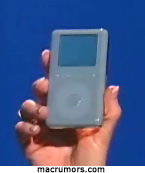
The HP iPod

More details of the Apple/HP iPod agreement are starting to come to light. Many people have expressed surprise that the announcement wasn’t made during the Macworld keynote, where it would have made quite a splash. Apparently, the simple reason for that is that the Macworld keynote was on Tuesday, and negotiations were “completed only after an extensive bargaining session that ran long into Wednesday night,” according to the New York Times.

The agreement…represents a significant departure for both companies. For the first time, Mr. Jobs has stepped away from the self-enclosed Apple-only strategy he has pursued since he returned to run the company in 1997. Meanwhile, Hewlett, the second-largest computer maker in the world, has put its software partner, Microsoft, on notice that it will not necessarily follow its lead in every case.

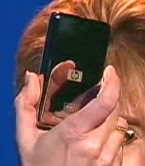
The back of the HP iPod

Additionally, one (and only one) report — that at the moment, doesn’t seem to be taken terribly seriously by most people — claims that HP “will be working with Apple to add support for Microsoft’s superior Windows Media Audio (WMA) format to the iPod by mid-year.” Now, first off, the claim that WMA is a “superior” format is questionable in and of itself (I’ve seen people on both sides of the WMA vs. AAC argument being equally rabid), and tossing that adjective into a single-sentence rumor shows enough bias that many people are discounting this rumor immediately. Additionally, the rumormonger is none other than Paul Thurrott, author of the WinInfo Super Site, who has been known to make some highly questionable claims when comparing Mac OS X and Windows in the past.

However, I’m not sure that this would be an entirely bad move on Apple’s part, if it’s true and if HP can talk them into it. Just as their partnership with HP will be opening up more potential avenues for the iPod and the iTunes Music Store, allowing Windows based iPod users to mix in previously-imported or downloaded WMA files along with their .mp3/.m4a library could give Windows users even more reason to jump on the iPod bandwagon. I wouldn’t be suprised at all if Apple has lost some iPod sales simply because there were people who were interested, but already had a large library of music encoded in WMA format, and would rather go with a competing .mp3 player than face having to re-import their entire music library.

While this may be nothing more than a Windows fanboy’s rumormongering, I’m not so sure that it should be dismissed so casually and out of hand. There may not be any way of knowing the truth until an official announcement is made one way or the other, but I think that there are potential upsides worth paying attention to.

(via MacMinute and MacRumors)

iTunes: “ToriMix v2” by DJ Wüdi from the album Difficult Listening Hour (2001, 46:37).

ecto beta available

The creator of blogging client Kung-Log has rewritten, updated, and renamed it, and has just relased the first public beta of ecto, which I’m playing with now. While I was never completely pulled in by Kung-Log, ecto so far seem to be fairly impressive. Quick response time, supports about everything I’d want it to (trackback pings, categories, file uploading, etc.), and has a decent number of useful extras (an option to prevent uploading posts that don’t have a category set or a summary written, and a live preview that can even tie into your site’s stylesheet so that it actually looks the way it should once posted), plus some “fun” goodies (like the ability to automatically insert what track iTunes is currently playing).

I’ve gotten so used to just using the web interface that I’m not entirely sure if I’ll be coaxed away from that or not, but I’m always willing to give one of these things a try. We’ll see how it goes.

(via Lane)

iTunes: “Difficult Listening Hour – 02v2” by DJ Wüdi from the album Difficult Listening Hour (2000, 1:04:41).

About that iPod mini

When Steve Jobs made the announcement of the iPod mini during the Macworld SF keynote, I wasn’t overly impressed.

…the biggest news on the iPod mini will be the price — no matter how happy people are about having the smaller player available, and no matter how cool it is, too many people were hoping for the \$100 price point. At this point, the 15Gb full-size iPod is only \$50 more than the 4Gb iPod mini…is this really going to go over well? Only time will tell, I suppose, but I have to say that I’m fairly skeptical. It’ll be a bit sketchy as to whether the smaller form factor and colors will be enough of a draw to offset the reduced capacity.

After thinking it over for a few days, though, I think I need to revise that.

See, I currently have a 2nd generation 10Gb iPod, which I bought for \$399 (it was the midrange model at the time I bought it). I also have an unusually large music collection: upwards of 1200 CDs, which will take up somewhere upwards of 80Gb of space once it’s all ripped onto my computer. Even if I had the money to spring for the top-of-the-line iPod, at 40Gb it would still hold less than half of my entire music library, so I’m not in a position of being able to carry around my entire music collection with me at all times.

Because of that, I’ve been looking at how I do use my iPod — and, quite simply, I really don’t use much more than a quarter of the 10Gb that I have available to me. I’ve gone into my listening habits in more detail in the past, but essentially, I carry around one 1Gb playlist, and occasionally toss one or two other specialized playlists on when I’m in a mood to, and that’s it. Right now, I’m currently using a whopping 2.12Gb of my 10Gb iPod for music, leaving around 7Gb free.

Now, say my iPod dies (heaven forbid). The more I think about it, if I do end up in a position where I need to get a new iPod, the iPod mini is perfect for my usage habits. Sure, it’s “only” 4Gb — but when I’m more than content with using just over half that space right now, why should that bother me in the least? I could spend \$50 more than the iPod mini, get the bottom rung iPod, and have 15Gb available…but chances are, I’d still only use around 2Gb of it for music, essentially wasting the other 13Gb. On the other hand, I could spend only \$250 (a full \$150 less than the 10Gb iPod I have now, incidentally), still have about twice the drive space than I’m likely to use, and have a smaller, lighter iPod that does everything that I use mine for now.

Sounds like a damn good deal to me.

So, contrary to my initial opinion, count me fully in the camp of the iPod mini supporters. If my current iPod ever dies — which hopefully won’t happen for quite a while yet — the iPod mini will do quite well for me.

Announcing the…iHPod?

In an unexpected (and potentially extremely lucrative) partnership, Apple and HP announced today that HP will be re-branding and selling Apple iPods and including iTunes pre-installed on HP branded desktop computers.

Working to provide consumers with the most compelling digital content whenever and wherever they desire, HP and Apple® today announced a strategic alliance to deliver an HP-branded digital music player based on Apple’s iPod™, the number one digital music player in the world, and Apple’s award-winning iTunes digital music jukebox and pioneering online music store to HP’s customers.

As part of the alliance, HP consumer PCs and notebooks will come preinstalled with Apple’s iTunes® jukebox software and an easy-reference desktop icon to point consumers directly to the iTunes Music Store, ensuring a simple, seamless music experience.

ZDNet provided more details:

Apple will manufacture the player, which will not have the iPod name but will have the same design and features as Apple’s third-generation iPod players, Phil Schiller, senior vice president at Apple, said in an interview. Also, the HP music player will come in “HP Blue,” he said.

“The way we look at it, HP will be reselling an iPod device,” said Schiller, who noted that the device will display the Apple logo at start-up and will work with all of the accessories made for the white-hued Apple varieties.

I can’t see this as being anything but an incredibly good deal all around. Apple, iTunes, and the iTunes Music Store get a lot more exposure than they had previously with the bundling agreement, Apple also has a far greater potential sales base for the iPod from customers who might not look at something obviously from Apple but won’t mind looking at something with the HP logo on it, sales of both iPods and iTMS songs rocket upwards, and even more people get to experience Apple’s high standards of quality and ease of use. Talk about a win-win scenario!

(via MacRumors)

Photoshop CS won’t do money

Adobe Photoshop CS apparently has special image-recognition code built in that will detect someone attempting to work with scanned currency, and then refuse to work with the image (“login as guest” to read the thread). Instead, it pops up an error message, and directs the user to the Rules for Use website.

We received a TIFF image from a customer, of a \$20 bill. The image does not violate any laws regarding reproduction of currency (it’s not even close to actual-size, and it’s not a “flat” portrayal – it’s wavy, as if it’s fluttering in the wind. Nor is it real-color.

However, Photoshop CS refuses to open the image, and provides an error message regarding the (il)legality of currency reproduction and an “information” button that takes you to the web. (Photoshop 7, of course, has no such qualms).

What the hell is this? In my book this is completely unacceptable – Photoshop is an image editor, not a censor, government policy enforcer or anything else.

Adobe, you’ve got some explaining to do.

Further testing by users has determined that the limitation affects the new US \$20 bill and several European bills, probably through as series of image-recognition algorithms (that, incidentally, must be applied to every image brought into Photoshop), at least one of which is probably the “EURion Constellation” method. Adobe has yet to comment on the issue.

Most likely, though, this was done at the request/strong encouragement of the government in an attempt to prevent counterfeiting of currency. The problem is, while the intent may be noble, this is enforcement at entirely the wrong end of the process. There are many, many legal uses for altered versions of the images on currency (advertising, promotional or informational purposes, parodies, and so on), all of which are covered by the fair uses clauses detailed on the very site where Adobe directs the user.

The Counterfeit Detection Act of 1992, Public Law 102-550, in Section 411 of Title 31 of the Code of Federal Regulations, permits color illustrations of U.S. currency provided:

  1. the illustration is of a size less than three-fourths or more than one and one-half, in linear dimension, of each part of the item illustrated;
  2. the illustration is one-sided; and
  3. all negatives, plates, positives, digitized storage medium, graphic files, magnetic medium, optical storage devices, and any other thing used in the making of the illustration that contain an image of the illustration or any part thereof are destroyed and/or deleted or erased after their final use.

Adobe have taken entirely the wrong step with this approach. In an effort to crack down on counterfeiters, they have summarily denied any and all users of their software the ability to perform legal operations on images of currency — and in cases such as that detailed by in the post that started the thread in Adobe’s forums, this can and will cause problems for those people who have a real and legitimate business need to work with such images.

(via /.)

[Update:]{.underline}

A response, of sorts, from Adobe.

This GarageBand is a hit

Analysts said they expect Apple’s new GarageBand music creation software to greatly benefit sales of Macs in the coming year. “You look at an application like GarageBand — you can’t get that on another platform at any price,” said Michael Gartenberg of Jupiter Media. “People will buy Macs on the basis of GarageBand.” Tim Bajarin, an analyst with market research firm Creative Strategies, also thinks the same. “GarageBand might even have more long-term effect on Apple’s sales [than the new iPod mini],” Bajarin said. “Steve has taken the consumer application layer to its next level from playing music to allowing you to be part of making music.”

(ripped shamelessly from MacMinute)