iTunes 4.5: Major iTunes Music Store update!

iTunes 4.5

The iTunes website hasn’t been updated yet (as of 0:17 4/28/04), so I can’t download it yet, but if you open up iTunes and go to the iTunes Music Store, you’ll see a badge for iTunes 4.5.

Update at 0:29: The iTunes website has been updated with iTunes 4.5.

This looks huge.

Clicking on the badge leads to a page with a quick rundown of the new features. As it’s all within the iTMS interface, I can’t link to anything, but here’s what I’m seeing:

Free Downloads/Single of the Week: Great music from emerging artists each week. Check back every Tuesday for the latest. (Currently, clicking on the “Get Free Single” link just leads back to the main iTMS page. [Update:]{.underline} The Foo Fighters‘ “My Hero” is the first free single.)

iMix — Publish Your Playlists: Be a tastemaker on iTunes. Publish your playlists for all the world to see. It’s easy to send lists to friends and family via “Tell-A-Friend” to boost your ratings and top the charts. (Playlists can include music from your personal library along with songs available in the iTMS. Drag selections into a playlist, give it a title and description, hit Publish and it’s in the iTMS for a year, then hit “Tell-A-Friend” to send the link to friends.)

[Update:]{.underline}

In the spirit of experimentation, I’ve created my first iMix. Since I listen to a ton of non-mainstream music, I was curious just how good the iTMS was. I fixed my “Recently Played” smart playlist to only list the last 250 songs that I have listened to (as that’s the upper limit for what you can submit to an iMix in one playlist) and sent that in. Of those 250 tracks, 61 were recognized, and I’m rather surprised at some of the ones that made it in. Nifty!

Music Videos Page: Now there’s a whole area dedicated to music videos, with new ones added all the time. Buy the songs you like with just one click. (Currently there are 72 available, free to watch, with a link to the iTMS song underneath.)

Movie Trailers — Now in iTunes: The ultra-popular movie trailers from Apple’s QuickTime site are now available on iTunes. (This section is live, includes both trailers and soundtrack iTMS links.)

Radio Charts: Check out the most-played tunes on your favorite radio station. Updated weekly, there are more than 1200 stations across hundreds of cities nationwide. (Nine stations are listed for the Seattle/Tacoma area: Mix 92.5, KUBE 98, KMPS, KWJZ, KISW Rock, Star 101.5, The Mountain, KISS 106.1, Warm 106.9, and The End. Eight are listed for the Anchorage area: KFAT, KAFC, KYMG, KGOT, KMXS, KBRJ, KNIK and KWHL.)

Party Shuffle: Playlists just got even easier. Party Shuffle is a new dynamic playlist that’s always on and ready to party. It shuffles songs from your library or playlists, and you can add or delete on the fly. Be the DJ you’ve always wanted to be.

CD Insert Printing: Once you’ve burned your CD, print a jewel case insert for it right in iTunes. Choose from several cool designs using a mosaic of album cover art or just a single cover. iTunes also lets you print a list of all the songs or albums in your music library.

Wish List: Found a zillion songs in the Music Store you want to buy? Save the previews by dragging them into a playlist and download them later with a single click.

Import WMA Files (Windows): Along with your AACs and MP3s, you can now import WMA (Windows Media) files (unprotected files only).

Lossless Encoder: Using the Apple Lossless Encoder, you can import CDs into iTunes with sound indistinguishable from the original recording but at about half the size.

Links to Music Store: Your own music library now links back to the Music Store for a seamless connection to the artists you love.

Schweeeeeeet…!

(via Phil)

Solutions for MP3Concept

Another thing I like about the Mac community — there are a lot of very intelligent and creative people in it. Scant days after the proof-of-concept MP3Concept ‘trojan’ caused such a brouhaha in the Mac community, various approaches to dealing with the potential vulnerability are appearing. MacFixIt highlighted two very interesting techniques today.

First, Rick Bargerhuff has created a small AppleScript Folder Action that will scan for potential exploits using the MP3Concept technique:

The Folder Action will check any files or folders to see if a file’s name- extension corresponds to the file’s Type and kind. If it does not meet this criteria, the script asks the user if they want to quarantine the file. If the file does not have an extension and the file’s type and kind indicates it is an application, the script acts as if the file did not meet the criteria. If the user chooses to quarantine a file, the script creates a folder named ‘Quarantined’ which is created inside the directory the Folder Action is attached to. More info is available in the read me.

Secondly, Jack Pate suggested the simple approach of restricting application launch privileges to the system’s Applications folder, so that any application (and hence, any trojan) outside of the Applications folder simply won’t be able to launch and potentially wreak havoc with the system.

To nip this while thing in the bud, simply change the “limitations” of all your users to only applications in the Applications folder (and OS9 Apps, if applicable. . . ). It’s is an easy ‘check-box’ setting, and should TOTALLY eliminate the threat, because it would prevent any executable code from being run outside these apps, while still allowing .sit files to open normally and EVEN ‘real’ MP3 files, because it would be launching a qualified app in the approved folder to play it.

Good solutions, both of them, especially when used in tandem.

iTunes: “Keep Yourself Alive” by Queen from the album Queen (1973, 3:46).

First OS X exploit: Concept

One of the (many) nice things about being a Mac user is our general invulnerability to the multitudes of viruses, trojan horses, and other exploits that threaten the ‘net on a regular basis. So it’s no wonder that the Mac world is all a-tizzy over anti-virus company Intego releasing news of what appears to be the first Mac OS X trojan horse, wrapped inside an apparent .mp3 file.

This Trojan horse, MP3Concept (MP3Virus.Gen), exploits a weakness in Mac OS X where applications can appear to be other types of files.

The Trojan horse’s code is encapsulated in the ID3 tag of an MP3 (digital music) file. This code is in reality a hidden application that can run on any Macintosh computer running Mac OS X.

Mac OS X displays the icon of the MP3 file, with an .mp3 extension, rather than showing the file as an application, leading users to believe that they can double-click the file to listen to it. But double clicking the file launches the hidden code, which can damage or delete files on computers running Mac OS X, then iTunes to play the music contained in the file, to make users think that it is really an MP3 file . While the first versions of this Trojan horse that Intego has isolated are benign, this technique opens the door to more serious risks.

As it turns out, there are some mitigating factors to this announcement that Intego either didn’t know about, or deliberately chose to ignore in their press release that haven’t been as widely reported, and really should be.

First off — and most importantly — yes, this should be taken seriously, as it does appear to be a very possible source of attack against OS X.

However.

This does not appear to be evidence of someone actually attempting to release a malicious attack into the wild.

Dori Smith was kind enough to point out this usenet thread from comp.sys.mac.programmer.misc where the possibility of this exploit was first broached. During the discussion as to whether or not this was a real possibility, one of the people involved took it upon themselves to create a benign proof-of-concept.

This proof-of-concept seems to be what Intego found, and then proceeded to craft an accurate, but very alarmist press release around. While the concept definitely seems to be sound, and is something that OS X users should keep in mind when accepting files from untrusted sources, there does not appear to actually be a malicious attack of any sort currently propagating across the ‘net aimed at OS X users, now matter how much FUD Intego puts into their Security Alert.

As always, while it’s still very true that OS X is a far more safe and secure system than Windows, no system is entirely safe, and the user has to accept some amount of responsibility for their actions.

iTunes: “Gutter Glitter” by Switchblade Symphony from the album Gothik (1995, 3:50).

iChat just went bye-bye

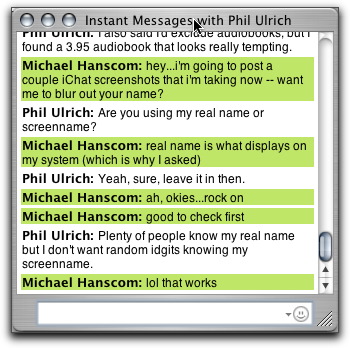
That was more than a little odd. I was just in a conversation with Phil, and wanted to blog some of it. Normally I use iChat in “cute” mode (pictures and bubbles), like so:

iChat's 'cute' mode

When I want to blog a conversation, I’ll switch it to “text” and “show names”, which works much better for a copy-paste into a weblog post:

iChat in text mode

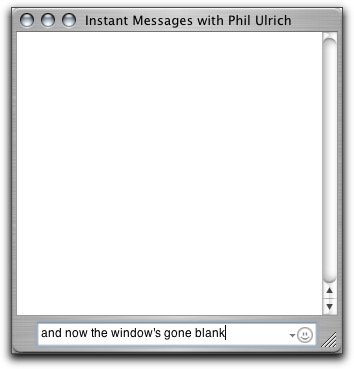
However, for some reason, iChat just went all wierd on me. When I switched it into text and names mode, everything in the chat window went blank. I could see what I was typing in the text input field, and hear when messages came through by the “bloop” sound…but I couldn’t see anything!

iChat goes wonky

Thankfully, closing out the window and starting a new chat session cleared it up, but I was quite amused for a few moments there.

iTunes: “Pink Potassium” by Radioactive Goldfish from the album Rhythm and Rave (1992, 4:46).

QuickSilver

A piece of Mac freeware worth touting: Quicksilver. Very similar in many ways to LaunchBar, it’s scoring points over LaunchBar for me in three important aspects.

  • Speed. QuickSilver is fast once the initial setup scan is done (and even that didn’t take very long on my machine). No more of LaunchBar’s “Initial System Scan” on every startup.
  • Functionality. While QuickSilver looks to be able to do everything that LaunchBar can, it can also handle a lot more (including iTunes, which is a very handy little trick).
  • Price. It’s freeware. What more can be said there?

Download it, check it out, and see what you think — there’s even an (unofficial) online tutorial to help get you started playing.

(via Jim)

Mac OS X turns three

Ars Technica has a nice rundown of the first three years of Mac OS X. I’ve been an OS X user for all three (plus the Public Beta period beforehand) — how time flies when you’re having fun!

Has it been three years already? A quick glance at the calendar tells us that the date is March 24, 2004, three years to the day after Mac OS X 10.0 began shipping. Join Mac.Ars in a trip down memory lane as we look at three years of Unix-y/NeXT-y/pinstripe-y goodness on the Macintosh.

iTunes: “Hurt Me…Hard (Armand Van Helden’s Gyro)” by Hard House Café from the album In to the Mix II: The 2nd Coming (1998, 5:52).

Even startup pranks are harder in Windows

There used to be a stupid little prank you could play on unsuspecting Mac users (running System 8 or 9 — if I remember correctly, the required utility wasn’t included in previous systems). Normally, when you were done using the computer, you would choose Special > Shutdown… to turn the computer off. However, apparently too many people had difficulties with that, so Apple started including a small utility that lived in the Apple Menu called Shutdown that would…shut down the computer.

So, if you wanted to annoy someone and had a moment at their Mac when their back was turned, you could copy that Shutdown application from the Apple Menu Items folder into the Startup Items folder. Once that was done, every time they started up their computer, as the system went through the Startup Items, it’d find that program, and shut right down again. Simple, and wonderfully annoying.

Tonight, I found a similar prank for Windows XP in Tech TV’s ‘Best Computer Pranks Ever’, and was fairly amused to see how convoluted the process was to get the same result!

To recap — on the Mac:

  1. Open two windows, [System Drive]:System Folder:Apple Menu Items and [System Drive]:System Folder:Startup Items.
  2. Option-drag Shutdown from Apple Menu Items to Startup Items.

On Windows XP…

  1. Right-click the Start menu.
  2. Select Explore Users.
  3. Navigate to Programs > Startup.
  4. Right-click the file windows and select New > Shortcut.
  5. When the window pops up asking for the location, enter “%windir%system32shutdown.exe -r -t 00“.

On the one hand, it’s “only” five steps versus two, and I could have broken the Mac list into three steps (by splitting the first step into two). But even beyond that, there’s that cute little text string that has to be typed in to get the program to execute correctly.

Okay, yeah. So maybe it’s a good thing that — at least in this one instance — it’s harder to annoy someone under Windows XP than under the Classic Mac OS. That doesn’t mean that it doesn’t amuse me, though.

iTunes: “Moon Over Greene County” by Zanes, Dan from the album Natural Born Killers (1993, 2:19).

Tori Amos: Tales of a Librarian

Tori Amos has a new “greatest hits” collection available at the iTunes Music Store called ‘A Tori Amos Collection — Tales of a Librarian‘. Normally, this wouldn’t be terribly interesting to me, as I already have a very large Tori collection, and therefore wouldn’t have much need for a compilation album. However, this one caught my eye for two reasons.

Firstly, there are two exclusive tracks included only if you purchase the full album through the iTMS: Putting the Damage On (Reconditioned) and Pretty Good Year (Live from Sound Check). Secondly, all of the songs have been ‘reworked’ or ‘reconditioned’, which made me curious.

So far, I’m fairly impressed with what I’ve heard. None of the new versions are entirely new — in fact, on some of them, the changes are so subtle as to be almost unnoticeable, and I was initially starting to wonder if they had simply used ‘reworked’ rather than ‘remastered’ as a term and had just re-issued the original tracks. However, there are some definite changes to the tracks, usually in the form of a few extra instruments here and there, an extra vocal track or harmony line…slight edits and additions that flesh out the tracks a bit more.

One noticeable exception to the rule is the ‘reworked’ version of Professional Widow, which actually appears to be an edit of Armand van Helden’s dance remix of the track!

Overall, it’s not a must-buy for most people, but for a collector or for someone (like me) who gets a kick out of listening to a track’s production, trying to identify how it was all assembled, the collection is definitely worth the download.

iTunes: “Professional Widow (Reworked)” by Amos, Tori from the album A Tori Amos Collection – Tales of a Librarian (2003, 3:47).

FedEx making The Switch?

Interesting rumor via MacRumors:

According to one unconfirmed source, Federal Express may be looking to make a significant purchase of Macs to replace their current PCs.

Reportedly, the move is under consideration due to the recent wave of viruses that have swept the PC world.

While Macs are not inherently immune to virus attacks, most viruses have been written on the Windows/PC platform.

Now, this is “one unnamed source”, so it could easily be entirely fictitious, but it’s interesting to think about, at the very least.

As an added bonus, the MacRumors discussion thread for this item has a much higher signal-to-noise ratio than what I’m used to seeing in their forums, and I found this wonderful little point buried within, from MisterMe:

…there is more evidence for ghosts, UFOs, and Big Foot than there is for MacOS X viruses. People have actually reported seeing ghosts, UFOs, and Big Foot.

iTunes: “Thunder Kiss ’65 (Swinging Lovers)” by White Zombie from the album Nightcrawlers: The K.M.F.D.M. Remixes (1992, 4:46).