
Revamping the Archives

I’ve made some revamps to my archive listing pages, in an attempt to address some of the issues raised by Dave and Kirsten.

Monthly archives I’ve kept the same — I really like the calendar-style display that they use.

Clicking through to the main archive page should be much nicer now. Rather than the huge (and rapidly growing) table listing the title for every post I’ve ever made, you’ll now see a simple list of each category I use, with a short description of the category and the titles of the last ten posts within that category.

Heading into each category’s archive page (for instance, my Humor archive), I wanted to get away from listing the entirety of each post, as that lead to huge pages, but still include more info than just the title of each post. Nicely enough, MT includes an ‘excerpt’ field for each post, and if an exerpt isn’t written by hand, MT will auto-generate one using a snippet of the beginning of each post. So, the category archive pages list the title for each post, then the excerpt. I’m going to start trying to remember to create excerpts for any new posts from here on out, but the auto-generated excerpts will have to suffice for all the old posts — at least until I get really bored. ;)

Hopefully this makes things far easier to deal with. As always, questions, comments, and words of wisdom are always appreciated!

[Addendum: the main archive listing and all category listings validate as valid XHTML. Individual entry pages should, but may or may not, on a case-by-case basis. However, there’s lots of those, and I need to go to bed.]{.underline}
Searchling

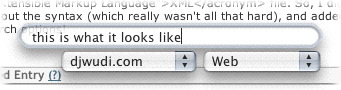
I just stumbled across Searchling, a very cool little mini-application for OS X. When running, it adds a system-wide search field that allows you to search Google, Slashdot, or a few other sites.

The coolest bit, though, is that the search options are defined by a simple XML file. So, I did a bit of digging, figured out the syntax (which really wasn’t all that hard), and added djwudi.com to the search options!

Searchling djwudi.com screenshot

On the off chance that another OS X user might want to add me to Searchling, here’s the code to add:

<dict>
<key>name</key>
<string>djwudi.com</string>
<key>types</key>
<array>
<dict>
<key>type</key>
<string>Web</string>
<key>url</key>
<string>http://www.djwudi.com/cgi-bin/search/search.pl?
nocpp=1&Match=1&Realm=All&Terms=</string>
</dict>
</array>
</dict>

(Note: the string between <string> and </string> is one continuous line, a linebreak has been added here for readability.)

Update: As I’m no longer weblogging at djwudi.com, the above XML snippet won’t actually work. I’m leaving it up here, though, as a handy example of how to add things to Searchling.

I wish…

I’m not too sure how they stumbled across me, but I just got notification today that I’ve been added to the list of birthdays at I Wish, You Wish. They’re working on collecting links of bloggers that have their Amazon Wishlists posted, and listing them alongside their birthdays. A pretty cool little idea, I think.

A tweak here, a tweak there

Finally! I’d noticed a week or so ago that after an upgrade to the W3C’s Validation tool that made it a bit more strict, my site wasn’t validating properly anymore. After a few minutes work tweaking the code, though, I can now honestly state that my site uses valid XHTML 1.0 (Transitional) and valid CSS.

At least, it does on this page. I’ll do a page-by-page (ugh) check at some other date. That’ll be fun….

The ‘Recent Tunes’ list is no longer an automatically updating frame. It was fun to play with, but a simple list that loads with the page will do fine, and produce less uneccesary overhead in bandwidth.

I’ve also removed the links to ‘featured posts’, along with the link to my NaNoWriMo blog, as it’s been residing in a state resembling suspended animation for a while now. However, fear not, gentle readers — in the words of Monty Python, it’s “not dead yet!” and will resurface in the (near?) future, along with some other ideas I have for that side of my site.

Further changes (including some of the ideas that have been tossed at me in the comments to my last post) will appear as I get around to them. In other words, it could be tomorrow, and it could be sometime in 2007. Around here, you just never know.

Everything old is new again

I’ve finally managed to finish up what’s been something of an ongoing “whenever I’m bored” project for the past few months — re-entering all my old posts (two years worth, approximately 700 or so?) that disappeared when my old webserver died in August. They’re finally all back in, so with the exception of a two and a half week period in mid-August that I didn’t have a backup for, every post I’ve written since November of 2000 is back online!

Just in case you’re really bored and want to read everything I’ve ever written, from start to finish. Um…sure. That’ll happen. ;)

Now, time to backup.

Top ten web design mistakes

Usability guru Jakob Nielsen posted his list of the year’s top ten web design mistakes, and while it’s aimed more at commercial sites, I thought I’d take a quick gander and see if there are any that I should worry about.

  1. No prices: Hrm. Well, in general, I’d say that this one doesn’t apply. However, let it be said for the record that I’m often fairly cheap. Even free, given the right circumstances!
  2. Inflexible search engines: Unfortunately, there’s not much I can do about this one. The search page for my site is nice and powerful, but I’m not enough of a coder to tell it how to correct for spelling errors. Bummer, too — that’s a nice feature.
  3. Horizontal scrolling: I try to avoid this one, however on a smaller screen or resolution, my archives page might need scrolling. Right now, I like the format I’m using, though, and until I find a better one, this will work. Anyone have any suggestions for a different design?
  4. Fixed font size: Yay! I got away from this one during my last site redesign. Something I don’t have to make cute comments or excuses for! :D
  5. Blocks of text: Guilty. Very guilty, in fact. Given the fact that I tend to ramble, I’m not sure how to approach this one, aside from spending some time going through Jacob’s articles on writing for the web, which I should do soon.
  6. Javascript in links: Lightly guilty here — while I’ve excised most of the JS links on my site, the ‘Show Smileys’ links in post comment forms still use it. I need to find a good way around that, I suppose (probably either displaying a small set of smileys and leaving the rest hidden, or just removing the smiley code entirely). Again, any suggestions? I’m leaning towards removing the code — they’ll still be available, but they’re used so infrequently, I might as well get rid of them in the comment form.
  7. Infrequently asked questions in FAQ: Not having a FAQ, this one doesn’t really apply. I’ve never gotten enough questions to warrant a FAQ, actually.
  8. Collecting e-mail addresses without a privacy policy: Well, again, this doesn’t really apply. While there’s a spot for e-mail addresses in my comment forms, they’re optional, and I don’t do anything with them. They just sit there.
  9. URL’s greater than 75 characters: I’m pretty sure I’m safe here. Some of my posts with obnoxiously long titles probably break this one, but they’re relatively few and far between. I’ve also been trying to keep my post titles shorter since I moved to an archiving system that names the files by the post title, rather than using generic numbers for names (such as 000735.php, for instance).
  10. Mailto links in unexpected locations: I think I’m good here. Every page has a fairly clearly marked “Email me” link at the bottom, and that’s it. Not hidden, available at all times, and not overly intrusive.

Not too bad, all in all, I’d say.

However, this does bring to mind a question. For those of you that visit my site from time to time — is there anything I’ve done here that bugs you? Or even if it doesn’t bug you, is there anything that you think might be worth my investigating? I’m starting to get into a mood to play with code and clean up some small areas that are bugging me, and I’m always open to suggestions. Feel free to let me know!

Weblog publishing systems

Just a quick test here — the new beta version of NetNewsWire Pro has a weblog editor built in. Not bad, seems to handle things alright, and it is handy having the weblog editor built into the newsreader.

However, one definite strenth of EspressoBlog over NetNewsWire Pro right now is that EB lets me add categories to my posts, which NNWP doesn’t support just yet, so I’ll have to go back into this post after it’s up and add the category later. Bummer.

Looks like EB still gets my vote!

Neighbors

What does djwudi.com have in common with the blogs of a girl in the Netherlands, a guy in the UK, a guy in Georgia, a girl in Michigan, a girl in South Africa, a guy in California, Phil, Phil (a different one), and a guy in New York; somebody’s list of their .mp3 files and someone else’s list of their DVDs; homepages for a web hosting company and a web design company; more homepages for a shareware program for the Mac, a Mac developer in Georgia, and a web message board software package; and finally, John Gruber‘s post over his disgust with VersionTracker?

I haven’t got a clue. But that’s what you get when you do a “related” Google search to find which sites Google considers to be similar to djwudi.com. Definitely makes me wish I knew the criteria.

michaelhanscom.com

As a followup to my “Own yourself” post, I’m now the proud owner of www.michaelhanscom.com. It’s not active yet, but once everything propagates through the ‘net, that address should automatically redirect straight to www.djwudi.com. It’s a start, until I figure out if I want to do anything else with it.

I’ve also changed my displayed name on this site from ‘djwudi’ to ‘Michael Hanscom’. After a few Google crawls through the site, I should have fairly firmly entrenched my real identity upon the ‘net at large.

In theory, at least. ;)