
MacWorld Expo '03 Keynote

My schedule actually works out so that I can watch Steve Jobs’ keynote address at MacWorld Expo 2003. I’ve got the live streaming webcast going now, watching people filter in…everything’s scheduled to get started at 9am, so in theory, Steve should be hitting the stage any time now. Okay — I had a hard time getting the stream going after it stalled, but I’m back in now.

  • Apparently he’s got about “two MacWorld’s worth of stuff to show today.”
  • 130 countries are watching the keynote live via the Web.
  • Some Apple Store facts and figures.
  • 51 stores, \$141 million in sales last year.
  • Going over the updates to iCal and iSync that were released last week.
  • Talking about .Mac now.
  • 250,000 paying .Mac subscribers since they added the yearly price (I’m one).
  • iPods have been around for 14 months, over 600,000 have been shipped (one every minute since introduction).
  • iPod #1 .mp3 player in US and Japan, with 42% market share in Japan.
  • Apple has teamed with snowboard equipment/apparel maker Burton to create a skiing/snowboard jacket with a pocket for the iPod and remote controls built into the sleeve.
  • Jacket is \$499 only from the Apple Store this year, should be more widespread next year.
  • Moving to Mac OS X (still pronounced Jag-Wire according to Steve).
  • 5 million active users of OS X.
  • Expecting to get to 9-10 million users in ’03.
  • “We’ve got a few laggard apps we still need to get released — we all know which one we’re talking about.” (Quark Xpress?)
  • QuickBooks Pro 5.0 just started shipping a couple weeks ago (the most requested app).
  • Other quick application mentions.
  • Dave Lebolt from DigiDesign coming onstage to demo Digidesign ProTools professional audio app, which will ship this month.
  • Pro audio and MIDI creation and editing support finally available for OS X.
  • Next featured product — FinalCut Pro, the top pro video editing app.
  • Introducing Final Cut Express — FCP with a lighter feature set.
  • Phil Schiller taking stage to Demo FCE.
  • FCE uses same interface and file format as FCP.
  • Quick demos of built-in transition effects and color correction tools.
  • FCP is \$999 — FCE is \$299.
  • 5,000 native OS X apps available now.
  • Starting today, no new products will boot into OS 9 — Classic layer is still there, but will boot OS X only.
  • Moving to the Digital Hub concept.
  • All-new versions of all Hub apps being released, all rewritten to be more completely integrated.
  • iTunes 3 has some “hidden features” that will be revealed today.
  • iPhoto 2 comes out today.
  • iPhoto integrated with iTunes.
  • Adds 1-click enhance, retouch brush, and ability to archive photo albums to CD and DVD.
  • When creating an iPhoto slideshow, the iTunes music library is available for a soundtrack.
  • New iDVD 3 button in iP2 automatically transfers an album into iDVD for burning as a DVD slideshow.
  • Quick demo of iPhoto one-click enhance for automatically color-correcting photos.
  • Retouch brush demo — being used to automatically remove bruises and freckles, etc. from photos, just by “scrubbing” over the area.
  • Next — iMovie 3.
  • Fully integrated with other iApps.
  • Added most requested feature — Chapters, which are automatically read by iDVD.
  • Also added the “Ken Burns Effect”, named after the documentarian, and precise audio editing.
  • Updated UI, iMovie interface combined into a single window.
  • Again, iTunes music library integrated into iMovie.
  • Library of sound effects by Gary Rydstrom of Skywaker Sound and Pixar in iMovie.
  • One-button transfer of projects from iMovie to iDVD, automatically moves everyting into iDVD including chapter markers.
  • iDVD 3 released today.
  • 24 new menu themes integrating menu choices with user movies.
  • Steve is demoing various combinations of film clips, menu themes, and background music imported from iT3.
  • Blank DVDs from Apple lowered to \$3 each.
  • Recap — all four Digital Hub apps integrated into iLife — available Sat. Jan 25th.
  • iLife will be bundled with all new macs.
  • iMovie, iPhoto, and iMovie will be free downloads, iDVD will be sold (in a package with all iLife apps) for \$49.
  • “Buckle up — I’ve got something totally new for you.”
  • New App — Safari, a “turbo browser for OS X”.
  • First major new browser in 5 years.
  • Why? Speed — fastest browser on Mac.
  • Tested against Internet Explorer, Netscape and Chimera (latest versions of each) — 3 times faster than IE, faster than all others.
  • Second reason — to innovate.
  • Google integrated into toolbar, new Snapback feature, new bookmark system, ease of use.
  • Minimal UI, brushed metal window interface.
  • Fully supports CSS, Quicktime, Flash, all other standard technologies (this should be the browser built from the Chimera/Mozilla codebase).
  • Bookmarks easily dragged around on toolbar to reorder, or dragged off to delete.
  • Bookmarks library based around same interface as the iTunes or iPhoto libraries.
  • Snapback button brings you back to a Google results page after multiple click-throughs deep into a site.
  • Snapback also available on other search sites (Amazon is demoed).
  • Bug reporting built into Safari to submit problem reports to Apple.
  • Safari is standards-based, built on an Open Source rendering engine.
  • Apple started working with the code a year ago, improved the code dramatically to create Safari, and is re-posting their improved code to the Open Source community today.
  • Safari beta release starts today, free download.
  • Next brand new application — Keynote.
  • A presentation app “when your presentation really counts”.
  • Jobs has been using early versions of Keynote for every keynote address in 2002.
  • Full anti-aliasing for text, Quartz graphic functions (opacity, etc.), all major graphic file formats.
  • Lots of effects for charts and graphs.
  • Many high-quality built-in themes.
  • Lots of transitions between slides that utilize the Quartz 3D engine, allowing for 3D flips, rotations, etc.
  • Keynote imports and exports PowerPoint presentations.
  • Also im/exports PDF and Quicktime.
  • Uses an XML-based open file format.
  • Keynote for sale for \$99, available today.
  • Expo keynote attendees got free copies of Keynote.
  • Brings up the TiBook ad from its introduction two years ago.
  • Apple aiming to replace more desktops with notebooks, want to make 35% of their shipped computers notebooks.
  • Introducing a new 17\” PowerBook.
  • Uses same 17\” widescreen ratio display as the 17\” iMac, built into a PowerBook chassis — 1\” thick, slightly thinner than the original TiBook.
  • 1440 x 900 widescreen 16:10 aspect ratio display.
  • Keyboard keys are backlit with a light glow for use in low-light situations.
  • Ambient light sensors detect room lighting to automatically adjust keyboard brightness.
  • Only 6.8 lbs.
  • Built using a new material — aircraft grade Aluminum alloy (AlBook?).
  • 1Ghz G4, superdrive, GeForce graphics, Firewire 800 (twice as fast as current FireWire), Gigabit Ethernet, S-Video output, VGA/Digital video output, USB ports on each side, PC Card slot, line in and headphone jacks.
  • Bluetooth built in, Airport built in.
  • Introducing Airport Extreme — 54Mbps (up from 11Mbps) based on 802.11g wireless standard.
  • Wireless antennas in 17\” PowerBook built into the screen, equals wireless range of the iBook.
  • New Airport Extreme basestations handle up to 50 users, allow wireless bridging across multiple basestations.
  • USB printing built into basestation — plug a USB printer into the basestation, all wirelessly connected clients can print.
  • New basestations sell for \$199.
  • Battery for 17\” Powerbook allows for 4.5 hours runtime.
  • Quickbooks will come bundled with new Powerbook.
  • \$3299 for new 17\” Powerbook, shipping in February.
  • One more thing…
  • Introducing a new 12\” PowerBook — smallest full-featured notebook in the world.
  • 1024×768 display, 867Mhz G4, slot-load combo drive, wireless (Bluetooth built-in, Airport ready), 5 hour battery life.
  • \$1799 for new 12\” Powerbook, shipping in about 2 weeks.
  • \$1999 with added SuperDrive.
  • 2003 is “The Year of the Notebook” for Apple.
  • Cute quote from BT when getting a demo of the lit keyboard — “When do you guys stop thinking of cool stuff?”
  • Two new TV ads being shown (Jeff Goldblum is still doing the voiceovers).
  • Second ad is wonderful, contrasting the size of the notebooks — you’ll just have to see it.

And that’s it…
Searchling

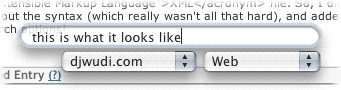
I just stumbled across Searchling, a very cool little mini-application for OS X. When running, it adds a system-wide search field that allows you to search Google, Slashdot, or a few other sites.

The coolest bit, though, is that the search options are defined by a simple XML file. So, I did a bit of digging, figured out the syntax (which really wasn’t all that hard), and added djwudi.com to the search options!

Searchling djwudi.com screenshot

On the off chance that another OS X user might want to add me to Searchling, here’s the code to add:

<dict>
<key>name</key>
<string>djwudi.com</string>
<key>types</key>
<array>
<dict>
<key>type</key>
<string>Web</string>
<key>url</key>
<string>http://www.djwudi.com/cgi-bin/search/search.pl?
nocpp=1&Match=1&Realm=All&Terms=</string>
</dict>
</array>
</dict>

(Note: the string between <string> and </string> is one continuous line, a linebreak has been added here for readability.)

Update: As I’m no longer weblogging at djwudi.com, the above XML snippet won’t actually work. I’m leaving it up here, though, as a handy example of how to add things to Searchling.

I wish…

I’m not too sure how they stumbled across me, but I just got notification today that I’ve been added to the list of birthdays at I Wish, You Wish. They’re working on collecting links of bloggers that have their Amazon Wishlists posted, and listing them alongside their birthdays. A pretty cool little idea, I think.

A tweak here, a tweak there

Finally! I’d noticed a week or so ago that after an upgrade to the W3C’s Validation tool that made it a bit more strict, my site wasn’t validating properly anymore. After a few minutes work tweaking the code, though, I can now honestly state that my site uses valid XHTML 1.0 (Transitional) and valid CSS.

At least, it does on this page. I’ll do a page-by-page (ugh) check at some other date. That’ll be fun….

The ‘Recent Tunes’ list is no longer an automatically updating frame. It was fun to play with, but a simple list that loads with the page will do fine, and produce less uneccesary overhead in bandwidth.

I’ve also removed the links to ‘featured posts’, along with the link to my NaNoWriMo blog, as it’s been residing in a state resembling suspended animation for a while now. However, fear not, gentle readers — in the words of Monty Python, it’s “not dead yet!” and will resurface in the (near?) future, along with some other ideas I have for that side of my site.

Further changes (including some of the ideas that have been tossed at me in the comments to my last post) will appear as I get around to them. In other words, it could be tomorrow, and it could be sometime in 2007. Around here, you just never know.

Everything old is new again

I’ve finally managed to finish up what’s been something of an ongoing “whenever I’m bored” project for the past few months — re-entering all my old posts (two years worth, approximately 700 or so?) that disappeared when my old webserver died in August. They’re finally all back in, so with the exception of a two and a half week period in mid-August that I didn’t have a backup for, every post I’ve written since November of 2000 is back online!

Just in case you’re really bored and want to read everything I’ve ever written, from start to finish. Um…sure. That’ll happen. ;)

Now, time to backup.

Top ten web design mistakes

Usability guru Jakob Nielsen posted his list of the year’s top ten web design mistakes, and while it’s aimed more at commercial sites, I thought I’d take a quick gander and see if there are any that I should worry about.

  1. No prices: Hrm. Well, in general, I’d say that this one doesn’t apply. However, let it be said for the record that I’m often fairly cheap. Even free, given the right circumstances!
  2. Inflexible search engines: Unfortunately, there’s not much I can do about this one. The search page for my site is nice and powerful, but I’m not enough of a coder to tell it how to correct for spelling errors. Bummer, too — that’s a nice feature.
  3. Horizontal scrolling: I try to avoid this one, however on a smaller screen or resolution, my archives page might need scrolling. Right now, I like the format I’m using, though, and until I find a better one, this will work. Anyone have any suggestions for a different design?
  4. Fixed font size: Yay! I got away from this one during my last site redesign. Something I don’t have to make cute comments or excuses for! :D
  5. Blocks of text: Guilty. Very guilty, in fact. Given the fact that I tend to ramble, I’m not sure how to approach this one, aside from spending some time going through Jacob’s articles on writing for the web, which I should do soon.
  6. Javascript in links: Lightly guilty here — while I’ve excised most of the JS links on my site, the ‘Show Smileys’ links in post comment forms still use it. I need to find a good way around that, I suppose (probably either displaying a small set of smileys and leaving the rest hidden, or just removing the smiley code entirely). Again, any suggestions? I’m leaning towards removing the code — they’ll still be available, but they’re used so infrequently, I might as well get rid of them in the comment form.
  7. Infrequently asked questions in FAQ: Not having a FAQ, this one doesn’t really apply. I’ve never gotten enough questions to warrant a FAQ, actually.
  8. Collecting e-mail addresses without a privacy policy: Well, again, this doesn’t really apply. While there’s a spot for e-mail addresses in my comment forms, they’re optional, and I don’t do anything with them. They just sit there.
  9. URL’s greater than 75 characters: I’m pretty sure I’m safe here. Some of my posts with obnoxiously long titles probably break this one, but they’re relatively few and far between. I’ve also been trying to keep my post titles shorter since I moved to an archiving system that names the files by the post title, rather than using generic numbers for names (such as 000735.php, for instance).
  10. Mailto links in unexpected locations: I think I’m good here. Every page has a fairly clearly marked “Email me” link at the bottom, and that’s it. Not hidden, available at all times, and not overly intrusive.

Not too bad, all in all, I’d say.

However, this does bring to mind a question. For those of you that visit my site from time to time — is there anything I’ve done here that bugs you? Or even if it doesn’t bug you, is there anything that you think might be worth my investigating? I’m starting to get into a mood to play with code and clean up some small areas that are bugging me, and I’m always open to suggestions. Feel free to let me know!

Weblog publishing systems

Just a quick test here — the new beta version of NetNewsWire Pro has a weblog editor built in. Not bad, seems to handle things alright, and it is handy having the weblog editor built into the newsreader.

However, one definite strenth of EspressoBlog over NetNewsWire Pro right now is that EB lets me add categories to my posts, which NNWP doesn’t support just yet, so I’ll have to go back into this post after it’s up and add the category later. Bummer.

Looks like EB still gets my vote!

Neighbors

What does djwudi.com have in common with the blogs of a girl in the Netherlands, a guy in the UK, a guy in Georgia, a girl in Michigan, a girl in South Africa, a guy in California, Phil, Phil (a different one), and a guy in New York; somebody’s list of their .mp3 files and someone else’s list of their DVDs; homepages for a web hosting company and a web design company; more homepages for a shareware program for the Mac, a Mac developer in Georgia, and a web message board software package; and finally, John Gruber‘s post over his disgust with VersionTracker?

I haven’t got a clue. But that’s what you get when you do a “related” Google search to find which sites Google considers to be similar to djwudi.com. Definitely makes me wish I knew the criteria.

michaelhanscom.com

As a followup to my “Own yourself” post, I’m now the proud owner of www.michaelhanscom.com. It’s not active yet, but once everything propagates through the ‘net, that address should automatically redirect straight to www.djwudi.com. It’s a start, until I figure out if I want to do anything else with it.

I’ve also changed my displayed name on this site from ‘djwudi’ to ‘Michael Hanscom’. After a few Google crawls through the site, I should have fairly firmly entrenched my real identity upon the ‘net at large.

In theory, at least. ;)