
Jakob Nielsen recently published a list of the top ten weblog design mistakes. As I’ve done in the past with similar listings, I took a quick look to see how I feel my site fares against his list.
Tech
Tech-focused ramblings. Computers, blogs, and whatever else fits.
Seattle’s Seasons in Software
The news that yesterday’s rumors are true and that NewsGator has acquired NetNewsWire is flying all over the ‘net right now. NewsGator posted a quick Q&A about the acquisition, which produced this little gem from NetNewsWire’s Brent Simmons:
Q: Is Brent moving to Denver? Or Tennessee?
Greg: Yes!
Brent: No, I’ll be staying in Seattle.
Greg: Darn it, I’m 0 for 2. Denver’s not such a bad place, you know. We have 4 seasons and everything!
Brent: As a Macintosh user interface designer I like to simplify whenever possible. Four seasons is two too many. Seattle has two seasons, rainy and dry — anything more is too complex for new users. ;)
LJ-style links for Ecto
This is actually fairly simple, but you never know.
For ecto users who want to post LiveJournal-style links to LJ user accounts (such as ![[djwudi's info]](http://stat.livejournal.com/img/userinfo.gif) djwudi) into a weblog entry on a non-LJ system:
djwudi) into a weblog entry on a non-LJ system:
- Open
Window > HTML Tags. - Click the
+button to create a new tag set. - Paste the following code into the ‘opening tag’ box (as a single line):
<a href="http://www.livejournal.com/userinfo.bml?user=%*"> <img src="http://stat.livejournal.com/img/userinfo.gif" alt="[%*'s info]" width="17" height="17" /></a> <a href="http://www.livejournal.com/users/%*/"><b> - Paste the following code into the ‘closing tag’ box:
</b></a> - Assign a command key sequence (optional, of course — I used option-command-J).
Viola! You’re done. Now, just type someone’s LJ username into a weblog post, select it, and choose the new tag set (or type the command key sequence you set), and the LJ-style link is created.
Help: CSS2 selectors
I’m working on setting up a print stylesheet for the site. I’ve got it about, oh, 98% done — done enough that I could leave it as-is, except that there’s one little thing that’s bothering me that so far, I’m not able to fix. Any and all help would be greatly appreciated.
Because hyperlinks are essentially useless on the printed page, in the print stylesheet, I’m using CSS2 selectors as outlined in this A List Apart article to insert URLs after links in the text. This way, instead of links simply printing as colored and underlined text, the destination address of the link is printed out after the link text.
Here’s the code I’m using to accomplish this:
a:link, a:visited {
    text-decoration: none;
    }

.entry-body a[href]:before,
.entry-more a[href]:before,
.trackback-content a[href]:before,
.comment-content a[href]:before {
    content: " [";
    color: #000;
    text-decoration: none;
    }

.entry-body a[href]:after,
.entry-more a[href]:after,
.trackback-content a[href]:after,
.comment-content a[href]:after {
    content: " " attr(href) "] ";
    color: #000;
    text-decoration: none;
    }
So far, so good, it’s doing exactly what it should. Here’s a sample of what it looks like when printed from a browser that understands CSS2 declarations (that is, pretty much everything except IE):

However, I often insert images into my posts that are linked, either to larger versions as in the above screenshot, or to the Flickr pages for the original images. In that instance, I’d prefer that the target URLs not be inserted, as they are less relevant, and tend to muck up the final printed page in odd ways.
Example number one: the panoramic image that appears at the beginning of the Cal Anderson Park post from earlier today:
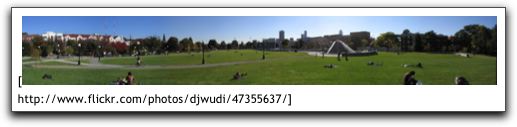
Example number two: the Flickr imagebar from the bottom of the same post. The web version shows five thumbnails side-by-side, but once the URLs are appended for the print version…

…only two of the thumbnails can even appear on the page.
Okay, sure, so these things aren’t exactly major disasters, but I’m just anal enough that I’d like to fix them. What I’d like to do, then, is figure out just what CSS code I’d need to use to exclude images from the code shown above.
Of course, I haven’t got a clue how to do this (obviously, or this post wouldn’t even exist). I’ve been poking at it all morning, and I’m stuck. Any ideas?
Anyone?
Bueller?
NOTE: Possible Safari Bug? In the original A List Apart article, the example code used a combination of a:link:after and a:visited:after to ensure that the links were inserted after all the links — if the code was only attached to a:link:after, then any links that the user had visited would not get the link appended when the page was printed.
While I was working on this, I started with that code. However, I was noticing an odd bug that was only appearing in Safari (at least, it wasn’t appearing in Firefox or Opera, the other browsers I have available to test with) — Safari would pick one URL of the URLs on that page and insert it after every link. In other words, if one link on the page pointed to www.example.com, then no matter how many other links were on the page, they would all display as www.example.com.
I wrote that off as something to worry about later, and kept fiddling around trying to get my images to do what I wanted. In the process, I skimmed over a more recent ALA article on print stylesheets and noticed that Eric Meyer had presented slightly different code: instead of combining a:link:after and a:visited:after, he simply wrote a[href]:after, and that took care of both instances. I swapped out my old code for the new, more concise version, and not only did it work as it should…but the repeating URL bug disappeared. Now, when printing from Safari, all the correct links print out just as they should.
Weird…but good to know.
Yet More Tweaks
A few more tweaks and oddments:
- Re-worded the post metadata.
- Added Technorati tags to the metadata.
- Added pseudo-hidden ‘admin only’ links to all posts, comments, and TrackBack pings, allowing for single-click jumps to the edit screen for each item.
- Used SimpleComments to combine comments and TrackBack pings into a single chronological list.
- Update: Replaced SimpleComments with this version that recognizes MT3.2’s ‘junk’ status. Many thanks to Yukino’s mention of this issue!
- Added small icons (yanked right from the MT interface, actually) to comment and TrackBack listings to more easily visually identify which is which.
- Added a
:hovereffect border to comment and TrackBack listings. - Comments I leave will display with a colored background to easily distinguish them from visitors’ comments.
- Lots of templates updated so that all
alinks have an associatedtitleattribute.
And…that’s all I’m remembering right now.
LiveJournal/OpenID Authenticated Commenting
So much for declaring a “no more tweaks” point. I just can’t resist the urge to fiddle around…
Thanks to Mark Paschal‘s OpenId Comments plugin (announced and described here, current release here), visitors can now authenticate themselves when leaving comments using a LiveJournal or OpenID account in addition to TypeKey authentication (or no authentication at all).
I’ve also increased the width of the comment entry field, as it was a bit cramped (thanks to mom for prompting me on this, as it was bugging me too).
Leave a comment, play around, and let me know if anything seems goofy!
(Update: Some goofiness exists. Generic, TypeKey, and LiveJournal options are working fine, OpenID comments are coming through as ‘anonymous’ even though the commenting UI reports that they’re successfully signed in. Something to fiddle with….)
Transitioned
There are a few benefits to being unemployed for a little bit. One of those is having more available hours in the day to spend tinkering around with some of my neverending PROJECTs.
I’ve just (mostly) finished converting all of my pages over to the new template styles provided by Movable Type 3.2. There’s a few tweaks that I didn’t bring over (multiple stylesheets, the live comment preview, gravatar support, and incorporating TrackBack pings and comments into a single list), and I’m still running over in my head which, if any, will be re-incorporated down the line.
For now, though, I’m declaring things done. Feel free to poke around, and as always, suggestions are always appreciated.
Here’s a brief overview of the changes I’ve made to MT’s default templates…
Pussy Power!
Today’s news of the weird: Inventor fuels car with dead cats.
A German inventor has angered animal rights activists with his answer to fighting the soaring cost of fuel — dead cats.
Christian Koch, 55, from the eastern county of Saxony, told Bild newspaper that his organic diesel fuel — a homemade blend of garbage, run-over cats and other ingredients — is a proven alternative to normal consumer diesel.
Koch said around 20 dead cats added into the mix could help produce enough fuel to fill up a 50-liter (11 gallon) tank.
Never fear, though…it turns out that while the biodiesel fuel Koch is working on is real, the “dead cats” angle was nothing more than the overactive imagination of a Bild newspaper reporter.
A German inventor said he has developed a method to produce crude oil products from waste that he believes can be an answer the soaring costs of fuel, but denied a German newspaper story implying he also used dead cats.
“I use paper, plastics, textiles and rubbish,” Koch told Reuters.
“It’s an alternative fuel that is friendly for the environment. But it’s complete nonsense to suggest dead cats. I’ve never used cats and would never think of that. At most the odd toad may have jumped in.”
Bild on Tuesday wrote a headline: “German inventor can turn cats into fuel — for a tank he needs 20 pussies.” The paper on Wednesday followed up with a story entitled: “Can you really make fuel out of cats?”
A spokesman for Bild told Reuters the story was meant to show that cat remains could “in theory” be used to make fuel with Koch’s patented method.
The author of the story said Koch had never told him directly that he had used dead cats as the story implied.
Sounds like Bild employs one reporter who’d make a better fit at the Weekly World News….

“Liontamer” by Faithless from the album Outrospective (2001, 5:48).
In Transition
Along with upgrading the backend of the site to Movable Type 3.2, which I did last week sometime, I’ve decided to upgrade my templates to the new MT3.2 styles. As I’ve had a fair number of customizations that I’ve been using, though, it’s taking a bit of time to incorporate them into the default templates provided by Six Apart.
Expect some oddities for a few days as I get things tweaked and configured. Once I’ve got everything working with a basic startpoint, then I’ll see about customizing the style to something a little more “me”.
For now, though…things might be a bit odd. Bear with me, hopefully this won’t last too long.
Basic HTML tag cheatsheet
After a friend asked me a few questions about the basic HTML tags while trying to clear up some confusion, I went Googling for some sort of cheat sheet listing just the most basic tags. I couldn’t find one — just came up with a lot of full-blown tutorials or cheat sheets listing every tag in the book — so I tossed this together. Hopefully it helps.
I’m only looking at the tags most likely to be used in your standard, basic weblog post, so there won’t be much in the way of structural stuff here, just presentational.