Mayday! Mayday!

Back in August I described my experience level as “somewhere between ‘power user’ and ‘geek’ — in other words, I know enough to be dangerous, but not enough to get paid for it.” While it was said somewhat tongue-in-cheek, it’s come through with a vengeance this week — especially the dangerous part.

What started as simply trying to install a MovableType plugin has, thanks to my own bumbling incompetence, rapidly devolved to the point where I may not be able to resurrect my server to its prior state without starting completely over from scratch. While I haven’t lost any information from any of the three sites I hosted (the sole consoling factor to any of this), I have managed to utterly and completely destroy all the various little connecting pieces of software that tied it all together.

Something in the old httpd.conf file (the configuration settings file for the Apache webserver) was causing issues after the system reinstall, to the point where CGI executables weren’t running, and Apache itself was sometimes refusing to start up. I’ve just reverted to the default httpd.conf file, and I’m going to need to go through the old and new files line-by-line, enabling features one by one, until I find whatever setting(s) is (are) causing the problems.

MySQL needs to be reinstalled. Once it’s reinstalled, I need to see if I can find the old MySQL database that MT was using, and then see if I can get the new MySQL installation to access it. If I can’t, then MT won’t be able to access any of the old posts, and we’ll have to start over from scratch there.

Perl is missing various libraries that MovableType uses. Off the top of my head, the Perl -> MySQL bridge that allowed MT to read the MySQL database that stored all the weblog entries for six (?) weblogs strewn across the three sites; and the image processing libraries that allowed MT and the Gallery photo album software on the hanscomfamily.com site to automatically generate thumbnails for uploaded images. There are probably more missing too that I just haven’t run across yet.

In other words, to borrow an old military acronym, everything is currently FUBAR.

What I really want to do right now is call in “sick” to work so I can dedicate the day to working on the system. Unfortunately, neither my bank account nor my slightly overdeveloped sense of responsibility to my job will let me do that, so things are just going to have to stay the way they are for the moment.

The worst thing about all this is that it’s not just my own site. If it were only my own personal playground, than while it would certainly be frustrating and aggravating, at least that way I would only be causing issues for me. However, since I have been hosting the sites for both my family and a friend, I’ve now managed to knock them offline too. Bleah. Not a good situation.

Anyway. Whining about it here isn’t really going to do much other than let me vent my frustration for a bit. Work beckons, and then this evening, I’ll be diving back into everything to see what else I can break.

Dammit

Well, I managed to break my server. Attempting to log in to MovableType results in long strings of errors — apparently perl is completely hosed. Time to re-install Jaguar and hope that I don’t manage to nuke the websites that are on there.

This has not been my best couple of nights.

Update: OS reinstall is done, and all three websites are visible again. MT functionality hasn’t been restored yet, though — that’s my project for tomorrow night. Right now, it’s bedtime.

Not a good evening

I host three sites on a computer here in my apartment — my old website (djwudi.com), my family’s website (hanscomfamily.com), and my friend Kirsten’s site (geekmuffin.com). All three sites have been getting hit over the last few weeks with the comment spam that is rapidly becoming such a hassle.

Tonight I attempted to install the MT-Blacklist plugin that has recently been released as a tool to combat these comment spammers. Unfortunately, after installing it, when I attempted to access it, I got the following error:

An error occurred: Can’t locate Storable.pm in @INC (@INC contains: /Library/WebServer/CGI-Executables/mt/extlib /Library/WebServer/CGI-Executables/mt/lib /System/Library/Perl/darwin /System/Library/Perl /Library/Perl/darwin /Library/Perl /Library/Perl /Network/Library/Perl/darwin /Network/Library/Perl /Network/Library/Perl .) at /Library/WebServer/CGI-Executables/mt/lib/MT/PluginData.pm line 9. BEGIN failed–compilation aborted at /Library/WebServer/CGI-Executables/mt/lib/MT/PluginData.pm line 9. Compilation failed in require at /Library/WebServer/CGI-Executables/mt/extlib/jayallen/Blacklist.pm line 18. BEGIN failed–compilation aborted at /Library/WebServer/CGI-Executables/mt/extlib/jayallen/Blacklist.pm line 18. Compilation failed in require at /Library/WebServer/CGI-Executables/mt/mt-blacklist.cgi line 29.

Well, that’s no good. I dinked around with fink for a while, attempting to get the mysteriously missing ‘storable.pm’ installed, only to continually get error message after error message. Eventually giving up in frustration, I decided to attempt one of the other, lower-tech methods of combatting the spambots — simply renaming the scripts that handle comment and trackback submission. However, when I attempted to do a rebuild on my old weblog, I ended up getting the same error message.

This worries me. It would appear that this ‘storable.pm’ is required for MovableType to function at all. However, now all of a sudden, I don’t have it, and I have no idea why. So now, I’m faced with reinstalling OS X, fink, and whatever other packages I had installed on the server — and I just hope I can remember them all — and hopefully do so while still managing to keep the information for all three weblogs. I could actually live if I lost what’s on my old weblog, as most of it is already imported into this weblog, and I’ve got the export files saved already, but I don’t have either a recent backup of the box or backups of the hanscomfamily.com or geekmuffin.com directories (yes, I know, bad sysadmin).

I think I’ll be able to reinstall without losing everything — but then, I thought things were hunky-dory up until this point, too. So I’m a little concerned.

End result — it’s past my bedtime, I’m tired, more than a little frustrated, and ready to go to bed. Hopefully things will look better when I get back to poking around tomorrow evening.

(I don’t think that MT-Blacklist caused any of the problems, in case anyone is wondering. I think it’s just either my goofing something up, a random server glitch, or a combination of the two. No worries on the MT-Blacklist front in and of itself.)

TypePad discount codes

Today TypePad moved out of “Preview Release” status, making them officially open for business. I still have fifteen fourteen thirteen twelve ZERO (this offer has long since expired) discount codes available that will get anyone who uses one a 20% discount for as long as they stay with the TypePad service — they make what’s already a really good deal just that much better! You’ve only got until November 30th 2003 to take advantage of the codes, though, so don’t dawdle. Feel free to e-mail or leave a comment here if you’d be interested…first come, first serve, of course!

Easy MovableType to TypePad redirecting

Since this weblog used to be managed using MovableType on my personal server, and I’m working on moving all of my old posts over to this weblog (only one year’s worth of posts left to go!), I’ve ended up with most of my posts duplicated in two spots on the ‘net. I’m also still getting a lot of hits to my old site (and the occasional comment) thanks to all the search engines that still point there.

I’d been planning on diving into the arcana of the Apache mod_rewrite module — it’s a very powerful way to tell your server “if someone asks for this page, send them to that page instead” — to redirect all the hits to this new address, but then tonight I discovered a much, much easier solution.

Needless to say, as soon as I get those last years’ worth of posts transferred over, I’ll be setting this method up.

Here come the ads

My “Bookshelf” (books) and “Noises” (CDs) lists are back on the site, now that TypePad has given us the necessary tags to work them into our templates. Since I didn’t want to go back to having sidebars on the page, but still wanted to incorporate them into the front page somehow, I’m currently experimenting with an “ad banner” style layout.

Between the 2nd and 3rd posts on At the very bottom of the main page, there’s now the “ad banner” box, displaying the most recent addition to my book and music lists. For books, this is whatever I’m currently reading, and for music, I’m more or less randomly choosing a CD every so often to pop in there. The far right side is simply a link to Amazon. As always, any purchases from these links funnel a few pennies my way. It may not be much, but every little bit helps!

Weblog Ethics

Rebecca Blood has an excerpt from her book The Weblog Handbook posted dealing with weblog ethics that’s well worth looking at. I do my best to abide by these rules — to me, most of them are pure common sense — but it’s not a bad idea to occasionally refresh the concept in your mind.

  1. Publish as fact only that which you believe to be true.
  2. If material exists online, link to it when you reference it.
  3. Publicly correct any misinformation.
  4. Write each entry as if it could not be changed; add to, but do not rewrite or delete, any entry.
  5. Disclose any conflict of interest.
  6. Note questionable and biased sources.

Notable me

TypadistasNifty — I just got picked as a ‘Notable’ site on the Typadistas directory!

And while it’s really, really geeky, I love the fact that she complimented me on my source code (hey, like I said, it’s really geeky). I actually put a bit of effort into making sure that my code is clean, well-structured, and easily readable — not only does it help me when coding and debugging, but I figure it might also help others looking for examples (which is a large part of how I learned in the first place). Always nice to know that someone appreciates that!

Print-friendly pages with CSS

Printing often seems to be the bane of web publishing doesn’t it? All this information scattered across the ‘net, and so many times, trying to get a decent hardcopy printout just results in frustration. Sites that are beautiful in a browser may fail when printed — text disappears into background colors if you’re printing black and white, ads take up tons of unnecessary space on the printed page, and if the site uses tables or a fixed-width CSS layout that’s wider than the page, you may end up with having text cut off along one side of the page. Many commercial sites create special ‘print friendly’ pages, but that’s something of a kludge in itself — it’s an extra click, sometimes the link to the ‘print-friendly’ page is difficult to see, and it means having to deal with that many extra pages (and extra bandwidth) to maintain and serve.

Thankfully, CSS allows a remarkably simple way to avoid having to deal with all these frustrations. With a little bit of coding time, you can create a special “print stylesheet” that will determine exactly how your page looks when it’s printed out, without ever having to deal with the problems outlined above. Here at TypePad, you’ll need to be a “Pro” user to take advantage of this (as you’ll need access to the code of your templates), but the same technique will also work for MovableType powered sites, or any other website where you have full access to your code.

Need a quick example? Just try printing this post out, then compare what your printer gives you to the screen version (Netscape, Mozilla, Firebird, and Safari users will get an extra bonus trick that IE doesn’t support). For all the gory details (which really aren’t all that gory), just read on…
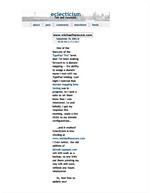
This site without print CSS

For a quick example, I’ll hold myself up to the spotlight (hey, if I’ve going to point out the problems, might as well humiliate myself instead of someone else, right?). The image to the right shows the result of printing this site after my redesign — those nice big white borders that work so well on screen cause definite issues on the printed page, squishing all the actual content into a single really tiny column in the middle of the page. This obviously was not acceptable! So, I got to work.

The first step was to design the print stylesheet itself. The basics of that are essentially the same as designing an on-screen stylesheet, and you can even use a browser to work it all out. I started by copying my stylesheet into a blank text document on my computer and tweaking it piece by piece to adjust it for the printed page. I won’t go through all the changes I made (though you’re welcome to compare the two to see for yourself — feel free to look at the code for either my screen stylesheet or my print stylesheet), but I do want to call attention to a few of the methods I used.

First off, the borders — an easy fix there, all I had to do was adjust the margins for the #content div from 150 pixels to 5%. By using a percentage instead of a fixed value, it ensures that the content area of the printed page will always be 90 percent of the available width, no matter if the person printing the page is in the US or in Europe (as there are different standard paper sizes).

Now for a handier trick. One of the major differences between on-screen display and the printed page are that navigation elements, such as the navigation sidebar across the top of each page on my site, are essentially useless when printed. Obviously, they can’t be clicked, so all they really end up doing is taking up space on the printed page. If that’s the case, then why bother printing them at all?

In my original stylesheet, my navigation bar is contained within a div of its own, like so:

#navigation {
   text-align: center;
   margin-top: 2px;
   padding: 4px;
   background-color: #eee;
   }

So, for the print stylesheet, I simply changed all of that to this simple argument:

#navigation {
   display: none;
   }

And voila! When printed, that entire div just disappears from the page. That little display: none; argument comes in very handy for deciding just what appears and doesn’t appear on your printed page and on screen. I added a class called “screenonly” to my print stylesheet that uses the display: none; argument, and then wrapped the comment entry form on my individual entry pages in a div class="screenonly" tag — bingo, no printed comment entry form. With a little experimentation, it’s very easy to determine exactly what elements on your pages will and won’t print.

The same technique can be used on screen, of course. I added another class to my screen stylesheet called “printonly” that also uses the display: none; property, then added a copyright declaration to the bottom of every page that is wrapped in a div class="printonly". Now that won’t display onscreen, but will appear when printed. Pretty nifty, isn’t it?

There’s one last trick I want to call attention to before I close out, though — while it will only work in browsers that have good CSS support (in other words, almost every browser except Internet Explorer), it’s incredibly useful.

Links are somewhat of a quandry on the printed page — in fact, by default, they’re nearly useless. A slight color change in the text, but nothing else. However, CSS includes ways to work around this, as well. I added the following lines to my print stylesheet:

.postbody a:link:after, .postbody a:visited:after {
   content: " (" attr(href) ") ";
   }

This looks a little complex, but it’s really not all that scary. The first line says simply that within any element that has the class postbody (I’ve wrapped the text of my posts, trackback excerpts, and comments in divs with that class), any a element that is either a link or a link that has been visited is going to have some information added after that element.

The second line is the content that we’re adding: first we add a space and an opening parenthesis, then we add the href attribute (in other words, the URL that the link points to), then we add a closing parenthesis and another space. That’s it — the last line is simply closing the CSS argument.

So what does all that mean? Simply this — when the page is printed, every link will be followed with the target URL of that link in parenthesis. Nifty!

Okay, so those are some of the tricks I’ve used. Now, supposing you’ve done some poking, prodding, and experimentation on your own and you’ve got a print stylesheet all set up and ready to go — how do you get it working? Easy enough! First off, create a new Index Template for your site, name it something like “Stylesheet-print”, and have it output to “print.css”. Now, you’ll need to do a slight edit to each of your templates.

The default line in TypePad templates that calls the stylesheet is in the header information at the top, and looks like this:

<link rel="stylesheet" href="<$MTBlogURL$>styles.css" type="text/css" />

We’ll be adding one argument to that line, and then adding a second, very similar line –here’s what you should end up with:

<link rel="stylesheet" media="screen" href="<$MTBlogURL$>styles.css type="text/css" />
<link rel="stylesheet" media="print" href="<$MTBlogURL$>print.css" type="text/css" />

What we’ve just done is tell the browser that the “styles.css” file should only apply to on-screen display, while the “print.css” file should apply to content that is sent to the printer. That’s it — rebuild, and you’re done!
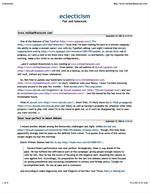
My site with the print stylesheet

And here we have the final result — the image to the left is how my site prints out with the print stylesheet added. The useless navigation bar has disappeared, borders have been set to values that are far more manageable and readable for the printed page, I’ve brought the font size down a touch, and all links now display their target after the link itself. All in all, a far more readable printed page than what I started with, and all accomplished with a little bit of playing with CSS.

So that’s it! Hopefully this all made sense and is useful for you. As always, feel free to leave any comments or questions below, and I’ll do my best to clarify any places where I may have been unclear. Enjoy!

(Post-link URL display code was found at A List Apart.)

www.michaelhanscom.com

One of the features of the TypePad “Pro” level that I’ve been looking forward to is domain mapping — the ability to assign a domain name I own with my TypePad weblog. Last night I noticed that domain mapping beta testing was in progress, so I sent a note to let them know that I was interested. Lo and behold, I got my response this morning, made a few clicks to my domain configurations…

…and it worked! Eclecticism is now residing at www.michaelhanscom.com! Even better, the old address of djwudi.typepad.com will still work as a backup, so any links out there pointing my way will still work, without any issues whatsoever.

So, feel free to update your bookmarks to point to www.michaelhanscom.com (or don’t, whatever suits your fancy). I know I’ve been bouncing everyone around in the past few months — from djwudi.com’s ‘The Long Letter’ to djwudi.typepad.com and now to michaelhanscom.com — but this should be the last move for the foreseeable future.

What of djwudi.com, then? Well, I’ll likely leave my DJ Wüdi propaganda over there, as well as having it available for whatever other little projects I want to play with when I’m in the mood to geek out, so it won’t be disappearing. Just in case you were worried. ;)