Out at the Vogue

Just got back from the Vogue. I don’t often go on Friday nights, as I’m generally a bit tired at the end of the work week, and I know more of the music on Saturdays, but getting out of the house just seemed to be the thing to do tonight. Besides, the DJ told me to. :)

Had a good evening, though. Mostly just kicking back and peoplewatching, with a little bit of bouncing around every so often. Even met a pretty blonde named Kim when she sat down next to me and we started chatting — no smooth lines from me tonight, but at least I didn’t trip all over my sentences, which happens all too frequently when I’m meeting people. Turns out she’s been going to the Vogue off and on for years, and we ended up talking mostly about music and swapping band names back and forth (and I need to remember to check out Morphine and local band Faith and Decay [if I’m remembering that correctly, I can’t find anything on Google for them], on her recommendation).

Anyway, not really much other than that. Just a decent night out bouncing around for a bit. ‘Bout time for bed for me, I think….

Weblog Ethics

Rebecca Blood has an excerpt from her book The Weblog Handbook posted dealing with weblog ethics that’s well worth looking at. I do my best to abide by these rules — to me, most of them are pure common sense — but it’s not a bad idea to occasionally refresh the concept in your mind.

  1. Publish as fact only that which you believe to be true.
  2. If material exists online, link to it when you reference it.
  3. Publicly correct any misinformation.
  4. Write each entry as if it could not be changed; add to, but do not rewrite or delete, any entry.
  5. Disclose any conflict of interest.
  6. Note questionable and biased sources.

Canon EOS Digital Rebel

Canon EOS Digital Rebel

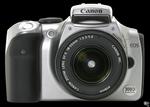
Now that my new computer is on the way (two weeks to go, at most…), I’ve started fixating on a new item for my techno-lust: the Canon EOS Digital Rebel.

I’ve had an interest in photography for many years now. I remember playing with my dad’s old SLR camera when I was younger — unfortunately, it didn’t work anymore, but I had fun fiddling around with it. I took one quarter of photography in high school. Not so much that I really remember much of anything, but enough to cement it as a definite interest. However, it’s been a fairly low-level interest for many years.

Just before I left Anchorage I picked up a nice little Kodak digital camera (the DX3500) which has served me well over the past few years. I’ve even managed to come up with a few shots that I really like from time to time (my favorite so far being one of Post Alley here in Seattle). The more I play with it, though, the more I wish I had a more full-featured camera, and the Canon EOS looks to be a really good value.

It’s essentially a full-featured SLR digital camera. 6.1 Megapixel resolution (roughly three times the resolution of my current camera), through-the-lens viewfinder, the ability to accept all of Canon’s EF series lenses and Speedlite flashes, and all sorts of other goodies. It even got rated ‘Highly Recommended’ by DPReview.

The downside, of course, is that I won’t be able to afford it anytime soon. While the \$999 price is extremely good for everything you get with the camera, it’s definitely out of my price range anytime in the near future (especially if I ever want to get myself out of debt). Ah, well — such is the way of life, right? At the very least, it’s a goal for the future.

Of course, if anyone out there is feeling generous at all, you’re welcome to help me out here! ;)

PayPal donations are accepted, if you go shopping at Amazon through this link I’ll get a miniscule percentage of whatever you spend, and, of course, Christmas is only a few short months away. Okay, sure, I’m shameless. But as I’m not expecting anyone to actually chip in, I can’t exactly be disappointed, now can I?

Moonshine Run

The winter before I left Anchorage, my brother was playing bass for a bluegrass band called “Moonshine Run”. One evening they were performing at a coffeehouse in town, so I headed down to see them. I brought along a MiniDisc recorder, and they were kind enough to let me plug into the soundboard and record them. The next morning they were playing and being interviewed on a local radio station, and I added that to the end of the disc.

A couple months ago, Rick ran his MiniDisc player into the ground. Since I wasn’t using mine, I handed it to him along with a stack of MiniDiscs with one condition — that he get me a copy of that recording.

This weekend Rick stopped by for a bit, bringing with him a CD of .mp3s that he’d made from the MiniDisc. I just got them copied over to my Mac, and now I’m sitting here listening to Kevin and his friends play some good old down-home bluegrass. It’s great — every so often between songs I can hear Kevin laughing in the background.

Beware: You might be next!

Beware!

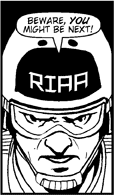
Nice editorial cartoon from the New York Times looking at the recent lawsuits by the RIAA against people sharing music files over the internet via file-trading networks.

I particularly liked the disclaimer at the bottom of the cartoon:

WARNING: Do not forward this column through e-mail, make photocopies to send to a child in college, tape it to your dorm-room door or put it on a bulletin board in your office — or you may be receiving an unexpected knock on your door.

(via Anil)

PCs are Voodoo

Well, that was entertaining. In roughly the same way that playing rugby against a team of rabid hyenas is entertaining, but entertaining none the less.

I just spent most of the past hour deciphering IDE cables, master/slave jumper settings, and USB vs. serial keyboards in order to get my PC configured the way I wanted it. The end result is good (the 6GB drive is C:, a 4GB drive I had in my closet from when my iMac died is D:, and the 2GB drive is E:, which should make the CD-ROM F:, I suppose), and I’m in the process of getting Windows 2000 installed (for the third time in three days) on the 6GB drive. Success — but quite a few headaches in the process. And people keep trying to convince me that Wintel PCs are “as easy as” Macs these days?

Puh-leeeze.

However, in the midst of all this, I did figure out my issue with the 2GB drive from yesterday. It turns out that if you boot off the Windows 2000 CD-ROM, the setup utility will let you wipe a system partition. The problem I was having was that since the DOS level didn’t have USB drivers, I couldn’t “hit any key” to tell the BIOS boot menu to boot from the CD, so it was always booting off the drive — which explains why it then refused to nuke the drive. Once I found and plugged in my “old-school” serial keyboard, I was able to hit the “any” key, boot from the CD, and proceed with everything I wanted to do in the first place.

Once I did that, while I was poking around in the BIOS menus, I found an option to “enable USB in DOS” (or some such wording) that may allow me to use the USB keyboard at the DOS-level menus…but I discovered it too late in the process to know for sure. Still, it might help in the future if I have to go through all this again.

But for now, Windows 2000 is installing, and I’ve got one Meat Lovers’ and one Hawaiian pizza sitting on my bed calling my name.

Update: Things I learned that I want to record here for future use…

  • Special IDE cables are needed to use the ‘cable select’ jumper setting on IDE devices. I don’t have those cables. ‘Cable select’ doesn’t work.
  • When two devices are on an IDE bus, the master device should be at the far end of the cable, and the slave device should be at the middle of the cable.
  • Windows 2000 (and, presumably, other versions of Windows) needs to write some boot information to the first available drive — usually the master drive on the first IDE bus (drive 0 on bus 0 in my BIOS screen) — even if you’re trying to install Windows on a different drive. It’s best to make sure that you’re installing the OS on that first drive. If you install the OS on a different drive, then when you use fdisk to format the first drive on the first IDE bus, then Windows will fail to boot as you’ve just nuked those boot files. This is a bad thing™.

Notable me

TypadistasNifty — I just got picked as a ‘Notable’ site on the Typadistas directory!

And while it’s really, really geeky, I love the fact that she complimented me on my source code (hey, like I said, it’s really geeky). I actually put a bit of effort into making sure that my code is clean, well-structured, and easily readable — not only does it help me when coding and debugging, but I figure it might also help others looking for examples (which is a large part of how I learned in the first place). Always nice to know that someone appreciates that!

New PowerBooks!

Well, it finally happened — Apple has finally updated their PowerBook line (Apple’s page isn’t updated yet, though — Steve’s still onstage giving the keynote speech at the Europe Apple Expo).

~~Since the keynote is still in progress, details are a bit sketchy, but~~

Here’s some key points of what MacRumors has posted so far:

  • The G5 will hit 3Ghz by the end of summer ’04.
  • iChat is based on standards and should be compatible with Windows software soon.
  • New 17\” PowerBook: 1.33GHz, 2GB RAM Max, \$2999. Mobility Radeon 9600. 2x Superdrive.
  • New 12\” PowerBook: 1GHz with 512k Cache, \$1599. GeForce FX GO, USB 2.0. Both available today. \$1799 12\”/Superdrive.
  • New 15\” PowerBook: Aluminum. Slot Loading Drive. Backlit Keyboard. 15.2\” TFT. 1.25GHz, G4. Up to 2GB DDR RAM 333MHz. Radeon Mobility, DVI, FW800, 2 USB, Airport Extreme. \$1999 Combodrive model. Superdrive for \$2599. One config has 1GHz, 60GB, 256MB. 1.25GHz has 512MB RAM and 80GB HD.
  • A New mouse and keyboard. No wire, but bluetooth. adaptive frequency hopping – a new technology to keep a better connection. 128-bit encryption.

Update:

Added links to Apple official product info pages and replaced Euro pricing with USD pricing.

A question for Windows experts

Or at least, people who are more familiar with the intricacies of Windows 2000 than I am.

Here’s the short version: Why can’t I delete a partition from within the Windows 2000 setup utility?

Here’s the long version:

I’m in the midst of nuking and paving (wiping and reinstalling) my Windows box, running Windows 2000. The machine has two physical hard drives in it — a 2GB drive and a 6GB drive. Under my previous setup, I had the 2GB drive mapped to C:, and the 6GB drive partitioned into 4GB for D: (for documents and downloads), 1.5GB for E: (for applications), and 500MB for F: (for a scratch/temp disk). The thinking at the time (since I’m far more used to the Mac) was that I’d be able to reinstall Windows on the C: partition if it had issues, and I wouldn’t risk either losing my documents or having to reinstall my applications, as they were on seperate partitions. Of course, on Windows, it’s not that easy, as so many applications tie into the registry, so over time, I decided to ditch that scheme.

So now I’m working on the reinstall. While in the Windows 2000 setup utility, I’m given the option of deleting and recreating partitions on my drives. My plan was to essentially flip-flop things around — use the 6GB drive as my Windows 2000 system and application partition, and the 2GB drive for documents and downloads. So, I happily nuked all the partitions on the 6GB drive and created one single large partition across the entire drive. However, for some reason, the 2GB drive seems to be locked down — I can’t delete that partition at all.

Okay, so I figured maybe that was because I’d started the reinstall process by booting off that drive, and since the installer copied a few files onto the drive for the install before restarting and dumping me into the DOS-based setup utility, it couldn’t wipe that drive as it would end up wiping those files. So, once Windows was installed and I rebooted from the new installation, I tried reformatting the 2GB drive from within Windows, and it still won’t do it. The 2GB drive (still C:, but not booting from it) has the designation ‘System’ visible in the Drive Manager (or whatever that window is called — I’m going from memory on that right now), and the 6GB drive (D:, booting Windows 2000) is designated ‘Startup’. Obviously, the Startup drive shouldn’t be nukeable, but I’m not too sure why the 2GB drive has the ‘System’ label, or why it’s still locked down.

In one final guess, I went back into the Windows 2000 setup utility, this time starting the process after booting from the new install on the 6GB (D:) drive. I wasn’t sure this would work, but I figured it was worth a shot, guessing that the lower-level system hooks of the setup utility would be better able to muck with the drives, and this time it wouldn’t be copying any setup files onto the drive I intended to nuke. Unfortunately, that didn’t make a difference — the setup utility still stubbornly refuses to let me reformat the 2GB drive. And, once I’d started the setup process, I couldn’t get out of it, so now I’m starting over from scratch (which is why I was going from memory in the previous paragraph).

So, now I’ve got a 2GB drive which is essentially useless to me, as I can’t remove the installation of Windows 2000 from the drive to either just put the new install of Windows 2000 on that drive (which I’d rather avoid, as these days 2GB is fairly limiting for both the system and applications) or to use it for my documents and downloads.

Anybody out there know how I can reclaim those 2GB of space?