BSG on the iTMS followup

Just a quick followup to my post comparing Battlestar Galactica downloads via Bittorrent and via the iTMS: according to MacRumors, recent BSG episodes are appearing in an uncropped widescreen ratio.

Of course, the resolution is still aimed solely at iPods, but I’m running out of ways to rationalize snagging the free-but-technically-illegal Bittorrent downloads rather than the cheap-and-legal iTMS downloads. This is a good thing (except for my bank account)!

iTunesMusic Reach (1/2/3/4)” by Prodigy, The from the album Prodigy Experience, The (1992, 4:12).

Schrodinger’s Mac

Well, no, it’s not a Mac. I’m just being cute. Or at least trying to.

Anyway…

This is the kind of geeky science stuff that I love: quantum computers that give results when they’re turned off.

Even for the crazy world of quantum mechanics, this one is twisted. A quantum computer program has produced an answer without actually running.

The idea behind the feat, first proposed in 1998, is to put a quantum computer into a “superposition”, a state in which it is both running and not running. It is as if you asked Schrödinger’s cat to hit “Run”.

With the right set-up, the theory suggested, the computer would sometimes get an answer out of the computer even though the program did not run. And now researchers from the University of Illinois at Urbana-Champaign have improved on the original design and built a non-running quantum computer that really works.

They send a photon into a system of mirrors and other optical devices, which included a set of components that run a simple database search by changing the properties of the photon.

The new design includes a quantum trick called the Zeno effect. Repeated measurements stop the photon from entering the actual program, but allow its quantum nature to flirt with the program’s components – so it can become gradually altered even though it never actually passes through.

“It is very bizarre that you know your computer has not run but you also know what the answer is,” says team member Onur Hosten.

This scheme could have an advantage over straightforward quantum computing. “A non-running computer produces fewer errors,” says Hosten. That sentiment should have technophobes nodding enthusiastically.

First Confirmed OS X Malware

Word has recently broken about the first confirmed piece of malware for OS X, a file that was originally distributed via a post to Mac Rumors, and has been disassembled by Ambrosia Software‘s Andrew Welch.

Key points: this is not a virus, rather, it’s a trojan horse; it’s buggy (doesn’t perform all the intended actions); and for most people, activating the payload involves entering their password, which should tip most people off that something’s not right.

Here’s Andrew’s summary of the situation:

A file called “latestpics.tgz” was posted on a Mac rumors web site http://www.macrumors.com/, claiming to be pictures of “MacOS X Leopard” (an upcoming version of MacOS X, aka “MacOS X 10.5”). It is actually a Trojan (or arguably, a very non-virulent virus). We’ll call it “Oompa-Loompa” (aka “OSX/Oomp-A“) for reasons that will become obvious.

Unless you work for an anti-virus company, please don’t email/message me asking for a copy of this trojan. It’s not going to happen.

You cannot be infected by this unless you do all of the following:

  1. Are somehow sent (via email, iChat, etc.) or download the “latestpics.tgz” file

  2. Double-click on the file to decompress it

  3. Double-click on the resulting file to “open” it

…and then for most users, you must also enter your Admin password.

You cannot simply “catch” the virus. Even if someone does send you the “latestpics.tgz” file, you cannot be infected unless you unarchive the file, and then open it.

A few important points:

  • This should probably be classified as a Trojan, not a virus, because it doesn’t self-propagate externally (though it could arguably be called a very non-virulent virus)

  • It does not exploit any security holes; rather it uses “social engineering” to get the user to launch it on their system

  • It requires the admin password if you’re not running as an admin user

  • It doesn’t actually do anything other than attempt to propagate itself via iChat

  • It has a bug in the code that prevents it from working as intended, which has the side-effect of preventing infected applications from launching

  • It’s not particularly sophisticated

To be on the safe side…

DO NOT DOWNLOAD OR RUN THIS FILE

When unarchived (it is a gzip-compressed tar file), which can be done by simply double-clicking on the file, it appears to be a JPEG file because someone pasted the image of a JPEG file onto the file.

After it’s been unzipped, tar will tell you there are two files in the archive:

._latestpics
latestpics

…the ._latestpics is just the resource fork of the file, which contains the pasted in custom icon meant to fool people into double-clicking on it to (in theory) open the JPEG file for viewing. In actuality, double-clicking on it will launch an executable file.

The file “latestpics” is actually a PowerPC-compiled executable program, with routines such as:

_infect:
_infectApps:
_installHooks:
_copySelf:

The rest of Andrew’s post goes on to detail the exact methods used by the attack.

Again: this is not going to be a concern for most people. Not only is this a relatively low-impact attack, but it’s been identified quickly. Admittedly, it’s a shame that neither Slashdot nor The Register are mentioning this fact, preferring to use the Chicken Little approach to news reporting (at least The Register correctly identifies it as a trojan).

However, even given that this is a fairly low risk trojan, it is the first confirmed OS X trojan. Too many people have fallen into the trap of believing that OS X is immune to viruses or trojans. It’s not — there just haven’t been any until now, and due to the architecture of OS X, any attack is limited in the amount of damage it can do. But as OSX/Oomp-A (or Lamp-A, as Sophos named it) shows, we’re certainly not immune.

iTunesBeen Up Long (Falsedawn)” by Prodigy, The from the album Always Outsiders Never Outdone (2004, 4:28).

iTunes Essentials: Goth

The iTunes Music Store‘s Essentials series has weighed in on the ‘essentials’ of goth.

It’s an interesting collection of tracks. Not a bad selection, either — I’m mostly just impressed that they have this many non-pop artists available now.

(If the above link to the Goth Essentials doesn’t work, try this one. Pity that while I can come up with iTMS Affiliate links for the iTMS and the Essentials program as a whole, I’m finding out if there is a way for me to link to the Goth Essentials set through the iTMS Affiliate program. Meh. Not that complaining about their affiliate program is a new thing for me.)

Bruce the Wonder Yak

Someone discovered a fun easter egg in Apple’s Final Cut Pro 5:

Open up “Final Cut Pro.rsrc” (/Applications/Final Cut Pro HD/Contents/Resources/Final Cut Pro.rsrc) in any text editor and you will stumble upon this hidden message:

If we can’t ship this puppy by then, we might as well be herding yaks. I’m glad it’s getting weird again. I didn’t understand it when it wasn’t weird. The C switch statement: Mmmmmm! Chock full of nooses! That would be like crossing the streams or something. Mmmm… Chicago style pizza! I’ve got my blankie, I’m good to go. A lot of this job is mental. “Mostly clockwise, sometimes reverses…” What’s the sound of one luma clamping? I just wanna be in the app! Oh, rough and woeful music which we have! Cause it to sound! The Yak is a delightful creature… rather like a visit with a bovine Confucious…

There’s a lot more there, I’ve snipped it for the sake of brevity. I think it’s a hilarious little random screed — and my guess is that they just took every little “in-joke” from the FCP programming team and tossed them all semi-randomly into a single text file. That’s what it reads like to me, at least — with the recurring Yak theme and the general random silliness of what’s in there, reading it reminded me a lot of some of my old brainstorming sessions with friends.

Gored for Women!

Another example of organizations that should check their web site addresses a little more carefully.

Today’s case in point: The American Heart Association’s Go Red for Women site, promoting heart disease awareness.

Unfortunately, ‘go red for women’, when written as a single phrase for the website — www.goredforwomen.org — looks a lot like ‘Gored for Women’.

This made me laugh.

(It’s still a good cause, though, and if I had any red in my wardrobe, I might wear it today.)

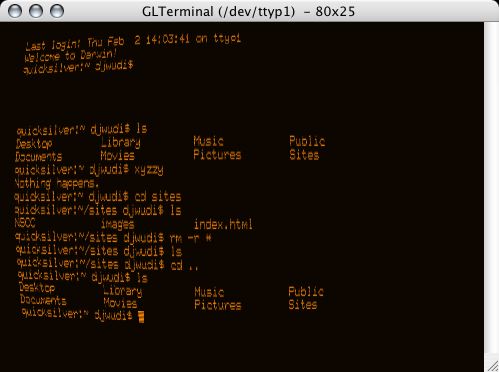
GLTerminal

Best. Terminal. Evar.: GLTerminal.

GLterminal

Complete with green or amber text, spots of variable brightness, screen curvature warping, and even baud selection (set it to 300 baud and watch the characters pop up on your screen)!

Incredibly old-school geeky. I love it.

iPhoto 6.0: Flickr Photocasts

One of the questions I had while watching the Macworld ’06 keynote popped up when Steve was demoing the new ‘Photocasting‘ ability in iPhoto 6. He clicked on the Photocast RSS feed, iPhoto popped right up, and the photos appeared in the album.

“What would happen,” I wondered, “if you tried to subscribe to a Flickr RSS feed as if it were a Photocast?”

Copying my Flickr Atom feed

Subscribe to Photocast...

Entering the Flickr Atom address

iPhoto's Flickr Photocast

Admittedly, it’s not quite the same as an official (iPhoto-created) Photocast would be, as Photocasts can (optionally) include the full-resolution photos. As the Flickr feeds only include the small size photo, the resulting album is populated only with small (~240×180) photos, certainly not any resolution suitable for printing. Also, my understanding is that a Photocast would include however many photos were in the album selected for ‘casting; the Flickr feed only includes the last 10 photos.

Still, it does work; the only real differences are simply differences in how the RSS feeds are created (number of items and resolution of the included images).

Perhaps Flickr could include an option to enable Photocasting — if not for entire feeds, then perhaps for individual sets — and allow a choice of what size photo to embed into the Photocast feed, and/or how many photos to include (last X, entire sets, etc.). Then, clicking on a set’s ‘Photocast’ link or icon would allow iPhoto/Flickr users very nearly the same Photocast functionality as iPhoto/.mac users do.

It’s at least worth tossing the idea out there, I’d say.

Update: Found in this spirited discussion of the Photocast feeds on Brent Simmons’ weblog is an announcement from John Evans that he’s created a Flickr to Apple Photocast (Phlickr) feed converter.

It will take a feed from flickr and rework it a little so that it uses the large images and contains the comment of the photo as well. It is an Atom 1.0 feed that seems to validate on the feeds I have tested, it also includes most of the extra apple stuff debated here. If I can work out the date format I will add that too, and myabe the tags can be retrived and added so they appear as keywords.

To use just paste any feed from flickr into the box and hit the button, the feed should just open up in iPhoto, if not it will just be a regular atom feed with all the relevent enclosures so it will work in NetNewsWire or whatever your reader is.

I just tried it, and it worked fine for me.