Advantages of a Real Server

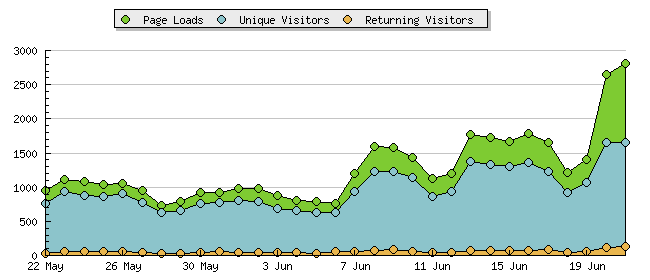
A quick look at my traffic over the last month does a good job of illustrating the benefits to moving to a server that can actually respond at a decent speed:

Eclecticisim Traffic May-June

The day I moved is pretty obvious — the 7th of June. Prior to that, I was averaging 921 page loads a day, and it was trending downwards. Once I switched to the new server, things suddenly improved, and until the past few days, I was averaging 1,490 page loads a day. Nowhere near any of the big sites on the net, but still not too shabby.

So, once again, many thanks to Rain City Story for hosting me!

That spike over the last few days (up to 2,820 page loads yesterday) is almost entirely due to people looking for pictures of the Fremont Solstice Parade, arriving either from Google searches or links to my picture pages from other sites. Lots of pervs out there looking for pictures of naked bikers, would be my guess…and good for them!

I wholeheartedly approve of pervs in most situations — moreso when it drives a traffic spike to my site. ;)

iTunesWe Care A Lot” by Faith No More from the album Never Mind the Mainstream (1987, 4:05).

Fame

Last night when I went down to check my snail mail, another of the residents in my apartment building was checking his. I was heading back to the elevator when he spoke up. “Hey — aren’t you Eclecticism?”

Turns out he’d stumbled across my site a while ago looking for pictures of the Jensonia Hotel fire, and has stopped by from time to time (recently enough to have seen some of the Fremont Parade pictures), and recognized me from my photos and my kilt.

Pretty fun, actually. So far, that makes the second time someone in the “real world” has recognized me from my site (the first being one of the regulars at the Vogue). I’m famous! ;)

Free Wi-Fi for my apartment?

Last month, the City of Seattle launched a program to bring free Wi-Fi access to several prominent areas around Seattle. The initial launch was in Columbia City and the University District, but other parks planned to go online include downtown’s Westlake, Victor Steinbrueck, Occidental, and Freeway parks.

Progress is obviously being made, as today on my way home for lunch I saw a work crew installing one of the Wi-Fi antennas on a lamppost on the 8th Avenue bridge over Freeway Park. Now I’m starting to wonder if my building just might end up with free Wi-Fi access provided by the City of Seattle. Here’s a look at the local layout:

Freeway Park Wi-Fi

Freeway Park is (roughly) outlined in red. The antenna I saw being installed is marked in yellow (I’m sure there must be more scattered around the park), and my apartment building is outlined in green. Now, I don’t know quite how much coverage beyond the borders of Freeway Park the antennas will provide, but just eyeballing it, I’d say that there’s at least a chance that my building might be covered.

Of course, the downside is that none of my computers are Wi-Fi enabled, so it wouldn’t do me any good. Still, I have a few friends with iBooks that occasionally stop by, so this might be a good thing for them.

iTunesNow That I Have You” by Information Society from the album Hack (1990, 5:03).

Flickr Badge in Weblog Posts

Flickr recently introduced a new badge generator with a lot of new features, including the ability to restrict the photos displayed to a certain set or group pool.

I started experimenting with whether it was possible to place badges into my weblog posts where appropriate. For instance, a post about a specific event could include a badge displaying photos from that event’s Flickr photo set or group pool.

My first attempts met with some trouble. The code that the Flickr badge generator creates comes in two sections: the CSS for style, and the HTML code for the badge. Unfortunately, the CSS block was causing issues, breaking validation (under XHTML Transitional, you can’t have a block inside a element) and doing something else that resulted in a random string of characters displaying instead of the badge.

After trying a few different forms of badge, though, I found that as long as I kept the same color and background choices (in step four of the HTML badge creator), the CSS code always stayed the same, and it was only variables in the Javascript call to Flickr that determined which photos were displayed.

So, I chose the style options that I wanted, created a badge, and put the CSS code into my stylesheet. I then took just the HTML code, dropped it into a post, and bingo — everything displays fine. As an example, here’s a random selection of images from the Utilikilts group pool:

www.flickr.com

Other advantages — because the CSS now lives in the stylesheet, you can create different color combinations for different stylesheets (if you use a stylesheet switcher), and your Flickr badges will blend in with the rest of the design no matter which design you choose.

Not a mind-blowing tip, sure, but could be useful from time to time.

Offshoring

Some things from last night’s Weblogger meetup that just popped into my head.

While Jake was interviewing Chas and I, the topic of offshoring came up. I then decided that the next time I go on vacation, I’m going to turn guest-blogging duties over to one of my regular readers that lives overseas. That way, I’ll be offshoring my blog.

Later I was standing outside with Kristin and Ian, and they commented on my Daring Fireball t-shirt, saying that they needed to make their own (their own site t-shirts, that is, not make their own bootleg Daring Fireball t-shirts, though that got some laughs). They figured that they could probably pay local kids a dollar a shirt to do some nice ghetto-style silkscreening. This led to a mix of child labor/sweat shop/offshoring jokes, culminating in my declaration that, “We only abuse local children!”

Politically correct? No.

Funny?

Definitely.

iTunesB-Boy Stance (Freestylers Revenge)” by Freestylers feat. Tenor Fly from the album Plastic Compilation Vol. II (1997, 6:50).

Mixes now Podcast compatible

After poking around a bit, I discovered that (as long as I’ve got everything figured out correctly) it would be fairly easy to enable Podcasting support for the mixes I’m posting.

In theory, then, the post for Difficult Listening Hour 01 should now be Podcast ready, and I’ll do the same for all future mix sessions.

If there are any problems or issues with this, just let me know, as I’ve got no real clue what I’m doing here. :)

June Meetup

Fun conversations and gadgetry at the Webloggers Meetup last night.

Apple eMate, June Webloggers Meetup, Ralph's Grocery, Seattle, WAPhillip Torrone brought a bunch of old and new hardware, gadgets, and toys along, including an Apple eMate, a Newton, and his cell phone — which is actually an old rotary phone that he’s hacked the cell phone hardware into. Pretty impressive!

Chas and Pops and I spent some time talking about Podcasts, and the possibility of my turning my dj mixes into a podcast stream. I’m still not entirely sure if I’m going to move that way, but I’m at least running it around in my head.

June Webloggers Meetup, Ralph's Grocery, Seattle, WAJake was wandering around interviewing anyone who’d sit still in his vicinity for more than a minute, and tossed a few questions my way. Look for some rather brainless-sounding pauses, “um”s and “aaahh…”s from me in an upcoming podcast from him at some point, if he doesn’t edit me out completely. ;)

As things were winding down, I spent a little time chatting with Kristin and Ian, both first-time attendees. Much enjoyed were the possibilities of answering Jake’s “What tech issue would you ask your state representative about if you had the chance?” question with “Teledildonics“, and Kristin and Ian’s picture outside the local Department of Homeland Security office.

A walk home afterwards, accompanied for a while by Jake and Chas until they went off their respective directions, and the evening was done. Not bad at all.

iTunesMy Weakness” by Moby from the album Play (1999, 3:37).

LiveJournal Oddness

Just wanted to thank Leareth for letting me know that my LiveJournal feed had suddenly gone all pear-shaped. I’ve found and fixed the problem, and it should go back to normal the next time LiveJournal updates the feed.

Also, a quick note out to the other 22 LiveJournal users out there who are subscribed to the woody_eclectic feed — I have no idea who set that feed up, but it wasn’t me! While I’m thrilled that someone did, there’s two important side effects:

  1. I often don’t know when the feed gets wonky.

  2. I don’t get any comments left to the posts on the feed. If you’d like to leave comments for me (which, in my world, is always a good thing), you’ll need to click through the link at the very top of the post (which usually looks something like http://feeds.feedburner.com/Eclecticism?m=758). That’ll send you to my real journal, and you’ll be able to comment there.

Just thought y’all should know. ;)

iPhoto Quandries

A few questions about iPhoto — things that don’t make sense to me.

  1. Why can’t I export items that are on a burned DVD (or CD, I assume)? I’d certainly understand not being able to edit photos, rename them, assign tags, and so on — it’s stored on read-only media. But why in the world can’t I export unless the photos are stored on my local hard drive?

  2. When I drag photos from an archive on DVD into my local photo library in order to export them, why can’t iPhoto keep track of the correct tags? While the tags are fine in the archive, as soon as I copy them into the main library, the photos end up tagged semi-randomly, usually with only one or two tags (and those often seem to be “wedding” and “family”, for some reason).

  3. What is iPhoto doing when it loads an archive from DVD that was created with an older version of iPhoto and it presents you with the “Updating iPhoto Library” dialog box? Obviously, it can’t be updating the database on the DVD, that’s write-only media. I think that it’s creating an updated copy of the archive’s database on the hard drive to use, but if that’s the case, why doesn’t it save that archive for later use? It seems to me that it wouldn’t be terribly difficult to do that, and yet every time I try to load an archived photo library, I have to sit and wait for iPhoto to think.

Thanks to these three issues, I may end up re-importing my three DVDs of archived photos so that they’re all on my hard drive — and then hope that having all the photos available doesn’t slog iPhoto down too terribly. Not my preferred approach (especially as, given issue number two, I’d likely have to go through and re-tag all the photos), but as it is, I dread having to go back to old photo archives.

iTunesShining Star” by Earth Wind and Fire from the album Pop Music: The Golden Era 1951-1975 (1974, 2:50).

Text-only individual archives in Movable Type

When I was first investigating John Gruber‘s excellent text-formatting system Markdown, one of the things that caught my eye on his demonstration pages was the ability to see the ‘source’ for any of the pages by simply replacing the .html extension with .text. I’d been wondering if it would be possible to pull such a trick for my site for a while, and got it figured out tonight.

You’ll now notice that just after the post date for each entry, there’s the option to go to a ‘text’ version of the entry. The URL is the same as the normal archive, except that it ends with .txt rather than .html. Clicking on the link will send you to the text-only version of the entry, which is simply the entry without any formatting applied to it whatsoever — just what I’ve typed, nothing more, nothing less.

For instance, here’s the text version of this entry.

I’m honestly not sure if there’s a huge use for this, actually, but that’s never stopped me from trying something before. ;) The biggest benefit I can see is that it allows for very easy copy-and-paste operations without having to worry about “smart quotes” fouling things up along the line. It also allows visitors to see the posts as they were written, of course — and thanks to Markdown, the text-only versions are generally just as readable as the formatted HTML versions, without lots of HTML code cluttering things up. Essentially, they look very similar to what a text e-mail might look like, with URLs placed after each paragraph, and references to each link at the appropriate point in the text.

I have noticed some caveats to this technique, however, which may put the usefulness of this entire technique into question.

  1. Safari doesn’t seem to display text files as pure text — rather, it treats them as HTML. This has the effect of running all paragraphs together as a single line, and rendering any HTML it might find. This has the rather unfortunate effect of defeating the purpose. If anyone has any suggestions as how to force Safari to actually display the text as text rather than rendering the HTML, I’d love to hear them.

    Update: Well, now Safari’s behaving and displaying the text versions as I’d expect them to display — as pure text, with un-rendered HTML. I have no idea why it didn’t do so the first time. This first caveat may be moot, then (which is a good thing).

    Update: John Gruber was kind enough to fill me in on why Safari will sometimes display the text as text, and other times will render it as HTML:

    Oh, and the reason that Safari sometimes refuses to show your text
    pages as plain text is because it tries to be clever. If anything
    that resembles an HTML tag appears in the first 100 KB or so of your
    document, Safari treats it as HTML, even if the HTTP headers state
    that it should be “text/plain”.

    Very frustrating, IMO. Apparently it’s a workaround for
    misconfigured servers that send HTML as “text/plain”, and it matches
    a similar workaround in IE/Win.

  2. Firefox will not wrap text files at the end of the screen, so each paragraph ends up as a single long line. Admittedly, this is technically correct, but without the word wrap, it’s a bit difficult to find something in the midst of a long paragraph. You could, of course, copy-and-paste the entire thing into a text editor before doing anything else, but that adds another step when working with anything.
  3. I have no idea what Internet Explorer will do with this, as I don’t have any version of IE on my computer.

If you’re still interested in implementing this yourself — or just curious — read on for the gory details. This is written for Movable Type users, of course, other systems will have to find their own techniques.

Read more