Links for September 28th through October 1st

Sometime between September 28th and October 1st, I thought this stuff was interesting. You might think so too!

  • Google Lateris Nescis (Using Google Translate’s Latin-to-English on the standard "Lorem Ipsum" text): "Hello world! Is here to cancel meals. Fresh troops the avenging can take the price of the gate elit. That beating you soften large and less trouble. In the fireball there is no element of time will not be avenging Moors, always. Product Sample no, the volutpat But to drink in that, at times as before. Show your little was Nisl undertakes to please a quiver. Maecenas from the fear of eros, which does not fear feugiat. Phasellus to leaven good lion Felis arrows beating. Smartphone EU nibh dignissim or to drink in your family is. "
  • STEAL THIS PRESENTATION!: An excellent presentation on how to create excellent (PowerPoint/Keynote) presentations.
  • Relative Sizes of STAR TREK and STAR WARS Ships: "It's interesting to see that a Next Generation-era Klingon Bird of Prey looks like it could probably take out an AT-AT with one shot, while the USS Defiant looks outmatched by the rebel ship from the opening scenes of the first Star Wars film."
  • This Is a News Website Article About a Scientific Finding: "In this paragraph I will state the main claim that the research makes, making appropriate use of 'scare quotes' to ensure that it's clear that I have no opinion about this research whatsoever. In this paragraph I will briefly (because no paragraph should be more than one line) state which existing scientific ideas this new research 'challenges'."

21st Century Television (Part Two)

As promised, here’s a bit more information on the geeky details of how I’ve set up our cable-free TV system.

First off, credit where credit is due: I got a lot of pointers in setting all of this up from this post at Nyquil.org, along with a couple of follow-up email messages with Jer. Thanks!

  1. Set up a GigaNews Usenet account. While Usenet, in the pre-web days, was one of the premier methods of communicating across the ‘net and thus included free with most Internet packages, those days are long gone. Now, Usenet is the best and fastest way to grab those TV episodes we’re looking for, but it costs a few dollars a month to get access (far less than your average cable bill, however). There are other Usenet providers available, but Giganews was recommended to me, is working fine for me, and is reasonably priced, so I’m passing on the recommendation to you.

  2. Set up a (free) NZBs(dot)ORG account. .nzb files are the Usenet equivalent of Bittorrent’s .torrent files: pointers to all the various pieces of each media file. NZBs(dot)ORG lists NZBs in a number of categories; the TV > XVID category is non-HD if you still have an old non-HDTV; people with HDTVs may want to use the x264 category for 720p/1080p content.

  3. Install SABnzbd+. This is a free, open-source program that handles all the pain-in-the butt steps of using .nzb files. Without SABnzbd+…well, I’ll let Jer explain:

    …you…find yourself manually extracting RAR files, applying PAR2 files to regenerate missing chunks, and then disposing of all the compressed/encoded files after extracting your media file. Not to mention seeking out and downloading every episode of everything you want to download. It’s not for the faint of heart.

    With SABnzbd+, you simply toss it the .nzb file, and it takes care of all of that for you. Even better, it supports a “drop folder” system, so you can simply put a downloaded .nzb file into a folder, and moments later it automagically gets slurped into SABnzbd+ and the files start downloading. Even better than that, though, is its support for RSS feeds…and since NZBs(dot)ORG lets you save RSS feeds of particular searches, it’s relatively trivial to automate the downloading process.

    For my setup, I created an “nzb” folder inside my usual “Downloads” folder. Inside that, I have three folders: “new” (my SABnzbd+ drop folder, for adding manually downloaded .nzb files), “incomplete” (where SABnzbd+ stores the in-progress downloads), and “complete” (where SABnzbd+ stores the finished downloads after post-processing). I also have an alias to the media folder that the Roksbox software accesses; this is for my own convenience and not necessary in all setups.
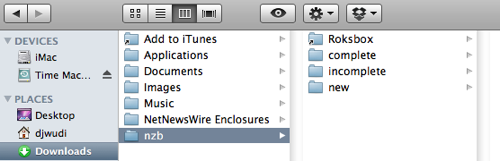
    SABnzbd+ folder structure

  4. Set up and save searches on NZBs(dot)ORG for the shows you want to track. (NOTE: NZBs(dot)ORG has redesigned since this post was written, so these instructions aren’t quite correct anymore. They should be close enough to point you in the right direction, though.) Click on the “My Searches” link towards the top right of the NZBs(dot)ORG page, then click on “[Add]” next to “Saved Searches” towards the left of the “Add Search” page. Because NZBs(dot)ORG doesn’t allow for a preview of a search, I’ve found it easiest to keep the NZBs(dot)ORG front page open in a separate tab so that I can do a test search for my primary search terms, then look for which terms I want to exclude.

    For example, we want to watch CSI, but aren’t interested in the New York or Miami spinoffs. So, my saved search uses the search term “csi” in the “TV-XviD” category, but filters out anything with “dvdrip” (as I’m not interested in older episodes ripped from DVDs), “ny,” “york,” “miami,” or “geographic” (apparently there’s a National Geographic show that uses the initials CSI in its title).

    Safari002.png

    Eventually, you’ll build up a list of shows that will automatically populate whenever a new show that matches any of your saved searches appears on Usenet. Here’s a look at how my searches are set up — no snarks on our taste in TV, please, we’re quite aware of our guilty pleasures. ;)
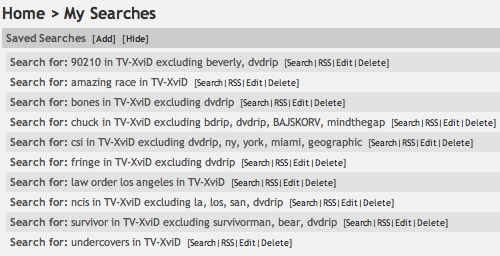
    Safari003.png

    Now, see that little “RSS” link after each search? Those are going to come in very handy, as we flip back over to SABnzbd+….

  5. Add your saved searches to SABnzbd+. Under the “Config” link in the left hand sidebar of SABnzbd+, click on “RSS”. Copy the RSS feed link for one of your NZBs(dot)ORG saved searches, paste it into the “RSS Configuration” > “New Feed URL” field in SABnzbd+, name the feed something other than “Feed1”, and hit the “Add” button. That’s it!

    (While SABnzbd+ does offer various filtering options for RSS feeds, because you’re taking care of the filtering ahead of time in your NZBs(dot)ORG searches, you shouldn’t need to worry about these fields. If you’re using a different .nzb search site that doesn’t allow customization of RSS feeds, you should be able to use these filters to remove items you’re not interested in.)
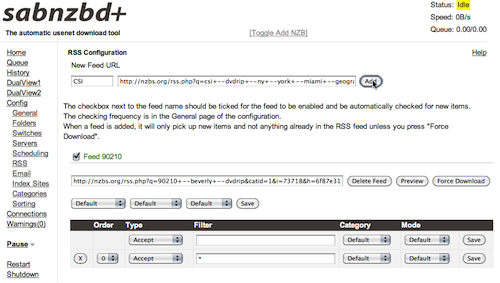
    Safari004.png

    The first time SABnzbd+ scans the RSS feed, it will not download anything — this is intentional, as you probably don’t want to suddenly be downloading all of the items listed in the RSS feed. If there are any recent episodes that you’d like to download, you can click on the “Preview” button next to your newly-entered feed to choose which items you’d like to download.

    Go through and add the rest of the RSS feeds for your saved searches, and you’re all set. From here on out, as long as SABnzbd+ is running, it will keep an eye on your saved searches. Whenever a new episode that matches one of your searches appears, SABnzbd+ will see it in the RSS feed, grab the .nzb file, download everything it needs, assemble and decompress it, and store the finished download in the “completed” folder.

Now, if all you’re interested in is getting ahold of TV episodes and having them on your computer to watch, you’re set! I copy the downloaded files to a network drive and use the Plex software to pipe the shows over to the Roku player attached to our TV. Good to go!


NOTE: The following information is the original ending to this post, but is deprecated, as the situation is now simpler. However, I’m keeping it here for the sake of completeness.

However, in our case, I also need to convert the downloaded video from .avi to H.264-encoded .mov or .mp4 files, as that’s the only format that the Roku player will accept, and then move the files into their proper place within my computer’s webserver for Roksbox to access. While I haven’t been able to automate all of this, I have managed to use Automator, AppleScript, and the HandBrake video conversion software’s command line interface to automate the .avi to .mp4 conversion.

Now, I’m no Automator or AppleScript guru — this is actually one of my first experiments with either technology — so this may not be the best or most efficient way to handle this particular option. I’m certainly open to suggestions for improvement! However, it’s working for me…so far.

If you’d like, you can download my Automator action (121k .zip file). To install it, decompress the .zip file and add it to your ~LibraryWorkflowsApplicationsFolder Actions folder. Create a folder named “TV” inside the ~Downloadsnzbcomplete folder (it will be added automatically by SABnzb+ the first time it downloads a TV episode, but it needs to exist for this to work). Additionally, the HandBrake CLI must be installed in your main Applications directory.

To activate the HandBrake action, right-click on the “TV” folder and choose “Folder Actions Setup…” from the pop-up menu. In the Folder Actions Setup dialog, choose “Handbrake.workflow” and click the “Attach” button. Once that’s done, whenever SABnzbd+ finishes post-processing a download and moves the folder containing all of the files to the “TV” folder, this Automator workflow will automatically be triggered. Here’s what it does:

  1. Get Folder Contents and repeat for each subfolder found. This scans the TV folder and the folder that’s just been added to it to find all the contents.

  2. Filter Finder Items for files with the .avi extension that are larger than 20 MB (this avoids running into a conflict with the small quality sample .avi files that are sometimes included).

  3. Run AppleScript

    on run {input, parameters}
      set input to POSIX path of input
      set ConvertMovieCmd to "nice /Applications/HandBrakeCLI -i " & input & " -o " & input & ".mp4 --preset="Normal" ;"
      do shell script ConvertMovieCmd
      return input & ".mp4"
    end run
    

    This simple AppleScript: grabs the file passed to it by step two; converts the file path to use POSIX slashes rather than HFS+ colons as delimiters; creates a terminal command for the HandBrake CLI using the .avi file as input, the “Normal” preset, and simply appending .mp4 to the existing file name on output; and passes the newly created file to the next step in the action.

  4. Move Finder Items moves the new .mp4 file to the “complete” folder, one level up from the “TV” folder.

  5. Show Growl Notification pops up a sticky Growl alert to let me know that a new episode has finished transcoding. Obviously, this step will only work if you have Growl installed.

Eventually, I’d like to figure out how to get the action to move the folder containing the just-processed .avi file to the trash, but I haven’t quite figured out how to do that without possibly also moving any other folders at the same level to the trash (which might interfere with other downloads not yet transcoded), so for now, I’m sticking with manually cleaning up the extra files after the transcoding is finished.

From there, all that really needs to be done is moving the file from the “completed” folder to its proper place in the Roksbox file structure, and it’s ready to watch on our TV. I do a few other steps manually to “pretty up” the experience — adding “poster art” and XML-based episode descriptions for the Roksbox interface — but those are entirely optional, and many people won’t see the need to bother with those steps.

And that’s it! 80% of the process is now completely automated, and that last 20% that I do manually is entirely optional and basically just feeds my anal-retentive need to present things as slickly as possible whenever I can.

Hopefully all this has been interesting and informative to at least a few people out there. Questions, comments, ideas for improvement? Let me know!

21st Century Television (Part One)

A few days ago, I was finally able to follow through on something that Prairie and I had been discussing of and on for a few weeks — I called Comcast and disconnected our cable account. As we live in the Kent valley and are too blocked by mountains to get effective digital broadcast reception, this effectively bans broadcast television.

We’ve been working our way towards this for some time now, for two major reasons: one, sitting around and watching too much TV just isn’t healthy, and two, though there are a few shows that we enjoy watching, the commercials were just driving us up the wall. We had started by developing a number of “rules” — all in place before disconnecting the cable, but still in place — governing our TV consumption:

  1. No reruns. Not even if we haven’t seen that particular episode before. If it’s not a first-broadcast show, we’re not watching it. It’ll be out on DVD or made available for online streaming eventually, and we’ll watch it then, at our convenience, without commercials.

  2. The TV does not get turned on before 7:30 or 8 p.m. On any given “normal” night (that is, those that don’t have me at school until late in the evening) we tend to eat dinner at right around 6 p.m. In the “old days,” it wasn’t uncommon for us to grab our food, plop down in front of the TV, and zone out until 10 or 11 when we went to bed. Now, we’re eating at the table, finishing dinner, doing the dishes, and spending an hour or so playing games (our current obsessions are Set and Monopoly Deal) before the TV even gets turned on.

  3. The TV does not get turned on unless we exercise. We have a non-motorized treadmill and a reclining stationary exercise bike in the living room, and we have to put in at least half an hour each on either the treadmill or the bike if we want to watch TV.

  4. We watch only what we’re actually interested in. No more just turning the TV on just to see what’s on, or to flip channels, or for background noise (admittedly, not something we were in the habit of anyway), or anything similar. Unless we know we want to see something, we’re not bothering.

All of this was a great start, but over the course of the summer, one more piece of the puzzle fell into place when I added a Roku player to our entertainment system. I rambled on about our love affair with this little box a few months ago, but here’s the Reader’s Digest Condensed Cliff’s Notes Executive Summary: inexpensive, dead-simple, on-demand access to Netflix, Amazon Video on Demand, and a whole lot more.

Thanks to the Roku and Netflix’s library of streaming titles (plus the DVDs we get through the mail), there was never a question of whether there was something we were interested in watching — just a question of what we felt like that night. After a few weeks, it became clear that the only reason we were holding on to our cable subscription was because there were still shows that we wanted to keep up with. We toyed with the idea of ditching cable, as we knew that more and more TV was being offered online either through legal channels such as Hulu and Amazon VoD or through the quasi-legal Bittorrent network, but watching shows on my computer in my office just wasn’t as comfortable or convenient as sitting in the living room in front of the TV.

A few weeks ago, however, I discovered Roksbox, an add-on channel for the Roku that allows me to stream media from my computer to the Roku in the living room. Bingo! That was the last piece we needed.

So, cable and broadcast TV are no more for us. Instead, we have our personal DVD library, DVDs we order from Netflix, the entire Netflix on-demand library, and, for the current-run TV shows we want to keep up with, I simply download them and toss them into the Roksbox library for us to watch commerical-free at our leisure.

It’s a great setup. We’re spending less time watching TV, and when we do watch something, it’s hassle-free, commerical-free, and at our convenience. As far as we’re concerned, this is definitely the way to go.

So that’s the general, non-techie overview. In part two of this, I’ll get into the geeky fiddly bits of how I’ve automated the process of finding, downloading, and prepping the TV shows we pay attention to.

Links for September 20th through September 26th

Sometime between September 20th and September 26th, I thought this stuff was interesting. You might think so too!

  • Billboard Error Creates Embarrassment: "If you ever wondered how much difference just one letter can make when it comes to a message, ask the thousands of people who drove by a digital billboard near the intersection of Ironwood and Indiana 23 between Thursday and Monday morning. The ad urged people to go to the 'southbendon.com' website for a look at the '15 best things about our pubic schools.' That's right, the billboard said 'pubic' instead of 'public' schools. The letter 'L' had been left out of the word public."
  • My Relentless Pursuit of the Guy Who Robbed Me: "See, aspiring thief, you just never know what you're stepping into when you hit up a random car on a random street. However badass you think you may be, there is someone on the other side of the robbery. And in this particular case it was someone who escaped the Iranian Revolution as a child; who roamed the world alone for five years because her parents couldn't get out; who watched from a dozen blocks away as the twin towers crumbled; who had just barely clawed her way out of that concentration camp known as late-stage cancer, if only because she was intent on raising her babies, come hell or high water. And all of this before she even turned 40. Can you see how that someone might be way more twisted than you?"
  • My First Week With the iPhone: "The other night, however, a very amazing thing happened. I downloaded an app called Color ID. It uses the iPhone's camera, and speaks names of colors. It must use a table, because each color has an identifier made up of 6 hexadecimal digits. This puts the total at 16777216 colors, and I believe it. Some of them have very surreal names, such as Atomic Orange, Cosmic, Hippie Green, Opium, and Black-White. These names in combination with what feels like a rise in serotonin levels makes for a very psychedelic experience. […] I went outside. I looked at the sky. I heard colors such as 'Horizon,' 'Outer Space,' and many shades of blue and gray. I used color queues to find my pumpkin plants, by looking for the green among the brown and stone. I spent ten minutes looking at my pumpkin plants, with their leaves of green and lemon-ginger. I then roamed my yard, and saw a blue flower. I then found the brown shed, and returned to the gray house. My mind felt blown."

Links for September 15th through September 20th

Sometime between September 15th and September 20th, I thought this stuff was interesting. You might think so too!

  • CLASH of the GEEKS | a Fantastical Chapbook to Benefit the Lupus Alliance of America: "Wil Wheaton, John Scalzi and Subterranean Press are proud to announce the publication of Clash of the Geeks, a special and fantastical electronic chapbook featuring stories by Wheaton, Scalzi, New York Times bestseller Patrick Rothfuss, Norton Award winner and Hugo Best Novel nominee Catherynne M. Valente, Hugo and Nebula Award nominee Rachel Swirsky and others, for the benefit of the Michigan/Indiana affiliate of the Lupus Alliance of America. The chapbook is free to download, but voluntary payment is strongly encouraged, via Paypal or by tax-deductible donation forms, both linked to later in this entry. All proceeds from this chapbook will go to the Michigan/Indiana affiliate of the Lupus Alliance of America."
  • The Nervous Breakdown: "Only the folks at Madacy Entertainment know exactly what Ocean Surf is, and their lips are sealed. I made several phone calls to Madacy's corporate headquarters in Quebec, and each representative I was lucky enough to reach declined to comment on the origins of the Ocean Surf audio. It's become patently obvious that the mystery of the Ocean Surf recording is one cornerstone of its appeal. Mysteriousness, in fact, is what makes Ocean Surf arguably the most important relaxation sounds release of all time."
  • Observations on Film Art : Bond vs. Chan: Jackie Shows How It’S Done: "The Michael Bay approach has become the principal way in which action scenes are shot. It isn't absence of craft that leads to these aimless bouts. The filmmakers actively want the action to be hard, even impossible, to follow. Sometimes I think that this blurred bustle is there to secure a PG-13 rating; if you could really see the mayhem, we might be moving toward an R. But filmmakers don't say that they're self-censoring. They seem to think that making the action illegible is creative because it promotes realism."

Links for September 9th through September 14th

Sometime between September 9th and September 14th, I thought this stuff was interesting. You might think so too!

  • Consequences of U.S. and Dutch Approaches to Teen Sex: "American parents approach their children's sexual initiation with fear and loathing; while Dutch parents treat sexuality like any other realm of life that a child must learn to manage. Accordingly, most American teenagers hide their virginity loss from their parents, furtively popping the cherry in risky situations, often without protection against pregnancy or sexually transmitted infections (STIs). In contrast, most Dutch teenagers lose their virginity in their own bedrooms with their parents approval… and condoms. This different approach to teen sexuality helps explain the dramatic differences between the U.S. and the Netherlands in rates of contraceptive use, teen pregnancy, abortion, and STI transmission."
  • Facebook Co-Founder Mark Zuckerberg Opens Up: "Zuckerberg, or at least Hollywood's unauthorized version of him, will soon be starring in a film titled 'The Social Network,' directed by David Fincher and written by Aaron Sorkin. The movie, which opens the New York Film Festival and will be released on October 1st, will be the introduction that much of the world gets to Zuckerberg. Facebook profiles are always something of a performance: you choose the details you want to share and you choose whom you want to share with. Now Zuckerberg, who met with me for several in-person interviews this summer, is confronting something of the opposite: a public exposition of details that he didn't choose. He does not plan to see the film."
  • Tax the Filthy Rich!: "Washington State has the most regressive taxes of any state in the country. In Washington, poor people pay 17.3 percent of their income in taxes, while the filthy rich pay only 2.6 percent of their income in taxes. This is the result of our state's heavy reliance on the sales tax, which accounts for over 50 percent of all state revenue. Imagine two families, one rich and one poor, going to the same store and buying the same basket of goods and subjected to the same sales tax. For the poor family, it's a much heavier burden than for the rich family. The sensible way to even out the tax burden is to tax income, like most other states. But Washington doesn't have an income tax. Never has. Hence our status as a national embarrassment–more regressive on taxes than even Texas or Georgia."
  • 5 Worries Parents Should Drop, and 5 They Shouldn’t: "Based on surveys Barnes collected, the top five worries of parents are, in order: Kidnapping, School snipers, Terrorists, Dangerous strangers, and Drugs. But how do children really get hurt or killed? Car accidents, Homicide (usually committed by a person who knows the child, not a stranger), Abuse, Suicide, and Drowning."

Regarding Facebook

A nice analysis of how Facebook works best:

Yeah, [Facebook] sucks ass if you use it wrong. Don’t do that. Keep connected only to people who are active, intelligent participants on the site; jettison everybody else. Facebook friends are not real life friends. You can unfriend somebody and keep their number in your phone. That’s allowed. Then, pursue lofty ambitions….

Facebook should not be a timesink where you slowly drown in all the half-remembered named of your youth. It’s a community like any other. What makes it great is that you control every member of your own community. Don’t like a contributor? Kick them out! And you’re left with a customized circle of the most wonderful people ever. (This works unless you don’t know any wonderful people.)

Rory Marinich

Links for September 1st through September 8th

Sometime between September 1st and September 8th, I thought this stuff was interesting. You might think so too!

  • Geena Davis Says Girl Characters Mostly Stereotypes: "Oscar winner Geena Davis has played a feminist icon, a baseball hero, and the first female president of the United States. But on Tuesday night she came to Emeryville for a new role: evangelist for change in Hollywood.<br />
    <br />
    Speaking to a packed auditorium at Pixar Animation Studios, Davis spoke about her work to create a cultural shift in American media — ending what appears to be insidious gender bias in movies and television aimed at kids, which she believes is sending the damaging message that girls are less valued in society."
  • New Record for Costumed Star Trek Fans Set at Dragon*Con: "On Saturday night at Dragon*Con in Atlanta, GA Star Trek fans gathered to attempt to break the record for costumed Trekkies set just a month ago at the Official Star Trek convention in Las Vegas. And based on the count, it looks like they did it. "
  • The Authorized Guide and Companion to Dune: "Snippets of poetry from the Imperium; a sample folk tale from the Oral History; brief biographies of over a dozen Duncan Idahos; two differing approaches to Paul Muad'Dib himself and to his son Leto II; Fremen recipes; Fremen history; secrets of the Bene Gesserit; the songs of Gurney Halleck — these are just some of the treasures found when an earthmover fell into the God Emperor's no-room at Dar-es-Balat. Out of print for more than two decades, disavowed by Frank Herbert's estate, and highly sought-after by fans, the legendary Dune Encyclopedia is now available online as a fully illustrated and searchable PDF."

Links for August 30th through September 1st

Sometime between August 30th and September 1st, I thought this stuff was interesting. You might think so too!

  • A Syllabus and Book List for Novice Students of Science Fiction Literature: "There are a few things to keep in mind about this syllabus for SF 101: Introduction to Literature. It is not comprehensive. It is intended to introduce the novice student of SF literature to the major themes in the genre, as well as books and authors who are representative of different eras in SF lit (including the present day). So you'll find a mix of old and new here, as well as fan favorites tucked in among more literary authors. Back in the mists of time, I used to teach literature and American Studies at UC Berkeley, so I have some experience putting together course materials for university classes very much like one. (In fact, there are a few books on here that I used to teach.) What educators aim to do in overview courses is expose students to the broadest possible set of examples of a genre, not just the 'canon.' It is in this spirit that I chose the books on this list."
  • Comparison – Apple TV vs. Roku vs. Boxee Box: "Despite its startup status, Roku still gets high marks for a product line that's on par with — if not better — than what Apple announced today. Roku's high-end HD-XR, priced at $99, has HDMI and 802.11N wireless connectivity, which is in-line with Apple TV is offering. It also has Netflix Watch Instantly and a video rental service in Amazon Video on Demand that rivals Apple's iTunes store. Roku has also promised a 1080p upgrade to its HD-XR product for personal streaming, going one better than the 720p streaming Apple TV is capable of."
  • Get More Out of Your Roku Digital Video Player: Great collection of extra 'private' channels for Roku, including Twitter and YouTube channels.
  • Parched English Fields Reveal Ancient Sites: "Known as crop marks, the faint outlines of unseen buried structures emerged because of the length of the dry spell, leading the national conservator to label 2010 a vintage year for archaeology. The outlines show up when crops grow at different rates over buried structures. Shallower soils tend to produce a stunted crop and are more prone to parching, bringing to light the new features. 'It's hard to remember a better year,' said Dave MacLeod, a senior investigator with English Heritage."

Links for August 28th through August 29th

Sometime between August 28th and August 29th, I thought this stuff was interesting. You might think so too!

  • The Top 20 Essential Science Fiction TV Shows: "Science fiction has ruled television for over 50 years, but some shows have brightened our screens and supercharged our brains more than others. Here are the 20 science fiction shows that everybody interested in the genre should see." I don't do quite as well with this list as I do with the earlier-linked list of films, but I've still seen at least some, if not all, of almost 3/4 (13 out of 20) of the shows on this list.
  • 25 Classic Science Fiction Movies That Everybody Must Watch: "Science fiction has rocked cinemas for a century, and the genre has produced many undisputed classics during that time. But which movies are essential viewing for anyone interested in the genre? We broke down the 25 must-watch science fiction films." As of right now, Primer and Moon are the only two films on this list that I haven't seen yet.
  • How I’D Hack Your Weak Passwords: "Believe me, I understand the need to choose passwords that are memorable. But if you're going to do that how about using something that no one is ever going to guess AND doesn't contain any common word or phrase in it."