…here it is: The Best. Blonde Joke. Ever.

“Mysterious Ways (Apollo 440 Magic Hour)” by U2 from the album Mysterious Ways (1991, 4:26).

Enthusiastically Ambiverted Hopepunk
…here it is: The Best. Blonde Joke. Ever.
“Mysterious Ways (Apollo 440 Magic Hour)” by U2 from the album Mysterious Ways (1991, 4:26).
26 days of rain, and a state of emergency has been declared.
Can’t say I’m surprised, really. I think it was my next-door neighbor starting to build an ark that tipped me off.
“Drip, Drip, Drip” by Chumbawamba from the album Tubthumper (1997, 5:08).
One of the questions I had while watching the Macworld ’06 keynote popped up when Steve was demoing the new ‘Photocasting‘ ability in iPhoto 6. He clicked on the Photocast RSS feed, iPhoto popped right up, and the photos appeared in the album.
“What would happen,” I wondered, “if you tried to subscribe to a Flickr RSS feed as if it were a Photocast?”

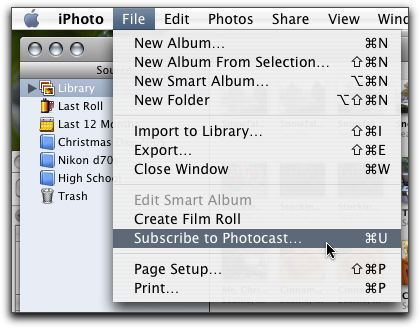


Admittedly, it’s not quite the same as an official (iPhoto-created) Photocast would be, as Photocasts can (optionally) include the full-resolution photos. As the Flickr feeds only include the small size photo, the resulting album is populated only with small (~240×180) photos, certainly not any resolution suitable for printing. Also, my understanding is that a Photocast would include however many photos were in the album selected for ‘casting; the Flickr feed only includes the last 10 photos.
Still, it does work; the only real differences are simply differences in how the RSS feeds are created (number of items and resolution of the included images).
Perhaps Flickr could include an option to enable Photocasting — if not for entire feeds, then perhaps for individual sets — and allow a choice of what size photo to embed into the Photocast feed, and/or how many photos to include (last X, entire sets, etc.). Then, clicking on a set’s ‘Photocast’ link or icon would allow iPhoto/Flickr users very nearly the same Photocast functionality as iPhoto/.mac users do.
It’s at least worth tossing the idea out there, I’d say.
Update: Found in this spirited discussion of the Photocast feeds on Brent Simmons’ weblog is an announcement from John Evans that he’s created a Flickr to Apple Photocast (Phlickr) feed converter.
It will take a feed from flickr and rework it a little so that it uses the large images and contains the comment of the photo as well. It is an Atom 1.0 feed that seems to validate on the feeds I have tested, it also includes most of the extra apple stuff debated here. If I can work out the date format I will add that too, and myabe the tags can be retrived and added so they appear as keywords.
To use just paste any feed from flickr into the box and hit the button, the feed should just open up in iPhoto, if not it will just be a regular atom feed with all the relevent enclosures so it will work in NetNewsWire or whatever your reader is.
I just tried it, and it worked fine for me.
My iLife ’06 package showed up today. I can’t stay up incredibly late to play, so this is just going to be a cursory overview to begin with, but it’s a start.
 First things first: the package has gotten much smaller. Where iLife ’05 used a more traditional box size, the box for iLife ’06 is barely bigger (width by height) than a CD. Still about an inch or so deep.
 Apple’s customary flair for design on even the smallest little things shows through again. As you open the box, there are small accordion folds on the flap, and rather than being just dropped inside, the software and materials are nestled inside a small cardboard tray that slides out.
What you get in the box:
One installation was done, I poked around briefly with iPhoto and iWeb.
As noted by John Gruber, iPhoto has gained “iTunes’ theme-without-a-name”. Looks pretty slick, actually. And, while I haven’t done any stress-testing yet, it’s definitely feeling snappier than the prior version (apparently I’m not the only one seeing this, either). I like the full-screen editing mode, too — for simple edits, that’ll actually cover me without heading into Photoshop. Nicely done.
iWeb is definitely looking to be worth poking around with. It’s not restricted to .mac (yay!), though without .mac you don’t have the one-click-publishing option — rather, you ‘publish’ to a local folder, and then you can either serve directly from there (if your Mac is a webserver), or you can upload the generated files to a remote server. The markup isn’t terribly pretty, but that’s not a big surprise. Feel free to check out the one sample page I’ve made so far to see what you think (though that is just a single page, and I haven’t delved into multi-page sites, blog publishing, or much of anything else). On the bright side, there was only one error preventing the page from validating…on the down side, that’s in part because the generated page is all images and link maps. Hmmm. Definitely reserving judgement on this one until I get a chance to play more.
That’s all I can do for tonight, though — it’s after midnight, and I’ve got class at 10am tomorrow morning. I’ll play more as soon as I can grab a few hours…
“Club 69 Future Mix Vol. 1 (full mix)” by Various Artists from the album Club 69 Future Mix Vol. 1 (full mix) (1998, 1:14:02).
Never having quite gotten the hang of .htaccess redirect requests, I’m hoping someone out there might be able to give me a hand with this.
I would like this…
https://michaelhans.com/eclecticism/tags/pickatag
…to map to this (though not wrapped onto multiple lines, obviously)…
http://www.michaelhanscom.com/cgi-bin/mt/mt-tags.cgi?
blog_id=1&tags=pickatag
Similarly, for multiple tags, this…
https://michaelhans.com/eclecticism/tags/pickatag+anytag
…should map to this (and so on, as more tags are added)…
http://www.michaelhanscom.com/cgi-bin/mt/mt-tags.cgi?
blog_id=1&tags=pickatag+anytag
Any ideas? Thanks much in advance!
“Mexican Women” by Throwing Muses from the album Just Say Yo (1988, 2:49).
Along with the Mac OS X 10.4.4 update that was released today, Software Update notified me of two other updates to install: QuickTime 7.0.4 and iTunes 6.0.2 (which doesn’t seem to have a support document listing the updates made to the program).
Apparently, one of the changes made to iTunes was more advertising! Yay! I was just lamenting the fact that I didn’t see enough ads while deciding which song to play next, and here Apple’s gone and taken care of that for me.

Thankfully, there’s a new little button added to the group at the lower-right that allows you to toggle the MiniStore on and off, so I can kill this little monstrosity. Still doesn’t make its inclusion any less obnoxious, though.
“Jerry Springer” by Yankovic, “Weird Al” from the album Running With Scissors (1999, 2:46).
The music in Apple’s clever Intel processor ad sounded really familiar, and after running it around in my head for a bit, I figured it out.
It’s Moby‘s ‘God Moving Over the Face of the Waters‘, which I have on the soundtrack to Heat (which, incidentally, is one of my favorite soundtrack albums, and a really good movie to boot).
Just in case anyone else is curious.
“God Moving Over the Face of the Waters” by Moby from the album Heat (1995, 6:58).
This is just sad — sixteen of the twenty-five displayed TrackBack pings to Seablogs are TrackBack spam. Is anyone paying attention to moderating the site?
“Goody Two Shoes” by Adam and the Ants from the album Rock and Wave Vol. 1 (1982, 3:29).
I’ll do my best to avoid any snarky “my god MySpace drives me up the wall” comments (heh…oops) to pass on this tidbit I just found:
So here’s the deal… SEATTLE PILLOW FIGHT is going to be a Guinness World Record breaking event held right here in Seattle THIS SPRING IN 2006! It’s going to be a great way to bring the excitement of a world record home to the Seattle community. Pillow fights have been sweeping communities and college campuses recently, each time setting the bar higher and higher (or not, as some efforts haven’t quite made the mark!) DOES SEATTLE HAVE THE SPIRIT AND THE PRIDE THAT IT TAKES TO SHOW EVERYONE WHAT IT MEANS TO COME TOGETHER AS A COMMUNITY AND CRUSH A WORLD RECORD? You bet it does! Let’s see who will stand behind this charitable effort between now and the “to be determined” date in May of 2006!
No definite day yet, but this should be worth paying attention to.
(via seattle)
“Get Up! Go Insane! (Fatboy Really Lost It)” by Strech ‘n’ Vern from the album Fatboy Slim’s Greatest Remixes (2000, 7:14).