13 Free Songs from iTunes

Have an iPod? Want some free music from iTunes?

iPod, meet iTunes.

  1. Back up any data on your iPod you don’t want to lose.
  2. Use the iPod Updater application (usually in /Applications/Utilities/iPod Software Updater, or it can be downloaded from Apple) to do a ‘restore’ on the iPod, resetting it to factory defaults.
  3. Launch iTunes.

And that’s all there is to it — upon launch, iTunes will flip over to the iTMS and offer you thirteen free songs. Here’s what you get:

  1. Blow It Out – Features
  2. All At Sea – Jamie Cullum
  3. Sunshine to the Rain – Miri Ben-Ari
  4. Lonely – Akon
  5. Golden Touch – Razorlight
  6. Every Time You Go Away – Brian McKnight
  7. Bigtime – The Soundtrack of Our Lives
  8. Laura – Scissor Sisters
  9. She Said – Brie Larson
  10. Just Anotha Shorty – O’Ryan
  11. Sleeping With the Lights On – Teitur
  12. Reach Out, I’ll Be There – Michael McDonald
  13. TKO – Le Tigre

No idea on how long this offer is good for, whether the selections might change at some point, or whether you’ll like the selections enough to make it worth your time. I figured, hey, free music, why not?

(via Accelerate Your Macintosh!)

iTunesLaura” by Scissor Sisters from the album iTunes New Music Sampler (Universal Motown Edition) (2004, 3:38).

It’s official: Six Apart acquires LiveJournal

Looks like the rumors were true: Six Apart acquires LiveJournal.

Pertinent posts:

I’ve read none of these yet, as it’s after midnight and I need to get to bed. Should make for interesting reading when I wake up, though.

Update: Okay, I stayed up a bit later and read the posts. Good stuff there — there was a lot of FUD running around due to the rumors, and I think that the three posts above do a good job of dispelling that.

Congrats to both Six Apart and LiveJournal — I’m looking forward to seeing where you all go with this.

iTunesGet Off My Land” by Operatica from the album O Vol. 1 (2000, 5:05).

De-Lurker Day

Don't be a stranger...

Well, the day’s actually almost over, but I just now found about about this thanks to Carla saying hi — today’s been declared De-Lurker Day!

I know you’re out there. My stats tell me you’re out there. And today you have a once in a lifetime chance to let your presence be known.

Well, okay, technically you have that chance everyday, but today is De-Lurking Day! A special day celebrating lurkers, and exhorting you to muster the strength and bravery to click on that comment button and end the deafening silence.

So say hi, or tell me your wish for 2005, or what you’re having for lunch, or your diabolical plan for world domination– whatever.

Sounds good to me — so…who’s out there?

iTunesCrying from Outside” by Tear Garden, The from the album To Be an Angel Blind, the Crippled Soul Divide (1996, 7:03).

Veronica Moser, Type Key Spammer

While there’s a fair amount of chatter today about spammers shifting tactics away from comments and towards Trackback (which my linklog got hit with this morning, actually), I just ran into a different approach — my first TypeKey authenticated spammer.

In theory, enabling TypeKey is supposed to be one of the more effective way of combatting comment spam, as it presents a much higher (and supposedly non-scriptable) barrier to the spammer. As the Six Apart Guide to Comment Spam notes:

The worst case scenario…would be if a spammer created a TypeKey account, and used it to send spam to your weblog. However, because the first comment from any TypeKey user must be approved by your before being published, the only way a spammer could sneak spam onto your site would be to first submit a comment that appears to be legitimate. While it’s possible that some spammers might attempt this, it is highly unlikely that they would be able to do this using automated scripts. If they do and are reported to Six Apart, TypeKey’s terms of service allows us to disable their accounts.

Apparently, that’s just what has happened to me. I noticed a comment that fit the profile of a standard spam comment pop up in my comments RSS feed: all it said was “Very interesting,” and included a link to http://veronicamoser.com/. I didn’t have a clue who Veronica was, so I did a quick Google — the results were pretty telling.

Since this was the first time I’ve seen this type of attack, though, I went ahead and left the comment (though I did edit out the active link) and sent a quick note to Six Apart. I’m rather surprised that someone went through this much trouble — barring a new script attack, ‘Veronica’ would have had to sign up for a TypeKey account, visit my page, sign in to the TypeKey system, and then manually post the comment. I’m also fairly amused that they used the name ‘Type Key Spammer‘ for their TypeKey profile — essentially thumbing their nose at authority, I suppose.

Of course, the one worry is if this might be a test case, and someone actually is working out a script to continue with the comment spam attacks even in the face of TypeKey authentication. We can always report the offending TypeKey account to Six Apart, of course, but if the spammers keep creating new accounts…well, it’ll just be one more side to the battle against spam.

Whee. :P

Quick Review: The Lion in Winter

I’m not really sure when I put The Lion in Winter in my queue, nor what prompted me to do so. When I popped it in tonight, I wasn’t really sure that I was in a mood for a historical drama, either, but I figured that I’d at least give it a shot. In the end, I’m very glad I did — what a wonderful, deliciously wicked film!

It’s Christmas in England, and Henry II (Peter O’Toole) needs to name the heir to his throne. He favors younger son John (Nigel Terry), his wife Eleanor of Aquitane (Katharine Hepburn, in an Oscar-winning performance) — who he releases from imprisonment to join the family for the holiday — favors elder son Richard (Anthony Hopkins, in his first screen role), while middle son Geoffrey (John Castle) stands nearby, nearly ignored. France’s King Philip (Timothy Dalton), whose sister Alais (Jane Merrow) is to be married to the Henry’s successor — and who has become Henry’s mistress in the interim — joins the party to ensure that his interests are looked to. Everyone here is motivated purely in their own interests, however, and the gathering soon devolves into some of the most vicious scheming, plotting, and verbal backstabbing I’ve seen in quite a while.

James Goldman‘s script, adapted from his own play, is a masterpiece, full of clever wordplay and innuendo. Watching the characters tear into each other, I was reminded strongly of two more recent films that I enjoy — The Ref and War of the Roses — only where those movies carry the viciousness beyond the verbal realm and into out and out physical battles, much of the fun in The Lion in Winter is that not only are all the battles fought merely with words, but there’s no need for actual physical violence, and the tale would suffer for it if it were there.

There’s no need for a literal knife in the back when a well-sharpened tongue can cut just as deeply, and often leave a more lasting scar. The pen is mightier than the sword, indeed.

iTunesMenofearthereaper (Concrete No Fee No Fear)” by Pop Will Eat Itself from the album Two Fingers My Friends! (1995, 5:54).

My best photos of 2004

Seattle, WA

I’ve just created a flickr photoset of my favorite photographs from this past year (hey, every news organization on the planet does this, I might as well join in the fun, right?).

Seventy-nine photos culled from a little over four thousand. Some have been featured on this weblog in the past, some were already on flickr, but quite a few of them are being posted publicly for the first time. I had fun picking out which ones to toss up — hopefully you enjoy looking through them.

Enjoy the show!

Wishlist: MT ‘tag’ category plugin

Thanks to Flickr, I’m becoming more and more of a fan of keywords or ‘tags‘ as categorization tools. Rather than having a set number of categories or sub-categories, tags are an amazingly simple way to categorize items (such as photos on Flickr, or links on del.icio.us [which I really need to look more closely at]) just by tossing whatever descriptive terms you want into the tag field.

What I want now is a way to use tags in my Movable Type installation rather than categories. I have no idea if this is even possible with the current plugin scheme, or if it would take a lot of lower-level source code hacking (seems like it might…I’m guessing you’d need to disable MT’s category system, replace it with the tag system, remove the Category drop-down menu from the MT interface and replace it with a field for inputting tags, incorporate a tag search feature, etc.), but I’d love to see it. Even better would be if enabling the tag system in MT would automatically create a dynamically-generated tags page similar to Flickr‘s, with the top X (50? 100? 150? User-definable?) tags displayed using variable sizes, and a link to a full tag list.

Okay, I want to rip off Flickr’s entire tag system and use it on my MT blog. Imitation is the sincerest form of flattery, right? ;)

Of course, I can’t code a “hello world” application (well, maybe in BASIC, but not in anything more complex than that), let alone tackle a project like this. But I can dream.

Barring some kind soul figuring out how to shoehorn such a thing into MT, though, do any of the current weblogging tools support tag-based categorization? I’m not entirely sure if that one feature would be enough to tempt me away from MT, but it’s obviously bouncing around my brain enough to make me ask…

Addendum: Just before posting this, I looked at the ‘Keywords’ field in the MT interface. Hmmm. Maybe all we need is a plugin to parse and interact with the keyword field that’s already there? Damn, I wish I knew more about programming…. Ideas, anyone?

Later tonight I may see what resources I can find to toss this idea into the wider MT community and see if some bigger brains than mine feel like poking around with this.

Update: Ben Hammersly is doing something similar, only rather than being an internal categorization system, it uses keywords to link to del.icio.us tags. Not quite what I’m thinking.

A comment there led me to this directory — which might be close to what I’m thinking of, though as the documentation is little more than “put it in your plugins directory”, it’s a little hard to tell what it would actually do.

No solutions yet, but apparently others have at least started looking this direction, so there’s hope…

Update: Another piece of the puzzle, and this from someone who pokes their head in here from time to time: Dan has PHP code for a weighted keyword list. Now, if those could be linked into some sort of category-like listing…


New Earth Time

Via Mike Whybark: New Earth Time.

Their site goes into more detail, but in brief, timezones are a pain in the butt. As the ‘net connects more and more of us in real-time, perceived distances become smaller and smaller (my Flickr contacts page, for instance, has a few people scattered across the US and others in Luxembourg, Singapore, Johannesburg, Brisbane, and Tunis). Rather than having to deal with local time zones and the bother of constantly converting back and forth, NET is an attempt to standardize one global time system.

This isn’t the first time something like this has been put forward, of course. Mike referenced WRLD.time, which I’d not heard of before, and I remember Swatch Internet Time. These projects always interest me, though, and I’d be thrilled if this actually caught on.

Okay, well maybe “thrilled” is a bit much, but it’d at least fall into the “really nifty” category.

The NET site provides a couple different javascript clocks, and pointers to both Windows and Mac clock applications. The Mac software they link to is an old System 9 menu bar extention, so it’s not terribly useful under OS X — but as the JavaScript clocks look fairly simple, it strikes me that it shouldn’t be terribly hard to slap together a Tiger Dashboard widget (and, should such a thing be put together, it seems to be that it would be useful to include a converter, too…). Not that I know the first thing about doing that, aside from the very theoritical basics, but it doesn’t seem like it’d be very difficult.

Then, as long as I’m daydreaming, I wonder how hard it would be to hack around and automatically compute the NET time from the post time of each entry to include that in the dateline of each post on my site…

Visual Halo

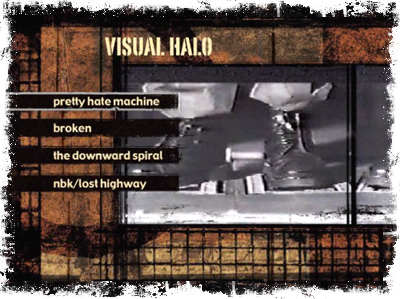
As long as I did manage to come up with working recordable DVDs, I decided to finally follow through with a project I’d had in mind for a while now. Sometime last year I found a repository of videos from Nine Inch Nails, including the uncensored version of “Closer” and the infamous Broken short film. Most of the videos have been available on VHS for a while now, but the DVD version hasn’t been released yet, so I decided to play with iDVD.

I’ve not really poked around with either iDVD or iMovie in the past, as I don’t have any sort of video input other than my iSight. Home movies aren’t exactly something I’m playing with at the moment, in other words. Still, it was really easy to put this project together: opened iDVD, chose an appropriate background theme, tossed in the videos, added background music from iTunes for the different menus, and burn. Nice and easy, and now I’ve got my own DVD of Nine Inch Nails videos — and even when they are officially released on DVD, I’d lay good money down that the collection won’t include the Broken short film, so I’ve got that, too.

Visual Halo main menu

iTunesCloser to God” by Nine Inch Nails from the album Closer to God (1994, 5:05).

DVD-R? DVD+R? Argh!

In theory, according to Apple’s promotional literature, iPhoto is supposed to be able to handle up to 25,000 photographs in its library without a hiccup. I’d love to know what kind of hardware they were testing that on, because I’ve got around 7,000 photographs in my iPhoto library and it quite frequently brings my 2.0Ghz G5 to a standstill, if iPhoto doesn’t crash out entirely.

Annoying.

So, part of last weekend’s running around was picking up a small spindle of recordable DVDs so that I could back up the older photos and pull them out of my iPhoto library. Prairie and I hit Best Buy and found a spindle of fifteen recordable DVDs for about ten dollars.

Yesterday, I grabbed all my photos up through 2003 (only about 2.5Gb out of the 4.7Gb available) and told iPhoto to burn the DVD. It asked for a blank disc, I put one in…and it popped it right back out and asked again for a blank disc. “That’s odd,” I thought, and put the disc back in. This time iPhoto went ahead and started chugging away, and I didn’t think more of it.

Until iPhoto finished burning, and the disc never mounted on the desktop. I started trying to figure out what was going wrong, and then some small part of my brain kicked in. “Wait a second…aren’t there a couple different DVD formats?” Sure enough, I’d picked up a spindle of DVD+R discs, and the Superdrive in my G5 uses DVD-R discs. Crud.

I’m just glad the discs weren’t terribly expensive, and I’ll just chalk it up as a learning experience. Thanks to an Office Depot just a few blocks away from my apartment, I now have a spindle of 25 DVD-R discs (for only \$9.99, too — the sale goes through Jan. 8th, and that’s a pretty good deal, as their spindles of 50 DVD-Rs are priced at \$40), all my photos up through 2003 are successfully burned onto one disc, and most of 2004 (Jan-Nov is all that would fit on one DVD) is merrily burning away in the background as I type this.

Boo to the industry for having two competing and incompatible formats, though, especially so similarly named (one is “DVD ‘plus’ R(ecordable)”, and one is “DVD ‘dash’ R(ecordable)”, I guess, though it could just as easily be read as “DVD ‘minus’ R(ecordable)”, which is even more confusing). If I hadn’t had some vague memory of reading about the different formats at some point in the past, I’d probably just have assumed that there was something wrong with my computer or the Superdrive, and been a lot more frustrated and aggravated than necessary.

iTunesI Sit on Acid ’96” by Lords of Acid from the album Lust (1996, 4:31).