First Confirmed OS X Malware

Word has recently broken about the first confirmed piece of malware for OS X, a file that was originally distributed via a post to Mac Rumors, and has been disassembled by Ambrosia Software‘s Andrew Welch.

Key points: this is not a virus, rather, it’s a trojan horse; it’s buggy (doesn’t perform all the intended actions); and for most people, activating the payload involves entering their password, which should tip most people off that something’s not right.

Here’s Andrew’s summary of the situation:

A file called “latestpics.tgz” was posted on a Mac rumors web site http://www.macrumors.com/, claiming to be pictures of “MacOS X Leopard” (an upcoming version of MacOS X, aka “MacOS X 10.5”). It is actually a Trojan (or arguably, a very non-virulent virus). We’ll call it “Oompa-Loompa” (aka “OSX/Oomp-A“) for reasons that will become obvious.

Unless you work for an anti-virus company, please don’t email/message me asking for a copy of this trojan. It’s not going to happen.

You cannot be infected by this unless you do all of the following:

  1. Are somehow sent (via email, iChat, etc.) or download the “latestpics.tgz” file

  2. Double-click on the file to decompress it

  3. Double-click on the resulting file to “open” it

…and then for most users, you must also enter your Admin password.

You cannot simply “catch” the virus. Even if someone does send you the “latestpics.tgz” file, you cannot be infected unless you unarchive the file, and then open it.

A few important points:

  • This should probably be classified as a Trojan, not a virus, because it doesn’t self-propagate externally (though it could arguably be called a very non-virulent virus)

  • It does not exploit any security holes; rather it uses “social engineering” to get the user to launch it on their system

  • It requires the admin password if you’re not running as an admin user

  • It doesn’t actually do anything other than attempt to propagate itself via iChat

  • It has a bug in the code that prevents it from working as intended, which has the side-effect of preventing infected applications from launching

  • It’s not particularly sophisticated

To be on the safe side…

DO NOT DOWNLOAD OR RUN THIS FILE

When unarchived (it is a gzip-compressed tar file), which can be done by simply double-clicking on the file, it appears to be a JPEG file because someone pasted the image of a JPEG file onto the file.

After it’s been unzipped, tar will tell you there are two files in the archive:

._latestpics
latestpics

…the ._latestpics is just the resource fork of the file, which contains the pasted in custom icon meant to fool people into double-clicking on it to (in theory) open the JPEG file for viewing. In actuality, double-clicking on it will launch an executable file.

The file “latestpics” is actually a PowerPC-compiled executable program, with routines such as:

_infect:
_infectApps:
_installHooks:
_copySelf:

The rest of Andrew’s post goes on to detail the exact methods used by the attack.

Again: this is not going to be a concern for most people. Not only is this a relatively low-impact attack, but it’s been identified quickly. Admittedly, it’s a shame that neither Slashdot nor The Register are mentioning this fact, preferring to use the Chicken Little approach to news reporting (at least The Register correctly identifies it as a trojan).

However, even given that this is a fairly low risk trojan, it is the first confirmed OS X trojan. Too many people have fallen into the trap of believing that OS X is immune to viruses or trojans. It’s not — there just haven’t been any until now, and due to the architecture of OS X, any attack is limited in the amount of damage it can do. But as OSX/Oomp-A (or Lamp-A, as Sophos named it) shows, we’re certainly not immune.

iTunes “Been Up Long (Falsedawn)” by Prodigy, The from the album Always Outsiders Never Outdone (2004, 4:28).
iTunes Essentials: Goth

The iTunes Music Store‘s Essentials series has weighed in on the ‘essentials’ of goth.

It’s an interesting collection of tracks. Not a bad selection, either — I’m mostly just impressed that they have this many non-pop artists available now.

(If the above link to the Goth Essentials doesn’t work, try this one. Pity that while I can come up with iTMS Affiliate links for the iTMS and the Essentials program as a whole, I’m finding out if there is a way for me to link to the Goth Essentials set through the iTMS Affiliate program. Meh. Not that complaining about their affiliate program is a new thing for me.)

Bruce the Wonder Yak

Someone discovered a fun easter egg in Apple’s Final Cut Pro 5:

Open up “Final Cut Pro.rsrc” (/Applications/Final Cut Pro HD/Contents/Resources/Final Cut Pro.rsrc) in any text editor and you will stumble upon this hidden message:

If we can’t ship this puppy by then, we might as well be herding yaks. I’m glad it’s getting weird again. I didn’t understand it when it wasn’t weird. The C switch statement: Mmmmmm! Chock full of nooses! That would be like crossing the streams or something. Mmmm… Chicago style pizza! I’ve got my blankie, I’m good to go. A lot of this job is mental. “Mostly clockwise, sometimes reverses…” What’s the sound of one luma clamping? I just wanna be in the app! Oh, rough and woeful music which we have! Cause it to sound! The Yak is a delightful creature… rather like a visit with a bovine Confucious…

There’s a lot more there, I’ve snipped it for the sake of brevity. I think it’s a hilarious little random screed — and my guess is that they just took every little “in-joke” from the FCP programming team and tossed them all semi-randomly into a single text file. That’s what it reads like to me, at least — with the recurring Yak theme and the general random silliness of what’s in there, reading it reminded me a lot of some of my old brainstorming sessions with friends.

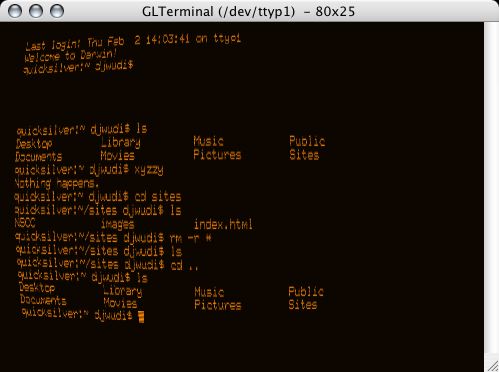
GLTerminal

Best. Terminal. Evar.: GLTerminal.

GLterminal

Complete with green or amber text, spots of variable brightness, screen curvature warping, and even baud selection (set it to 300 baud and watch the characters pop up on your screen)!

Incredibly old-school geeky. I love it.

iPhoto 6.0: Flickr Photocasts

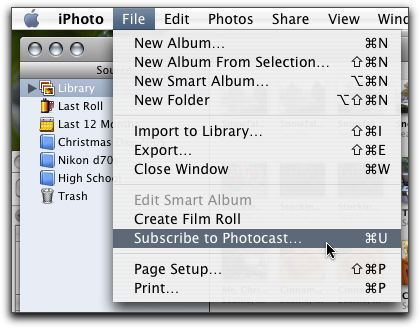
One of the questions I had while watching the Macworld ’06 keynote popped up when Steve was demoing the new ‘Photocasting‘ ability in iPhoto 6. He clicked on the Photocast RSS feed, iPhoto popped right up, and the photos appeared in the album.

“What would happen,” I wondered, “if you tried to subscribe to a Flickr RSS feed as if it were a Photocast?”

Copying my Flickr Atom feed

Subscribe to Photocast...

Entering the Flickr Atom address

iPhoto's Flickr Photocast

Admittedly, it’s not quite the same as an official (iPhoto-created) Photocast would be, as Photocasts can (optionally) include the full-resolution photos. As the Flickr feeds only include the small size photo, the resulting album is populated only with small (~240×180) photos, certainly not any resolution suitable for printing. Also, my understanding is that a Photocast would include however many photos were in the album selected for ‘casting; the Flickr feed only includes the last 10 photos.

Still, it does work; the only real differences are simply differences in how the RSS feeds are created (number of items and resolution of the included images).

Perhaps Flickr could include an option to enable Photocasting — if not for entire feeds, then perhaps for individual sets — and allow a choice of what size photo to embed into the Photocast feed, and/or how many photos to include (last X, entire sets, etc.). Then, clicking on a set’s ‘Photocast’ link or icon would allow iPhoto/Flickr users very nearly the same Photocast functionality as iPhoto/.mac users do.

It’s at least worth tossing the idea out there, I’d say.

Update: Found in this spirited discussion of the Photocast feeds on Brent Simmons’ weblog is an announcement from John Evans that he’s created a Flickr to Apple Photocast (Phlickr) feed converter.

It will take a feed from flickr and rework it a little so that it uses the large images and contains the comment of the photo as well. It is an Atom 1.0 feed that seems to validate on the feeds I have tested, it also includes most of the extra apple stuff debated here. If I can work out the date format I will add that too, and myabe the tags can be retrived and added so they appear as keywords.

To use just paste any feed from flickr into the box and hit the button, the feed should just open up in iPhoto, if not it will just be a regular atom feed with all the relevent enclosures so it will work in NetNewsWire or whatever your reader is.

I just tried it, and it worked fine for me.

iLife ’06: First Impressions

My iLife ’06 package showed up today. I can’t stay up incredibly late to play, so this is just going to be a cursory overview to begin with, but it’s a start.

  • iLife '06First things first: the package has gotten much smaller. Where iLife ’05 used a more traditional box size, the box for iLife ’06 is barely bigger (width by height) than a CD. Still about an inch or so deep.

  • iLife '06Apple’s customary flair for design on even the smallest little things shows through again. As you open the box, there are small accordion folds on the flap, and rather than being just dropped inside, the software and materials are nestled inside a small cardboard tray that slides out.

  • What you get in the box:

    • The iLife ’06 install DVD.
    • A ‘quick start’ installation guide.
    • The ubiquitous software coupons (has anyone, anywhere, at any time ever used these for anything?).
    • A ‘Welcome’ pamphlet advertising iLife add-ons (iWork, .mac, GarageBand Jam Packs).
    • A trial version of iWork ’06.

One installation was done, I poked around briefly with iPhoto and iWeb.

As noted by John Gruber, iPhoto has gained “iTunes’ theme-without-a-name”. Looks pretty slick, actually. And, while I haven’t done any stress-testing yet, it’s definitely feeling snappier than the prior version (apparently I’m not the only one seeing this, either). I like the full-screen editing mode, too — for simple edits, that’ll actually cover me without heading into Photoshop. Nicely done.

iWeb is definitely looking to be worth poking around with. It’s not restricted to .mac (yay!), though without .mac you don’t have the one-click-publishing option — rather, you ‘publish’ to a local folder, and then you can either serve directly from there (if your Mac is a webserver), or you can upload the generated files to a remote server. The markup isn’t terribly pretty, but that’s not a big surprise. Feel free to check out the one sample page I’ve made so far to see what you think (though that is just a single page, and I haven’t delved into multi-page sites, blog publishing, or much of anything else). On the bright side, there was only one error preventing the page from validating…on the down side, that’s in part because the generated page is all images and link maps. Hmmm. Definitely reserving judgement on this one until I get a chance to play more.

That’s all I can do for tonight, though — it’s after midnight, and I’ve got class at 10am tomorrow morning. I’ll play more as soon as I can grab a few hours…

iTunes “Club 69 Future Mix Vol. 1 (full mix)” by Various Artists from the album Club 69 Future Mix Vol. 1 (full mix) (1998, 1:14:02).

iTunes MiniStore

Along with the Mac OS X 10.4.4 update that was released today, Software Update notified me of two other updates to install: QuickTime 7.0.4 and iTunes 6.0.2 (which doesn’t seem to have a support document listing the updates made to the program).

Apparently, one of the changes made to iTunes was more advertising! Yay! I was just lamenting the fact that I didn’t see enough ads while deciding which song to play next, and here Apple’s gone and taken care of that for me.

iTunes MiniStore

Thankfully, there’s a new little button added to the group at the lower-right that allows you to toggle the MiniStore on and off, so I can kill this little monstrosity. Still doesn’t make its inclusion any less obnoxious, though.

iTunes “Jerry Springer” by Yankovic, “Weird Al” from the album Running With Scissors (1999, 2:46).

Apple Intel Ad Music: Moby

The music in Apple’s clever Intel processor ad sounded really familiar, and after running it around in my head for a bit, I figured it out.

It’s Moby‘s ‘God Moving Over the Face of the Waters‘, which I have on the soundtrack to Heat (which, incidentally, is one of my favorite soundtrack albums, and a really good movie to boot).

Just in case anyone else is curious.

iTunes “God Moving Over the Face of the Waters” by Moby from the album Heat (1995, 6:58).

…was blind, but now I see

Back again, new and improved — after swapping out my old, dead video card with a brand-spankin’ new Radeon 9800 Pro Mac Special Edition video card, my Mac is back up and running. A wee bit noisier than it was before, thanks to the fan on the video card (a simple heat sink isn’t enough for this one, apparently), but the main thing is that it’s up and running.

Of course, because life isn’t easy, even this simple seeming endeavor was not without its fair share of challenges.

The first — and the most nerve wracking — was the task of getting from Northgate to the U District through the combined messes of rush hour and holiday traffic. It had taken Prairie half an hour to get from home to the mall to pick me up after work (a drive that normally takes between three and five minutes) and had decided that that was all she could handle (quite understandably so), so I took over the driving from there. We managed to get to the Mac Store and back home in about an hour, so it wasn’t entirely bad…but it wasn’t entirely fun, either.

Next was getting the card itself. This should have been a simple task, but I inadvertently slightly complicated matters when I misstated the specifications of the card and said that I thought it had 512 Mb of onboard RAM. There were a few moments when I was afraid that we were about to be sucked into a debate between salespeople as to whether any Mac video card came with 512 Mb of RAM, but managed to point out that it really didn’t matter as long as they had a card and I could give them money to walk out with it. Crisis narrowly averted.

Lastly, once home, came the process of actually installing the card. Now, I’ve done such things before on other machines, so I was expecting a rather simple task: pop the case open, pull out the old card, put in the new card, close the case, and go on from there. The first two steps went fine, but then I made a mistake no self-respecting geek should ever admit to.

I read the manual.

I know, I know: who actually reads the manual? Still, at the time, it seemed a good idea. The problem I soon ran into was that according to the manual, the card required a power connection from the computer, something that could be accomplished with the use of a ‘Y’ power connector included with the card. This made sense, as it’s a newer, more powerful video card, except for one thing: there was no power connector in the package. Hmmmmm.

Double- and triple-checking the package commenced, with no power cord mysteriously appearing out of thin air. Rereading the manual multiple times didn’t help either, as the words failed to spontaneously rearrange into a friendly message saying, “oh, nevermind, we just wanted to see if you actually bothered to read the manual, go on ahead without the power cord.”

Pity, that. I’d have been amused at that — annoyed, yes, but amused, too.

I did notice, however, that the manual made repeated references to the card as a “Radeon 9800 Pro Mac Edition”…and my box said that I had a “Radeon 9800 Pro Mac Special Edition”. Hmmmm. Could the ‘special’ part of “special edition” mean that it simply drew power through the connection socket, and didn’t actually need the apparently mythical power cord? It was starting to look that way, especially as the card didn’t appear to even have a plug to attach a power cord to. However, I wanted to be sure.

As there were still fifteen minutes left before the Mac Store closed, I gave them a call, and explained my situation to the person on the other end. A bit befuddled at first, he started checking things out, first via the web, then going into the back to look for a box that he could crack open. He wasn’t able to find a box, but he did find some more information on the web. “What color is the circuit board?” he asked.

“Blue.”

“Ah. Yes — the blue card doesn’t have a power connector.”

I paused for a moment, then laughed. “Well, yes, this much I know,” I said. “I just wanted to make sure that that’s how things are supposed to be!” After a few moments, we came to the conclusion that as the pictures he’d found of the cards showed a red board with a power connector, and a blue board without a power connector, then I was probably fine, and they’d simply put a generic instruction manual in the box.

Sure, this was the same conclusion I’d been coming to on my own — but at least this way, I had confirmation from a second source.

So there we were. I put the card in, closed the case, reconnected everything, hit the power button…

…heard the computer start up…

…saw the lights on the keyboard flash…

…heard the scanner initialize…

…and then, finally, saw the power light on the monitor switch from the blinking amber of its ‘sleep’ state to the bright steady green indicating that it was getting a signal.

Success! Huzza, hooray, calloo, callay! And all was right with the world.

And so now, the old (dead) video card is no more, and the new (working) video card is quite happily (and nosily) humming to itself…and I’m the new owner of more video processing power than I’ll ever need.

I have an 8-pixel pipeline, which doesn’t sound very big at all, but is trumpeted on the box as something important, so I’ll assume that it’s a good thing. There’s 128-bit full floating point precision — an important thing, because sinking points would just pile up all the pixels at the bottom of my screen. I have SMARTSHADER™ for cinematic-quality lighting effects (which, I’m sure, will do wonders with the web pages I visit daily). I have VERSAVISION™ to rotate my display to a portrait orientation (of course, as my monitor doesn’t rotate to a portrait orientation, this will give me quite the crick in my neck — but I can do it!).

And lastly, according to the ATI Displays software, I have the option to “Enable Alternate DVI TMDS Receiver Mode”, which “Enables coherent TMDS Receiver support (Ti receiver).” I don’t even know if that’s English, or any language that might have some relation to English…but it’s an option.

I just might have to find some game to play just to justify having this card at some point, or the card’s likely to get bored with text windows and webpages, tell me to shove off, go on strike, and I’d have to do this whole thing over again.