Applescript: iPhoto or Aperture?

I’m experimenting with the Aperture free trial right now for photoshoots with my D70s, but I still wanted to use iPhoto for my Casio point and shoot. Apple allows you to set either iPhoto or Aperture to automatically launch when the Finder mounts a memory card, but by choosing either one, I’d have to quit and manually launch the other application depending on which camera I was importing shots from.

However, Aperture also gives you the ability to set any application to launch when a memory card is inserted. I set up this simple little Applescript (saved as a launchable app) to be the app launched on memory card insertion:

tell application "Finder"
    if exists disk "CASIO-DSC" then
        launch application "iPhoto"
    else if exists disk "NIKON D70S" then
        launch application "Aperture"
    end if
end tell

Now, whenever a memory card is inserted, the Applescript launches, checks the volume name of the memory card (which is set by the camera when you format the card), launches the appropriate photo application, and then quits.

Pretty simple for a lot of experienced Applescripters, I’m sure, but I’m pretty happy that I got it figured out.

Dig  al T  evis on

A few weeks ago, Prairie and I got our TV Converter Box Coupons from the government, so that we could happily continue to pump propaganda into our brains watch our favorite shows after the analog stations are turned off in February. I wandered down to the seventh circle of Hell Best Buy and picked up two of the converter boxes (the Insignia NS-DXA1). Rather than hooking both up right off the bat (tempting as that was, since I was a geek with new toys), I just hooked up the larger living room TV. This made sense, as it’s the one that has all the other fancy gadgets on it and requires me being home to successfully juggle five remotes — Prairie just sticks to the little one in our bedroom that only uses two remotes.

After a few weeks of using it…well, much as I like the idea of digital TV, the reality — at least as far as over-the-air broadcast goes — is definitely a bit of a mixed bag.

The box itself is fairly nice: simple to set up and use, with only a few minor caveats. For some reason, in addition to the blue ‘on’ light that’s quite standard for electronics, this also has a bright red ‘off’ light that looks oddly like there’s a Cylon staring at you when you’re not watching TV (incidentally, this is another reason we’ve not hooked one up in the bedroom yet). The on-screen guide doesn’t always seem to be accurate, though that may be the fault of the local broadcasters. Aside from that, I’m quite happy with it — the image quality is nice, and a noticeable step up from analog broadcasts, and the audio, while limited to standard 2-channel stereo (one of the requirements of the coupon-eligible boxes), seems good enough to my ears. The box also allows you to choose how it sends the video to your TV screen: letterboxed to preserve the widescreen aspect ratio; cropped to fill the square screen at the expense of information on the sides; or ‘squeezed’, where the widescreen image fills the square screen, making everyone look really really skinny. This is actually my preferred method when a show is broadcast widescreen, as my TV (a Sony Wega KV-27FS17) has an ‘anamorphic’ mode that ‘squishes’ the ‘squeezed’ signal into a 16:9 area, increasing the resolution and quality of the displayed image (geeky tech-speak for “it looks better this way”).

However, our one big issue is simply this: when analog TV signals dropped or had some form of interference, you got a little bit of snow or static, but you could still watch the show. When digital TV signals drop or hit interference…well, if you’re lucky, you’ll just get some ‘blocking’ in the image, like when a video DVD has a fingerprint. More often, though, the signal drops so far that first the audio, then the video cuts out entirely. This ends up being far more frustrating than the old analog issues, as it’s a total disruption of the signal. As interference seems to depend a lot on weather, Prairie and I have taken to watching TV on the little 13″ TV in the bedroom that still gets analog signals on rainy nights rather than even trying to watch the big TV with the digital receiver. A crystal-clear signal is only good when you get that signal, after all!

I keep finding myself wishing they’d tweaked the digital transmission standard so that the video was the first thing to go with a bad signal, rather than the audio. If the video cut out but the audio was still going, you could still follow along pretty well while the video did its little dance of cubist surrealism, but when the audio craps out, it’s just frustrating (especially when watching, say, a show like Jeopardy).

I’ve heard that a good antenna could alleviate the problems, but when we’re living in a rental apartment, there’s not much we can do on that score. Good old-fashioned rabbit ears will have to do.

So, in the end, it’s a mixed bag. It’s great when it works, but when it doesn’t work, it’s a lot more frustrating than the “old-n-busted” system ever was.

Another Valentine’s Day Present

Valentine’s Day morning, as I was puttering about the house and getting ready for the day while Prairie slept in, there was a knock at the door. When I answered, I was handed a package from Amazon by one of our landlords. This was a little confusing, as I didn’t remember ordering anything, but it was definitely addressed to me. Okay, whatever…

The Cult of MacWhen I opened it, I was quite pleasantly surprised to find The Cult of Mac, which I’d put on my Amazon Wishlist not too long ago. On the shipping invoice was a nice little note from ‘Liz in Pittsburgh,’ who reads this site and decided to send me a Valentine’s Day present — cool!

So, many thanks to Liz! I got about halfway through yesterday as I was bussing around town, and have been enjoying all the stories of the Mac über-fans (and, unsurprisingly, seeing elements of myself in more than a few of the stories). I hope your Valentine’s Day was a good one as well!

Netscape Has Left the Building

Netscape Navigator, one of the first ‘popular’ web browsers, is dead.

Navigator will continue to function should you happen to have a recent copy stashed away. But American Online, which has been Netscape’s guardian during its long, downward slide in popularity, will no longer support the browser and will stop releasing updates. Support for all versions of the software will be off-loaded to the Netscape community forum. Netscape.com will continue to live on as a web portal.

A sad, if unsurprising and inevitable end. One of my earliest web pages bills itself right at the top as being ‘Netscape 2.0 enhanced.’ Times gone by….

Condescended

I’m hoping that now that we’re just about a year away from the transition to all-digital TV broadcasting and the government’s TV Converter Program is up and running, we’ll finally start to get some information and reviews on the various TV converter boxes that are (or will be) available.

I just applied for my two coupons towards the boxes, and then started searching on some of the listed eligible converter boxes to see what they’re like. Unfortunately, much of what I found was brief little snippets from über-geek and audiophile sites with comments like this

…one of the “digital switchover” converter boxes your stubborn granny can buy early next year with her $40 coupon from the government, in lieu of getting a new goddamn TV.

Okay, sure, that’s from Gizmodo. Still — not every geek out there works for Microsoft and has a gazillion expendable dollars…or sees the need to toss out a perfectly good (and, actually, very nice) TV set that works fine, aside from not having the ATSC tuner.

Overspecialization?

With all the different specialized blogging, pseudo-blogging, or linking websites and services available these days, I’m starting to lose track of how I’m ‘supposed’ to do this one-to-many online communication thing.

It used to be easy. Back in the ‘old days,’ you’d hand-edit a simple HTML file with whatever you wanted to put on it, whenever you wanted to put something on it. Maybe it’d be a link, maybe it’d be a screed. Maybe people would see it, maybe they wouldn’t. Pretty simple.

Then blogging arrived to make everything simpler. Gone were the days of hand-editing HTML and managing pages directly, now you had specialized software that handled the details for you. Databases to store the information, automatically dynamically generated pages, comments, the whole shebang. Still, content-wise, it was still a grab-bag. Some posts would be long, detailed, and in-depth; other posts would be a single small link or quip; sometimes you’d get lists of links that caught someone’s eye.

Now, however, you’ve got a veritable plethora of specialized sites to handle all the different types of information you might want to share. The ones that I either use (in some fashion) or have pinged my radar strongly enough to trigger this little round of rambling, in rough order of depth:

  1. Twitter: 140-character messages originally meant to be IM-style ‘status updates,’ but now often used for ‘nanoblogging’ — short, pithy messages. No more, no less. Since brevity is the soul of wit, we will all tweet brief.

  2. del.icio.us: Social bookmarking that has evolved far more towards the social side than the bookmarking side. While I’m sure there are plenty of people that actually use their del.icio.us account as a substitute for the ‘bookmarks’ menu in their web browser, I see far more who use it as a ‘microblog’ (often displayed as a sidebar to their main weblog) wherein each post is a single link with short commentary.

  3. Tumblr: “The easiest way to share yourself,” according to their splash page. I’ve not bothered setting up a ‘tumblelog’ for myself, but this appears to fill in the ‘miniblogging’ niche, with an emphasis on simple link and media inclusion. Apparently, “this format is frequently used to share the author’s creations, discoveries, or experiences without providing a commentary.” Honestly, I’m still a little confused by the niche that this one fills (or attempts to fill).

  4. Weblogs (the usual suspects): Finally, the sites and software packages that used to be simple ‘blogging’ tools are now…what? Is this still ‘blogging’? Or is it now ‘macroblogging’?

I’m starting to feel like I’m losing track of what kind of post is ‘supposed’ to go to which service, and I’m more and more wondering if it’s even worth continuing to keep them all separate. However, there are occasional advantages to the specializations of the services (del.icio.us’s tagging and quick bookmarklets, the dedicated clients that are available for many of the services) that keep me using them instead of just using ‘old-school’ weblog posts for everything.

If I had the time (which student life prevents) and design skills (which simply don’t exist), I’d love to put some effort into seeing if I could assemble an über skin for my site that would streamline everything into one stream-of-consciousness approach (along the lines of what I see on Daring Fireball and kottke.org) but still allow me to use those services that I find useful. It doesn’t seem horrendously complex: plugins (some of which are probably available in some form or another) that would automatically convert each post at one service or another into its own post on my weblog, default posting options for each type of post (perhaps tweets don’t need comments enabled, for instance), and possibly some CSS work that would distinguish the types of posts.

But then, would that still be too complex? There’s always the question of what happens when one service or another is having connection issues (which I keep running into with Twitter — apparently there’s some avian flu going around over there). Perhaps I’d still be better off just coming back around to using my weblog for everything. Consolidate everything in one place — after all, there’s absolutely no real reason why I “have” to ramble on for a certain length for the post to be worthy of going on the blog, rather than being posted as a tumble, del.icio.us link, or tweet.

There’s a few things I’d miss, though, which may keep me from doing this. The in-built social networking of places like Twitter are nice, though not necessarily a dealbreaker. Being able to have my tweets and del.icio.us links show up on my Facebook profile is nice. Sometimes I like the compartmentalization (on the weblog, for instance, ‘big’ posts in the center, tweets and links over in the sidebar), sometimes I feel like it’s unnecessarily over complicating things.

Meh. I’ve gone on to just rambling now. Maybe that 140 character limit isn’t so much of a bad thing, huh?

NaBloPoMo

A couple years ago, I made a rather weak stab at participating in NaNoWriMo (National Novel Writing Month), in which participants attempt to write a 50,000 word novel during the month of November. Unsurprisingly, given how I constantly seem to have multiple projects going on at any one time, I didn’t get very far. I’d still like to try again at some point, but I think that’ll have to wait ’til I’m out of school.

NaBloPoMoThis year, I think it’s worth trying for something a little more possible: NaBloPoMo, or National Blog Posting Month. Inspired by NaNoWriMo, it presents a much more feasible goal for most people. Given that my posting lately has been rather sparse (assuming that my del.icio.us links and my Twitters don’t count), I think it’s worth a shot. Here’s my profile, since this drops me into yet another social networking site….

Of course, I’ve already missed a day, since I didn’t find out about NaBloPoMo until today (indirectly through cygnoir, more directly through Thom), but better late than never, right?

Facebook: MySpace Without the Pain

While I often, and not entirely tongue-in-cheek, spout off that “friends don’t let friends use MySpace,” it’s no secret that I have my own MySpace page and do occasionally (though not often) check in. Mostly, this is because I’ve got a few friends and acquaintances who seem to have been sucked into that particular hell and I have no other reliable way of keeping up with them, but be that as it may, I’m no stranger.

Some time ago, Facebook opened their doors to the general public, and while I signed up for an account a few months ago, I just really started playing around with the site over the past few days. I have to admit, while I’m not a huge Social Networking junkie (and don’t plan on becoming one), Facebook is pretty slick — the same basic idea as MySpace or any other social networking site, but done in a way that doesn’t leave me feeling like I’ve just spent a few hours being beaten with an ugly stick…or, given the number of times MySpace throws errors at me, an ugly stick carved by blind, palsied, one-armed, three-fingered hyperactive toddlers.

Yes, that analogy completely fell apart, but I think you get my point.

As a quick comparison, here’s a look at the primary pages of the sites that users who are logged in to the system see. Keep in mind, these aren’t the splash pages for the general public — these are for people who’ve already set up an account and are signed in.
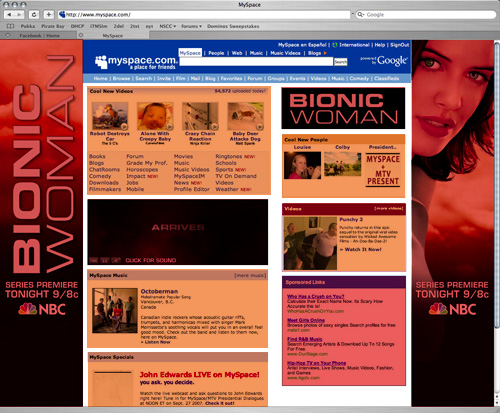
MySpace Front Page

I’ve color-coded the screen shot: red highlighted sections are ads for something not directly MySpace related, orange highlighted sections are for items that are (at least arguably) part of the MySpace network. Essentially, the entirety of the first page is advertising — it’s not until you click the tiny ‘home’ link in the menubar (one of three in the header) that you get to your personal page.
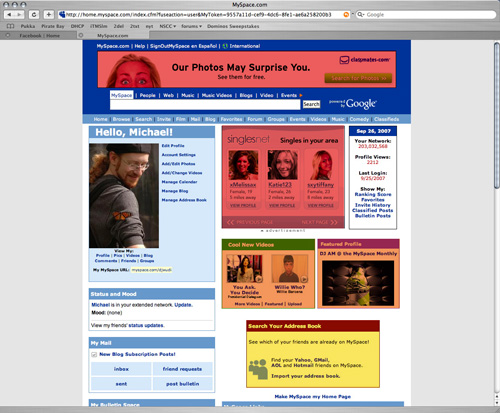
MySpace Page Two

Once again, red is for external ads, orange for internal ads, and I’ve used yellow for the “please sucker your friends into joining” box. Around half of the page (or slightly over half, given all the whitespace) devoted to advertising in one form or another.

And this is all just the site default pages — this doesn’t even begin to go into the atrocities that people’s personal profile pages become after they’ve played with every little piece of ‘bling’ that can be added, the horrendous embedded music that far too many people put into their profiles, or the ubiquitous “sorry, we can’t code properly” error messages that pop up as you try to navigate around the site.

In comparison, here’s how Facebook greets their users:
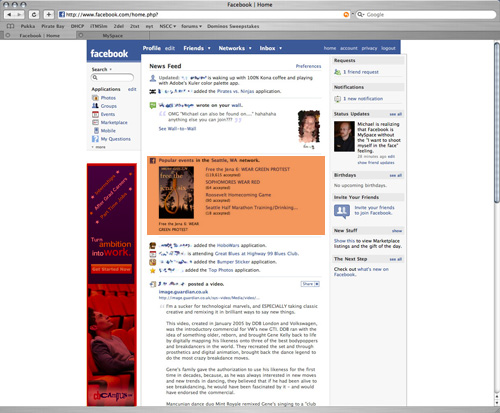
Facebook Main Page

Sure, there’s advertising — one banner ad on the right for an external service, and one section of the main News Feed showing what events Facebook is tracking that are popular in Seattle. I almost chose a different color for the orange block, as where MySpace’s ads are completely generic, Facebook is at least tying their “look what else we do” advertising to my location. The rest of the page is given to actually showing me information: any waiting friend requests or messages in the sidebar (along with their own “invite your friends” box — the same idea as MySpace’s, but far less intrusive), and the larger central section showing me my friends updates.

Not only is the website itself far better designed, making it drastically easier to navigate (and to put up with), but the extensibility of the Facebook ‘applications’ (small, externally hosted plugins) has allowed me to aggregate nearly all of my various online presences onto my profile page. My weblog posts are automatically copied into Facebook’s ‘notes’, and my LibraryThing ‘reading’ tag, Upcoming events, Flickr photos and Last.fm music tracking are all embedded in the page. All in all, it’s more or less ‘one stop shopping’ for my ‘net presence.

Sure, it’s not perfect — though at the moment, the only annoyances I’ve run into have been with some of the third-party application plugins, rather than with Facebook itself — but as far as social networking goes, this is the first I’ve seen that I’m actually fairly impressed by.

Seattle Outtakes Pipe

Update: PI staffer Mike Thompson let me know that they’ve just enabled RSS feeds for each individual category within the Big Blog. Each category page (like this one for Seattle Outtakes, for instance) now has an RSS link right at the top of the page. Thanks, Mike!

For some time now, I’ve been following the Seattle Outtakes blog from the PI, where PI photographers would post and discuss images that didn’t make the final cut into the paper for one reason or another (and some photos that were published), along with how they got the shot, techniques, and so on. Really good stuff for a photo bug.

Sadly, Outtakes has now been absorbed into The Big Blog, the PI’s latest addition to their ever-growing linup of weblogs. I’m not sure quite why they made this decision, but I found it rather annoying. As I posted in a comment on their announcement post:

One more vote for keeping Outtakes separate — I watch this one precisely because of my interest in photography, and have really enjoyed the insights into what the PI photographers do. The Big Blog feels too unfocused in tone and too similar to too many other local ‘catchall’ blogs, and it not something I’m likely to check in with regularly…which ends up meaning no Outtakes for me. Pity.

While you can manually check the Outtakes category on The Big Blog, there’s no category-specific RSS feed provided, and there’s just way too much traffic that I’m not terribly interested in for me to bother subscribing to the RSS feed (and even if I did feel like subscribing, it appears to be an excerpts-only feed instead of a full-text feed — one more reason for me not to subscribe).

So…Yahoo Pipes to the (theoretical) rescue. I’ve not actually played with Yahoo Pipes before, but given that it allows you to perform various operations on web data, it seemed like it might be a good potential tool for attempting to regain my Outtakes fix. In theory, if I’ve done this correctly, this pipe should be a Seattle Outtakes RSS feed.

However: I don’t actually know if it’s working correctly yet, and I’m not sure how soon I will…and there’s some potential down-the-road issues with the pipe. Geeky details under the cut…

Read more