Almost Time for Norwescon!

Once again, it’s about time for my annual mini-vacation at Norwescon. This is my second year as part of the ConCom (_Con_vention _Com_mittee — those of us who are crazy enough to volunteer to assist with planning and running the con), and I’ve really been enjoying it.

While for the first year, I had one official position as photographer and one unofficial position as “the guy who knows about Twitter,” this year I’ve had two official positions. I’m no longer simply “Photographer,” but “Lead Photographer,” complete with a staff of two minions assistant photographers (so I don’t have to make another attempt at shooting an entire four-day convention on my own); I’m also the “Information Network Manager”…which is kind of a fancy way of saying “the guy who knows about Twitter” again, but also encompasses handling Facebook updates and occasional website posts.

While the photographer position will be a lot of fun at the con, it’s so focused on the four days of the con itself that most of the lead-up time has been wearing my “Information Network Manager” hat. I’ve really been having fun being the primary Social Media guy for the convention for the past year, and I’m hoping that I get to keep this position for the next year (or two, or three, or…etc.).

(A quick note: While the next few paragraphs concentrate primarily on Twitter, the same basic ideology works for Facebook as well, and I have our Twitter and Facebook accounts connected so that posts to one appear on the other.)

I’ve found myself quite interested over the past couple years with the growing utilization of social media by companies and organizations as a way to create more personalized interactions with their customers and fans. I’ve had some good personal experiences with this kind of thing, when I’ve tossed out random comments on Twitter that have then been noticed and responded to by the companies in question, and I’ve really come to value the perceived personal touch that results. When companies take the time to actually interact with their followers, instead of seeing Twitter solely as another one-way broadcast medium, it makes a huge difference in how the company is perceived by the customer. It only takes a few moments, and suddenly the “little guy” doesn’t feel so little anymore — rather, there’s a real person somewhere behind the corporate logo that’s actually making a connection.

I’ve done my best over the past year or so to ensure that Norwescon’s social media presence is an interactive one. I watch Twitter and the web at large closely for any mention of Norwescon, using saved Twitter and Google keyword searches, and whenever appropriate, I try to answer any questions or concerns that I find. If I can’t provide an answer myself, I pass the question or comment on to the appropriate department. I’ll reply to people on Twitter, even if they’re just mentioning Norwescon in passing (as long as it’s appropriate to do so, of course) — not only does this let them know that they can contact the con directly, but it also helps to let more people know that Norwescon has a Twitter account. Over the past month, I’ve been watching for artists, authors, and pros announcing their schedules on Twitter and retweeting those announcements.

Basically, I’ve been running the Norwescon Twitter account like I prefer other official Twitter accounts to be run — and hopefully, I’ve been doing a decent job of it. Anecdotal evidence seems to say that I am, but it’s always hard to be sure when looking out from the inside.

I’ve also been enjoying prepping the photography side of things. Having a couple minions is going to be incredibly helpful this year (and thank you very much to Philip and Graves for volunteering to be part of the photography department!). Having three roving cameras will allow for better coverage of the convention while also allowing each of us to get some much-needed downtime and off-duty time where we can just do our own thing for a while. I think I’ve pretty much prepped most of what needs to be prepped, with only a few outlying pieces that need some last-minute followup before next weekend.

One personal triumph was creating public photography guidelines. This is one area that has often been a mild frustration for me, as an aspiring amateur photographer — when going to an event, what’s allowed? Are there any restrictions on my camera equipment, or various particular events? I didn’t want that to be an issue, and while perhaps I could have gotten this posted earlier, at least I got it up, and it will serve as a good template for years to come as well.

So that’s been a lot of my non-school-related work over the past few months. I’ve been enjoying it, so far the feedback I’ve been getting has been very complimentary, and I’m really looking forward to running around with my “nerd friends” (as Prairie likes to call them) next weekend. I should be arriving at the hotel by noon-ish on Thursday, am rooming with a couple friends again, and will be there until early afternoon on Sunday, when I’ll be leaving early enough to make sure I’m back home to Prairie in time for Easter dinner. Should be a good weekend, and hopefully I’ll see a few of you there!
Why Doesn’t Washington State Care About Higher Education?

From Why Not Just Privatize Higher Education? | Slog:

Some of the biggest losers in yesterday’s state House budget proposal are our state’s public colleges and universities… or I guess, more accurately, their current and future students.

The House would slash another $482 million from higher education spending, $100 million more than the governor’s already brutal proposal, amounting to a more than 50 percent cut over two biennia. Even after tuition hikes of between 11.5 and 13 percent, our two-year and four-year institutions would still have to cut as much as 5.4 percent from their budgets. Students will be paying more and getting less.

As a percentage of our state economy, higher education spending had already dropped 63.7 percent from a high of $15.53 per $1,000 of personal income in 1974 to $5.48 per $1,000 in 2010. And falling. Dollars speak louder than words, and clearly, as a state, we obviously no longer believe that providing affordable access to a quality college education is all that important anymore.

Although, to be fair, as sad and scary as this is (especially as someone who’s partner is employed by a state university — and, for that matter, I am too, at least for this quarter), thanks to the stupid voters (and the even stupider eligible voters who decline to do so) who refuse to pay an extra penny or two on candy bars and soda because of the big scary three-letter-word “TAX” (and that’s just one example of the stupid, greedy, short-sighted results of recent state votes), the state just doesn’t have as much money as it should. The way things have been going, I’m still not convinced that education would be getting funded as it should even if the state was flush with cash…but I do realize that the current budget crunch isn’t helping matters any.

When will people wake up and realize that education is important, public services are important, and we have to pay for them? The money to run these things doesn’t just magically appear. I don’t particularly care if you whine about paying taxes, really — sure, we all would like to have a little more money in our pockets than we do. But when your distaste becomes outright refusal (through ill-conceived ballot initiatives) to pay into the services that support and benefit everyone in this state, in both the short- and long-term, then I have no use for you — especially when you then turn around and bitch and moan that this country isn’t as great as it could be, should be, or used to be. Your greed is a large part of the reason for that.

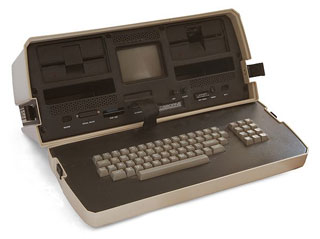
My first computer: The Osborne 1

This Sunday marks the 30th anniversary of the introduction of one of the first “portable” computers, which also happens to be the first home computer that my family had. This was the machine that first got me into much of the geekery I’ve been into for years.

From Osborne!:

The Osborne 1 had a Z-80 processor (like Radio Shack’s TRS-80 and many other early systems) and a generous-for-the-time 64KB of RAM. It had two single-density floppy-disk drives, each of which stored a relatively skimpy 102KB of data, plus a handy pocket for extra disks. And it ran Digital Research’s CP/M, the popular operating system that was very much like Microsoft’s later MS-DOS.

Even by 1981 standards, the Osborne 1′s 5″ monochrome CRT was puny; today, there are smartphones with displays as big. It could display only 52 columns of text at a time–less than the eighty you really wanted for word processing, but more than the Apple II’s forty. The screen size was chosen in part because 5″ displays were readily available, having been engineered for a 55-pound behemoth that IBM had optimistically marketed in 1975 as the IBM 5100 Portable Computer….

Osborne 1 (Image via Wikipedia)The sewing machine-sized Osborne 1 weighed 24 pounds (slightly more than ten modern-day 11″ MacBook Airs) and sported a handle; it created a class of PC that would forever be known as “luggables.” It was famously touted as fitting under an airplane seat, but you couldn’t actually use it on an airplane–not only because you would have busted your tray table, but also because it had no battery. Just getting it from place to place involved effort. Felsenstein has written that “carrying two of them from my car four blocks to the [West Coast Computer Faire] had nearly pulled my arms out of their sockets.”


The fact that the Osborne 1 was a fully-functioning personal computer in a portable case captured the imagination of techies in 1981. But it was only the second most innovative thing about the system. The most impressive part of the deal was that the computer gave you absolutely you needed to be productive for one remarkably low price: $1795 (about $4370 in current dollars).

I spent hours entranced by the machine. I learned to type (with the help of my mom’s vintage typing class book from when she was in school), I figured out the intricacies of the WordStar word processor (which gave me a leg up in learning HTML a decade and a half later, as the printer control codes used to create bold and italicized text in the not-even-close-to-WYSIWYG interface of WordStar mapped very closely to HTML tags), and I used BASIC to translate entire Choose Your Own Adventure books into simple text-based command line video games.

Not only did our family have one of these, but we eventually ended up with three. A few other families that we were friends with had had Osbornes, and as newer, smaller, more powerful computers from competitors like IBM and Compaq came on the market, they upgraded and gave us their old Osbornes as hand-me-downs. Not only did this let us upgrade ours with some goodies that we hadn’t added — like the state-of-the-art 1200 baud modem — but I was able to keep one working for quite a few years by cannibalizing pieces from the other two.

Eventually, of course, the machines either died out or simply got shoved away into storage as the family upgraded. I saved up and got myself my own computer — a Mac Classic, with 1MB RAM and no hard drive, just a single 1.4MB floppy disk drive — in 1991, and though I’ve occasionally pieced together a Frankenstein PC, Macs have always been where I feel most comfortable. Interestingly, the same article excerpted above points out that the Osborne itself may have influenced why the simplicity and “it just works” attitude of the Mac has always appealed to me.

Price was only part of the appeal of the Osborne 1′s all-in-one approach, Thom Hogan, an InfoWorld editor who became Osborne Computer’s director of software, says that the company’s greatest achievement was:

Something that Steve Jobs eventually learned from us, actually: simplicity of customer decision. At the time the Osborne 1 was launched, your choices at that level of capability were basically CP/M based systems from a number of vendors or an Apple II. In both cases, those other choices required you to make a LOT of decisions as a customer. For an Apple II: memory, drives, monitor, sometimes boards to add those things, plus software. A typical customer had to make five or six, sometimes more, decisions just to get the boxes necessary to build a useful system, and then they had to put it all together themselves…So Osborne not only saved the person money, but time and agony on the decision-making. Note how iPads are sold: two decisions: memory and communications. And they work out of the box, nothing needing to be assembled by the user.

The Osborne 1 was the first personal computer product that really did that (even the Radio Shack TRS-80 forced you into a number of decisions). Basically, plop down US$1795, take the box home, unpack it, plug it in, and start using your computer. One of the things that was integral to that was a stupid little <1K program I wrote. Previous to the Osborne, the user had to CONFIGURE CP/M. Even once configured, you’d boot from CP/M, then have to put in your word processing disc and execute from that. When you got an Osborne, you put the WP disk into the computer and you ended up in WordStar. In other words, we booted through the OS to the task the user wanted to do. Again, simplification of both process and pieces. As a result of that the Osborne was a no-brainer in terms of selling it against any other computer that was available in 1981: any sales person could demonstrate “put in the disc, turn it on, start writing” compared to “assemble the computer, configure the software, start the software program, start writing.”

(via /.)

Ellensburg Update

Well, we’re here! We’re finally officially out of Kent and living in Ellensburg, in a cute little one-bedroom apartment just a block off of the CWU campus.

Though the official ceremony won’t be until June, I am now officially a CWU graduate, having earned my Bachelor’s degree from the Law and Justice program. Not only that, but I graduated with honors, Magna Cum Laude! I’m not sure what my final cumulative GPA was (the one that’s used to calculate honors status, after combining the CWU GPA with the NSCC GPA from when I was earning my AA degree), but my final CWU GPA was a very respectable 3.925.

After winter quarter finished, Prairie came over the mountains to Kent, and we spent the next week and a half packing up everything in our Kent apartment. We donated a ton of stuff to various local organizations (over a trunkload of food to Northwest Harvest, two trips totaling roughly a carload and a half of stuff to St. Vincent de Paul, and our old pay-as-you-go cellphones to the Domestic Abuse Women’s Network), almost completely filled a 10’x20′ storage unit with the majority of our belongings, and took us and one final carload of stuff back over to Ellensburg. A day or so of unpacking and organizing, and we’re nicely settled in.

The first week in Ellensburg has been pretty good to me, as it turns out. Over the past two quarters, I’ve been working with CWU-Des Moines Law and Justice department head Professor Reimund on putting together some outreach material, one Des Moines-centric, and one covering the entire CWU Law and Justice department to be distributed to alumni. As we’ve been working on this, we’d started playing with ideas on how to improve the LAJ department’s online outreach. Well, it looks like I’ll be able to continue working on those ideas, as thanks to a recommendation from Professor Reimund, I’ve been hired by CWU to work with the LAJ department on revamping their website. It’s a temporary part-time position through this spring quarter, but not only is it better than being unemployed, with luck this may lead to other opportunities in the future.

So, the next few months are going to be a mix of some fun part-time work drawing on my geek tendencies and generally relaxing and exploring eastern Washington, with a jaunt over to Norwescon come Easter weekend. I think it’s going to be a good spring and summer.

Flare

A fun new piece of photo editing/post-processing software was just released yesterday evening. One of the features that’s become very popular in many of the iPhone photo apps like Camera+ or Instamatic is the easy ability to apply post-processing filters and special effects. Often designed to mimic the analog effects of toy plastic cameras, old film, faded prints, and other imperfections, these filters have become a popular way to add an artistic touch to digital photos.

However, such effects haven’t been that easy to mimic in desktop apps — not impossible, but not one-click simple, and that’s where Flare comes in.

Satyr Dance

Flare makes adding these kinds of retro effects to any photo incredibly simple: just drag a photo into the window, choose a filter to apply, and export the finished photo to email, a new file, or Flickr. Flare comes with 24 filter presets, and has a small selection (which will apparently be expanded over time) of extra presets that can be downloaded and added to the lineup.

i love you (again)

Not content with that, though, each preset is completely editable. The presets are created by mixing together and adjusting combinations of color, texture, border, and effect, and each preset can be adjusted to tweak the final output, or new combinations can be built from scratch. Once the final look is chosen, the settings can be saved as new presets for use on other photos later on. Presets can even be exported from Flare and shared with others (here’s a sample of that effect).

Swimming

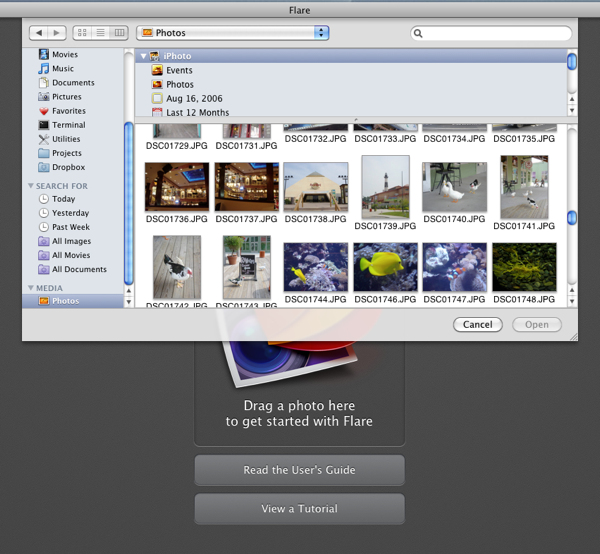
This is a 1.0 release, and while I’ve been enjoying playing with Flare and haven’t run across any bugs, there are some things that I’d love to see in future releases. At the top of my list is image importing: At the moment, the only way to bring an image in to Flare is either a standard “open file” dialog or by drag-and-drop. While this is great for initial simplicity, I tend not to have image files lying around in directories. Rather, they’re all stored in iPhoto or Aperture libraries. While dragging from another program is easy enough, that requires me to have both applications open and taking up screen space. Integrating the standard Mac OS iPhoto/Aperture image browser would make selecting photos to work with much easier.

Update: Thanks to @talosman for pointing out that Mac OS X already has image library support built directly into the “open file” dialog. Just select “Media” from the left hand sidebar, and your iPhoto and Aperture libraries pop right up. Slick! Funny how features like this can easily go overlooked, I’d never stumbled across that before.

I’d also love it if Flare could be more tightly integrated into Aperture. Right now, Flare doesn’t work as an external editor for Aperture (when saving a file after making adjustments, Flare writes to a new file rather than to the file that Aperture created, so the changes don’t get pushed back to Aperture) — and even if it did, I prefer having Aperture tied to the more full-featured Photoshop as an external editor. As Flare is essentially a one-trick pony (admittedly, a very well-trained pony), I’d love to see it available as an Aperture plugin. Happily, there are hints that this is something that may be coming in the future.

Flying High

All in all, I’m really impressed with Flare, and had a lot of fun playing with it and exploring different filters and combinations of effects. Flare is $20, and is on sale for half off ($10) for its first week (until March 18th) if bought through the Mac App Store. It’s definitely worth checking out.

New Design

During my between-homework breaks today, I snagged bits of time here and there to see if I could slap together a new design for my site. Initially I was just hoping to find a decent temporary placeholder theme until I had time to really dive into a full redesign, but as it turned out, I think I’m happy enough with this to simply declare it my new look (until I get bored again).

I’ve wanted to simplify things and remove some of the clutter for a while, so I went looking for a nice, clean, single-column theme. After experimenting with two or three, I’ve settled on Satorii, by Felipe Lavin, slightly modified to fit my taste (adding the graphic in the background, switching to a serif font, and using my handwriting font for the site and post titles). I may do other tweaks here and there — I’m not thrilled with the footer at the moment — but that will come as I have time and inspiration strikes.

For the most part, though, this is what I’m going with from here forward. Nice, simple, clean, and easy to read.

Back (Sorta)

While I don’t really think that very many people noticed, something went all pear-shaped over the weekend and this blog disappeared for a few days. Thanks to some assistance from Dreamhost support, I’m back up and running…mostly. Some of the plugins I used broke, and I’ve lost the customizing of the theme (including all the egolicious representations of me), so I’ll have (yet another) PROJECT to keep me busy once the quarter ends.

So, some minor frustrations. However, the content is here, and that’s the most important part. I was thinking that it was about time for a redesign anyway.

Twitter’s Weird Email Search: Not Findable, Except That They Are

While killing time the other day, I ran into a weird little “feature” on Twitter that, I have to admit, I don’t entirely understand.

Twitter's FInd FriendsAs part of their new interface, there’s a tab at the top titled “Who to Follow”, when then has a tab called “Find Friends” that allows you to hook into your Gmail (or Yahoo, MSN/Hotmail, AOL, or LinkedIn) address book to discover people that you might not know are already on Twitter. So far, so good.
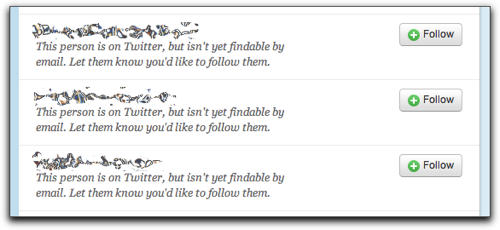
So, I pop my email address in, authorize with Gmail, and let Twitter think for a moment. After a moment of thinking, I get a long list of Twitter accounts that are associated with the email addresses in my address book (most of which I was already following). Once again, so far so good — this is all what I would expect to have happen.

But as I scrolled down, things got a little more odd. I started getting hits for a bunch of people with the cryptic message, “This person is on Twitter, but isn’t yet findable by email. Let them know you’d like to follow them.” When I clicked the “Follow” button on a few of those entries, Twitter kindly let me know that it had sent a message to let them know I was interested in following them.

Not Findable?

This morning, I got a note from one of the people behind those accounts letting me know that that account was unused. They were kind enough to forward the message that Twitter sends, however:

On Jan 28, 2011 11:13 PM, “Twitter” discover-wrejneera=tznvy.pbz-5591e@postmaster.twitter.com wrote:

Michael Hanscom (@djwudi) would like to follow your tweets (@—–) on Twitter.

Michael Hanscom knows your email address: @—–@—–.com. But Twitter can’t suggest you to users like Michael Hanscom because your account (@—–) isn’t configured to let users find you if they know your email address.

So here’s what I don’t understand. These accounts are set to hide their email address, and to not be searchable by email address. This is even mentioned twice, once in the listing after Twitter read through my address book, and again in the email sent out after I hit the “Follow” button. However, that’s exactly how I found the accounts: by their email address.

Sure, Twitter isn’t showing me the account name, so I can’t follow directly. Instead, I have to send a request, and the account owner then has to approve (or disapprove) the request. It does, however, let me know that there is a Twitter account associated with that email address…which seems to run counter to the intent of the account owners who have set their accounts to not be findable by email address.

Is this a bug? A feature? A privacy concern? Or is there something that I’m just not grokking, and this actually makes perfect sense and is how things should work?

Anybody want to toss their two cents in the ring (yes, mixed metaphor, I know)?