Managing Inbox Overload with Google Buzz

My Google account just got set up with Google Buzz, the new social networking addition to Google’s stable. One of the first things I noticed was that this could be a recipe for inbox overload, as every new reply to something I’ve posted or replied to ends up as a new message in my inbox.

Inbox Overload

Simple solution: set up a filter. Here’s the settings I used…

  1. Click the “Create a filter” option just to the right of the search box and related buttons towards the top of the screen.

    Create a Filter

  2. Enter “Buzz” in the “Subject” field of the filter options box, then run a test search. Unfortunately, this will catch any message that uses the word “buzz” in the subject line, and from my testing, neither adding a colon (“Buzz:”) or surrounding the word with quotation marks makes a difference. I can’t currently find a way to force the filter to grab only messages that begin with the word “Buzz” so caveat emptor. If your test search looks acceptable, click “Next Step”.

    As has been pointed out to me by a few people, and posted here: Enter “label:buzz” in the “Has the words:” field of the options box. Google will pop up a warning, but go ahead and ignore it.

    Filter Options Screen One

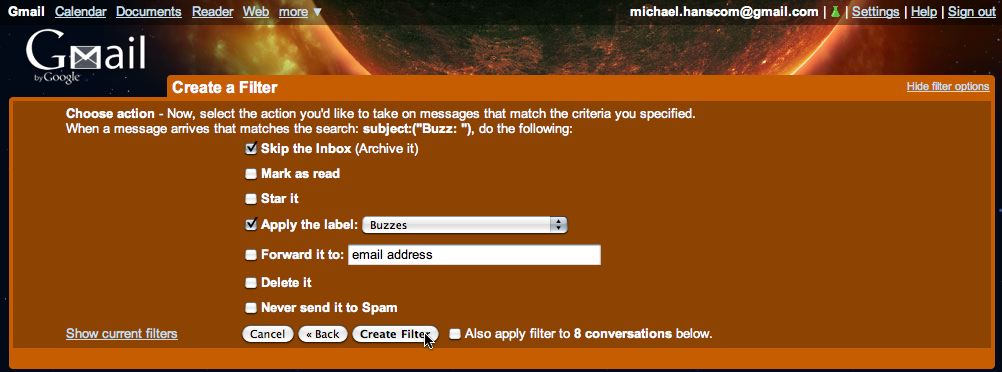
  3. In the next screen, activate “Skip the Inbox (Archive it)” and “Apply the label:”, then create a new label titled “Buzzes” (or whatever you want, but you can’t use “Buzz”). If you want, click the checkbox to apply the filter retroactively to the messages caught by the filter’s test run. Then click “Create Filter”.

    Filter Options Screen Two

  4. You’re done!

From now on, rather than getting flooded with inbox messages every time a new Buzz response pops up, you’ll have a little ‘Buzzes’ filter sitting to the left of your screen. If it’s bold, you’ve got a response waiting for you. And that’s it!

Thoughts on the iPad

I’ll admit it (not that it’ll be much of a surprise, as some have pointed out, I do occasionally bear some resemblance to this fine gentleman), I’ve got some serious Apple lust going on right now.

No, I’m not going to be lining up to be one of the first to get an iPad, for two primary reasons: one, experience has taught me that sometimes, it’s best to wait for the second generation of a new Apple device; two, I have a perfectly functional laptop (even if it is heavy, clunky, and Windows based). However, once that laptop goes away, I’ll likely be snapping up whatever the current generation of the iPad is at that point.

These concerns, originally posted on Facebook, about the iPad’s physical feature set…

bah…it’s not that impressive. With no ports, USB, HDMI, or a kick-stand; it’s just a gigantic iPod touch with an AT&T option.

I’ll wait for the next version. 1/2 the thickness, 1/3 more of everything, delivered by unicorns and doubles as a USB3 hub with a port every 2 mm around the shell.

…prompted the following response (though I’ll admit I would love to have my tech goodies delivered by unicorns).


See, for me, it looks to be about the perfect on-the-go machine.

For my main machine, I’ve always preferred a desktop. Laptops make acceptable secondary machines, but for me, they’ve always been overkill: too big, too heavy, too bulky and awkward, especially as their main purpose (for me) is simply to supplement my “real” computer. I’ve never needed a laptop that would do everything.

Up ’til now, netbooks have looked promising, but are only (officially) Windows-based (and I’m at a point where I’m less interested in jumping through the hoops to make a Hackintosh); Apple’s MacBook Air looked promising, but is too expensive; for carrying around and having access to information, my iPod Touch is nearly perfect, but is still more of an information viewer than something I can do things with. If I want to quickly check in with the world, look something up, or glance over notes for school, the iPod’s great, if I want to do much of anything more intensive than that, I have to lug around a big, clunky laptop.

The iPad looks to sit right in the sweet spot. A very focused device, doesn’t have a lot of unnecessary crap bulking it up, small and light enough that I’d be comfortable carrying it around in my bag, and with the combination of compatibility with existing iPhone apps and the new iPad versions of the iWork suite (I use the desktop version of iWork for all my work at home), I’d be able to take notes, work on schoolwork, and do everything I’d want to do while out and about.

Ports and a kickstand? The kickstand would likely be aesthetically questionable (especially from Jobs’ viewpoint), and take away a certain amount of space o the case that currently is being used for, oh, the guts of the thing. Obviously, as they’re introducing two docks and a case designed to support the iPad at introduction, they’re aware of the want and need to be able to prop it up, but (unsurprisingly for Apple), weren’t willing to sacrifice on the pretty. Besides, a flip-out/snap-in kickstand would be a potential point of physical failure.

Ports: really, how often do you use the ports on a mobile machine? And which ones? I’d bet the majority of laptops only ever use the USB port and/or the video-out port when connecting to projectors, both of which are accounted for in some way on the iPad. The rest just serve as receptors for things you could do, and might do, but don’t do, and hey, there’s a way for dirt, dust, grit, and liquid to get into your computer.

USB: I honestly don’t know what I’d want a dedicated USB port for. USB key for transferring documents? The iPad syncs with your computer and syncs its document folder that way, or use Dropbox and stop worrying about carrying around USB keys at all (my personal choice, Dropbox is incredibly handy). Keyboard input? Either use Apple’s keyboard stand, which also supports the iPad in a monitor-style configuration, or use any Bluetooth wireless keyboard with the iPad. Camera connection? I’m not going to be using the iPad for photo work, but for those who are, yeah, you’re going to have to spring for Apple’s dock connector-to-USB dongle, sorry…but adding a standard USB port would have made the iPad thicker than it is.

Video out/HDMI: It’s already been confirmed that the iPad will support 720p videos from iTunes, and that there will be video out (for projectors) through the dock connector. I’d assume that eventually, there will be an iPad-to-HDMI option. Once again, building in an HDMI port would have made the iPad thicker than it is.

If I didn’t already have a perfectly-functional-even-if-I-don’t-like-it-all-that-much Windows based laptop, I’d be preordering an iPad the first day they’re in the Apple Store. As it is, I’ll likely be grabbing whatever the current version is the day our laptop dies.

Microsoft Excel .xls and .xlsx weirdness

I’ve been attempting to troubleshoot some issues with sending Excel files back and forth between my Mac at home and a professor who uses a Mac at home and a Windows PC at school. Even though we’re both using current versions of Excel, and though the files opened fine on her Mac, she was having consistent problems on the Windows machine.

After a few days of back-and-forth and trying to narrow things down, here’s what I’ve come up with.

For some reason, though Excel:mac2008 (hey, that’s how the ‘About’ screen writes the product name, don’t blame me) uses the new XML-based file structure, when saving files, it uses the old standard .xls file extension. Oddly, at least on my machine, it is behaving like this even though Preferences… > Compatibility > Transition > Save files in this format: is set to “Excel Workbook (.xlsx)”.

(And as an aside, why must there be an open workbook to access Excel’s preferences dialog box?)

Current versions of Excel on the Windows side of the fence, however, use (and expect) the .xlsx extension. Same file types, but different extensions, and this causes confusion. When Excel (Windows) sees the .xls extension, it expects a different type of data than it does when opening a document with the .xlsx extension, and it chokes when attempting to open the file.

The solution? Manually change the extension to .xlsx before e-mailing the file.

Sigh.

Facebook ‘Dislike’ Button Suspicion

I just got an invite to a Facebook group titled “DISLIKE BUTTON is here – ADD it now!”. After looking this group over, I have very strong suspicious about it, and my first impulse is to recommend that everyone ignore it.

First: Facebook still isn’t adding a ‘dislike’ button. This is a third-party software hack, and has nothing to do with Facebook. Admittedly, the group does admit this on their info tab — but placed so far down the page that most people will never see it. This is shady.

Second: The instructions on how to add the dislike button have very little to do with adding a dislike button, and everything to do with getting as many people as possible to look at the group. Out of five ‘installation’ steps, only one — the last one — has anything to do with installing the button. The other four are just about spamming the group out to everyone on your friends list. This is shady.

Third: The dislike button itself is a Firefox browser add-on, and will not work for anyone using Internet Explorer, Safari, or any other browser. This is not mentioned anywhere on the dislike button group page. This is shady. Also, because they stress that you have to invite all your friends to the group before adding the button, many people will not realize that the button will not work for them until after they’ve already spammed all their friends. This is doubly shady.

Now, I don’t know what the dislike button Firefox add-on actually does or does not do once it’s installed on someone’s computer. However, given that they’re being sneaky about the entire process, and seem more concerned with getting their software on as many computers as possible, this doesn’t look good to me.

If you get an invite to the dislike button group, I strongly suggest ignoring it. if you use Firefox and have already installed the Firefox addon, I strongly suggest removing it. I don’t know that it’s bad, but from what I can see, I strongly doubt that it’s good.

Windows 7 + Digital River = Headaches

Yet another item in the “why I’m a Mac user” file, and the “we’re never buying another Windows-based PC” file.*

Back on September 18th, I bookmarked an article detailing a special program Microsoft had set up for college students, offering the Windows 7 upgrade for $29 dollars. While I’m definitely a Mac user, we do have Hermie, our PC laptop, and this seemed like a reasonable deal. I went to the website, put in my college e-mail address, and got the process started, placing an order for the digital download and paying the extra $13 for a physical installation DVD to be set via snailmail.

Unfortunately, it didn’t take long before things started to go all pear-shaped. The following is the text of a support request I sent to Digital River, the company handling the digital sales and distribution for the program, through their website:

Selected Reasons: Order question – I received an error message.

Shopper Email: [me]@cwu.edu

Shopper Comments: Store error?

I just had what appears to be a catastrophic error when attempting to place my order for the $29 Windows 7 special student price. On my first attempt, I made it through to the final ‘checkout’ button, when the store stalled for a minute or two, then came back with an error message (unfortunately, I didn’t save the message, so I can’t relate exactly what it was).

When I reloaded the store and again attempted to place my order, I am now being told that I am not eligible for this upgrade, even though the initial check of my e-mail address indicated that I was, and allowed me to place the order (until the error message appeared).

At this point, I’m not sure if my order has been placed or not. I’ve not yet received any sort of e-mail confirmation, which seems to indicate that my order does not exist, but the ‘ineligible’ error message might mean that the system thinks I have placed an order, and is preventing me from placing a second order.

Additionally, I’ve been receiving the following error from the webserver while attempting to submit this error report:

Access Denied

You don’t have permission to access "http://drh.img.digitalriver.com/DRHM/servlet/ControllerServlet" on this server.

Reference #18.64d32d0.1253551495.12f2e3d

This forced me to find this customer service page on the main Digital River website, rather than being able to use the customer service page on the Windows 7 US Online Store.

Any assistance, including confirmation of whether or not my order has

actually been placed, would be greatly appreciated.

Three days later, on September 22nd, I got the following response:

Thank you for contacting the Windows 7 Offer online store.

We show that the payment for order number XXXXX has been received and is awaiting clearance through the bank. This process may take up to 14 days from the date payment was received. Once the payment has cleared, you will be notified via email. If you purchased a digital product, it will become available for download after the funds have cleared.

Order Number : XXXXX

Sincerely,

Mark V.

Windows 7 Offer online store

Customer Service

webhelp.v4@digitalriver.com

Email ID: 11915177

Time passes…

I never did get any e-mail confirmation of my order, and the payment took a lot longer than 14 days. Yesterday I checked my bank accounts online, and saw that the charge from Digital River had finally gone through on October 27th, more than a month after I had placed the order. Still, at least that was confirmation that they had received and processed my order. I went to the Digital River site, plugged in my order number, and was finally able to download the Windows 7 installation.

So, yesterday morning, I get the upgrade process started. The initial download was a small, 346k installation manager. I open that, and it begins the two-hour process of downloading the full Windows 7 installation package.

Two hours later, it’s ready to go. I run the installer, it chews on things for a while, checks for online updates, chews on things a little longer, and then tells me that I need to complete two steps before proceeding: I must uninstall iTunes, and restart Hermie because of some system updates the installer had changed. Okay, fine. iTunes goes away, and I restart Hermie.

Once Hermie restarts…um, well, now what? The installation process didn’t automatically restart. There’s no standalone installer that I can see, either on my desktop or in my Downloads folder. Odd. Maybe it’s all handled through that initial little download manager? I open that up, and a few minutes later, I’m watching the download counter slowly crawl through another two hour download process, as apparently whatever it downloaded the first time disappeared during the restart process. At this point, I have to head off to school, so I just let a few choice words fly and wander off, letting the machine do its thing.

That night, I come home from school. The download is finished, so I start the installation process again. This time the installer seems happy, and proceeds chug away, after warning me that the process will take “a few hours.” A few hours indeed — two hours later, it’s still installing, and I go to bed.

Which brings us up to this morning. When I check Hermie, it looks like the install has gone swimmingly, and Windows is happily sitting and waiting, asking me to type my Windows product key. “You can find your Windows product key on a label included with the package that came with your copy of Windows. The label might also be on your computer case.”

Hm. Well, since this was a digital download, I don’t have a package. Maybe, as this was a digital download, they just need the old Vista product key? I dig out Hermie’s box, find the Vista product key, type it in…no go. Okay, so apparently, I’m actually supposed to have a Windows 7 product key somewhere. Not really surprising, but I’m more than a little curious as to where it might be.

Back to Digital River’s site. I poke around the customer service pages and find out that the product key was supposed to be e-mailed to me. Hey, I’ll bet that that was part of the e-mail that I never got because the website crashed! Oh, goodie.

So, the following two e-mail messages go off to Digital River, this time directly to “Mark” at the e-mail address that replied to my first message:

Hi Mark —

On or about September 20th or 21st, I submitted a support request through Digital River’s main site regarding my issues ordering the special $29 student price edition of the Windows 7 upgrade. You replied to me on the 22nd, letting me know that despite my problems with the website, my order had been received and was merely awaiting clearance through my bank. I’ve included the discussion thread with my original request and your response below.

The good news is that the order did finally go through — I saw the entry on my bank statement yesterday, and was able to log in and download the Windows 7 installer. I let the installer run overnight, and everything seemed to be going well. Unfortunately, the bad news is that (I assume) because of the issues with the website when I originally placed my order, I never received an e-mail confirmation or receipt for my order. And, of course, it is this e-mail confirmation that contains the Windows 7 Product Key necessary to complete the install and activate Windows. At the moment, I have a computer that has a legally purchased and installed copy of Windows 7, but is of no more use than a doorstop because of the lack of a product key.

I’ve tried every avenue I can think of to find the key on the Digital River website. While I can log in and view my Order Details page, which verifies my order number, date, status, and billing and shipping addresses, that page does not display my product key. It does offer a helpful-looking button titled “View Invoice”, however, clicking on that, rather than showing me my invoice, instead sends me to the main Registration page on the site that asks for my educational institution e-mail address to verify that I’m eligible for the program.

I’ve paid for the software, the money has been deducted from my account, I’ve installed the software, and my computer is now useless due to some bug in the Digital River system. Please have someone find my invoice or receipt and send me my product key so I can use the software I’ve purchased…and my computer.


An addendum to the attached message that I sent approximately 40 minutes ago:

I have just checked my physical e-mail box, and though the charge from Digital River was deducted from my bank account on Oct. 27th (incidentally, more than a month after I initially placed the order), I have not yet received the physical DVD that I ordered (which I’m hoping would also have the product activation key as part of the package, though at this point, I’m less than optimistic). Do you have any idea when my installation DVD shipped, the expected shipping time, or (best case scenario) a tracking number?

In addition to sending the e-mail off, I also decided to see if I could call Digital River and actually speak to a customer support representative. Of course, Digital River doesn’t have a customer support phone number anywhere on their site that I can easily find, so I turn to Google…and boy, was that an education. Searching for ‘digital river customer service phone number‘ brings up a whole lot of reasons not to trust ordering anything from Digital River — including this battle from 2001, indicating that in eight years, they still haven’t managed to figure out their process — something that I wish I’d known before starting this whole process.

I do find a phone number for Digital River customer service listed on this customer service contact page from an entirely different company. Calling that number just gets me a recorded message from Digital River telling me that the number is no longer in service…but at least they are kind enough to give me another number to call.

For the record: as of November 6th, 2009, Digital River’s customer service phone number is (952) 253-1234.

So, at 7:57 a.m., I call. I speak to a polite young Indian lady who tells me her name is “Jay,” who checks and verifies my order, and tells me that I should get an email at my CWU email address in “about fifteen to twenty minutes” with my product key. The whole phone call takes all of about five minutes, so some small kudos to Digital River on that score: once you can find someone, they’re relatively polite and efficient. I thank her, and start writing this blog post. It’s now 8:52 a.m., long past the “fifteen to twenty minute” window that I was given, and no email has arrived yet. Yeah, any points Digital River got from their phone etiquette have been quite handily counteracted.

And that’s where the matter stands right now. I’m lucky in that Hermie is a backup machine, not a primary for either myself or Prairie, so it’s not catastrophic that it’s currently out of commission. I’ll keep fighting with Digital River, but if this goes on for more than another day or so with no product key, no physical installation DVD (with product key), and an inoperative computer, then I’ll be using the backup install DVD that came with Hermie to go back to Vista and start arguing for a refund instead.

What a completely crappy experience. Thanks, Digital River, and thanks, Microsoft, for choosing such a stellar business partner.

Update: After waiting for a full hour after the stated 20-minute window, I called back and spoke to another representative. This time, I had him send the email to my Gmail account, and kept him on the phone until it appeared. When it did appear, the email was very helpful in explaining how to download and install the Windows 7 upgrade…but said absolutely nothing about the product key. I explained this to the representative, even narrating exactly what happened when I followed the link in the email he had just sent me, until it finally sank in that yes, I had downloaded Windows 7, and yes, I had installed it, and yes, I still needed the product key!

Finally, he admitted that there seemed to be something going wrong, and read me my product key, character by character. Once again making sure to keep him on the phone, I read the product key back to him as I entered it in…and, finally, success! The box blinked away, and Windows 7 finally finished installing.

So, an eventual acceptable ending. But wow. What an incredible amount of frustration to get there. Any bets on whether that physical installation DVD ever shows up?


* A quick aside to the zealots: yes, I’m perfectly aware that this post details an issue primarily with Digital River, and only slightly with Microsoft. However, as I’ve never had a customer service experience quite this frustrating with Apple or an Apple-related company, and as I wouldn’t be having this experience were it not for attempting to upgrade a Windows-based PC, the Microsoft/non-Apple-PC side of things ends up being the target of my ire. Perhaps it’s not entirely fair, but that’s just how it is.

New iMac On the Way…

I’ve been planning on upgrading my desktop for a while now, and almost ordered an iMac a few months ago. I’m so glad I waited for the next generation of iMacs to be released, though! They were released this morning, and mine is ordered and on its way!

My final configuration:

  • 27″ screen
  • 3.33GHz Intel Core 2 Duo processor
  • 4GB RAM
  • ATI Raedon HD 4850 w/512 MB RAM
  • 1TB Hard drive
  • 8x dual-layer SuperDrive (CD/DVD)
  • Full (wired) keyboard with 10-key pad
  • Magic Mouse
  • iWork ’09 Preinstalled
  • AppleCare

It should be here sometime next week. Exciting!

Use your Twitter stream for Mac OS X’s RSS Visualizer screensaver

Just a quick little tip for OS X users. Nothing fancy, and others may have figured this out already, but a quick Google search didn’t come up with answers, just questions…so here we are.

For the uninitiated, one of the default screensavers in OS X is the RSS Visualizer, which shows a slick ‘floating text’ presentation of the text from any RSS feed against a cloudy blue background.

I wanted to put my Twitter timeline in, so that even when my ‘puter’s not doing anything, and I’m across the room reading on the couch, I can keep an eye out for updates. Seems simple, but on first blush, it didn’t seem to work, as I just got the background, and no tweets.

That’s an easy fix, though. Twitter password protects your RSS feed, so that other people can’t ‘hack’ into your feed and see updates from those of your contacts who have protected their feed from public view — and the screensaver options don’t give a way to enter your Twitter username/password combination.

Twitter does, however, respect RSS-embedded passwords. So, in order to get the screensaver to work correctly, change the RSS feed from the default

http://twitter.com/statuses/friends_timeline.rss

to a customized

https://USERNAME:PASSWORD@twitter.com/statuses/friends_timeline.rss

format, and you’re off and running.

Note that I’ve changed the protocol from http to https to avoid transmiting my Twitter username and password in cleartext. With the standard http protocol, in theory, if someone was really determined, there’s a chance that they could intercept the TCP stream between your computer and Twitter and see your Twitter login credentials. Using https (the ‘s’ stands for ‘secure’), the information between your computer and Twitter is encrypted, so that packet sniffers wouldn’t get anything.

And that’s it! One Twitter-enabled RSS screensaver.

12:34:56 7/8/9

Just a fun little numerical oddity: at the time of this posting (more or less, as WordPress doesn’t let me schedule a post time down to the second), the combined date and time (if you drop the leading zero from the two-digit abbreviation for the year) becomes 123456789.

Or, if you prefer not to worry about those silly leading zeros, wait until five minutes and six seconds after four o’clock, at which time it will be 04:05:06 07/08/09.

That’s all, nothing to see here, move along, go about your business….

Introducing my Photoblog

I think the time has come to formally introduce my latest endeavor to the world: Photography by Michael Hanscom.

My new photoblog.

As anyone who’s been paying any amount of attention to my ramblings for long knows, I occasionally pick up a camera, snap off a few shots, and hope that I’ve got something worth showing off. While I have the usual overdeveloped sense of criticism for my own work, enough people seem to think that I’ve got a worthwhile eye that I’ve finally decided to move forward on a project that’s been rattling around in the back of my head for a while, and I’m going to see if I might actually be able to sell the occasional print.

To that end, the photoblog. I’m opening things up with a small selection of some of my favorite shots from the past few years, though more shots will be added as I take the time to dig back through my archives to find more possibilities. Right now I don’t have much in the way of people, as I want to do a little research to make sure I’m on the right side of any legal considerations (that is, making sure I can sell photos taken at public events or festivals if there are identifiable people but no model releases — I think I’m in the clear, as I’m selling prints as art and not as product, promotional, or stock photography, but it’s good to be clear on things like this), but I’m hoping to get a broader range of photos up as time goes by.

In the meantime, please feel free to stop by the new site, poke around, and — should the spirit move you — pick up a print or two. If you’ve got any constructive criticism, questions, comments or words of wisdom regarding the site, let me know. And of course, as some of you have been watching my Flickr stream, if there are any particular shots you think should be featured, or that you’d like a print of, feel free to let me know…suggestions are always appreciated!

Lastly…wish me luck! I have no idea if this little project will be worthwhile in the long run, or just a fun distraction that won’t go anywhere, but I’m keeping my fingers crossed. We’ll see what happens!

Dreamhost Does Good

Since I’ve occasionally groused about the hosting service I get with Dreamhost, I wanted to be sure to mention when things go right, instead of only when things go wrong.

For a few months, the server that my account was set up on, and which hosts all three domains under my control, was being tweaky, resulting in sporadic downtime. I’d been building up a small library of downtime reports in my support page with Dreamhost, when last month, things took a turn for the worse…and then, soon afterward, for the better. Of course, I didn’t really know about the “for the worse” part until I got the news of the “for the better” side of things.

The last time my site went down, when I submitted the support request notifying Dreamhost of the downtime, they replied relatively quickly, letting me know that the server I was on had become “unresponsive,” and they were working on getting this back up and running. About half an hour later, my sites came back up, and I didn’t think much more of it. Until the next day, when I got the following…

This is just a note to let you know that we’ve moved your account to a new server! We apologize for the lack of notice, but this was an emergency move as a perfomance and stability measure.

Apparently the server I’d been on had gone seriously downhill, and had to be replaced, necessitating moving my account to new hardware (and hopefully all the other occasional downtime I’d had was due to the developing hardware issues, and I won’t get those again). Most of the rest of the message was covering anything I might need to do to ensure that everything worked as it should, and as it turns out, I didn’t really need to do much of anything, as the transition was seamless. Then, at the end of the note…

…again, we really apologize for the abrupt nature of this move! To try and make up for it a bit, we’ve also set your account to now have unlimited disk and bandwidth, forever!

Ooooh. See those last few words? That’s nice to see. “Unlimited disk and bandwidth, forever!” No worries about storing large files (not that I tend to do that), no worries about surcharges on the (very) off chance that I get Slashdotted or Dugg. Just keep paying my yearly bill, and I’m set.

Dreamhost, I’ve had issues with you from time to time, but this? This is good. Thanks!