No kidding

The result of attempting to open a .mix file with Microsoft Digital Image Pro 9:

Sorry

Thank you so much for that insightful and helpful piece of information. No indication of why the file is having problems, or what problems might have been encountered, or anything else. Just the computer equivalent of “Screw you, leave me alone.” Joy.

TypePad discount codes

Today TypePad moved out of “Preview Release” status, making them officially open for business. I still have fifteen fourteen thirteen twelve ZERO (this offer has long since expired) discount codes available that will get anyone who uses one a 20% discount for as long as they stay with the TypePad service — they make what’s already a really good deal just that much better! You’ve only got until November 30th 2003 to take advantage of the codes, though, so don’t dawdle. Feel free to e-mail or leave a comment here if you’d be interested…first come, first serve, of course!

Words, words, words

I’m so set for reading material for the next few weeks — it’s great!

Prairie just got me started reading an old series from Marion Zimmer Bradley, and I just finished the first book — The Inheritor — this morning. Unfortunately, I won’t have anything else in the series until this weekend.

No worries, though. Amazon just delivered Neil Gaiman’s newest work, Endless Nights, his return to the Sandman series.

And, on top of that, I picked up the latest book from Neal Stephenson, Quicksilver, the first book of a planned trilogy called The Baroque Cycle.

So if my posts are a little less frequent than they sometimes are for a bit…at least you know why. ;)

Dec. 16: LOTR Marathon

It’s official: the Lord of the Rings Marathon will be at the Seattle Cinerama on Dec. 16th.

Leading up to the December 17 release of The Lord of The Rings: The Return of the King, the final film Peter Jackson’s epic trilogy, New Line Cinema will bring moviegoers an exclusive, One-time-only in-theater event: The Lord of the Rings Special Extended Edition Screening Engagement.

The schedule for this special theatrical screening series is as follows:

December 5-11
Special Extended Edition The Lord of the Rings: The Fellowship of the Ring
December 12-15
Special Extended Edition The Lord of the Rings: The Two Towers
Tuesday, December 16
One-time-only marathon of both the Extended Edition prints followed by the first screenings of The Lord of the Rings: The Return of the King.

Tickets available October 9th!

Now comes the question — am I crazy enough to do this? I think so…

Search the web?

Search the web button

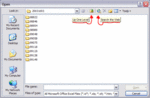
A question for Windows UI gurus — why in the world is there a “Search the web” button right next to the “Up one level” button in open/save dialog boxes in Windows XP?

I never realized that it was there before — or if I’d noticed it, I’d never given it much thought — but a few minutes ago, I was switching directories to open a file, when suddenly Excel switched into the background, my web browser came up, and I was dumped into an MSN search page. Now, I’m no newbie with computers, I’ve been using Macs since System 6, Windows since v3.1, and have experience with CP/M, MS-DOS, UNIX, etc. Even with many years of computer use behind me, for a few moments I was completely baffled — I didn’t have the faintest clue why I wasn’t in the open/save dialog box anymore, and was instead staring at a search box on the web.

Firstly, I’ve yet to come up with a good reason why an open/save dialog even needs a “Search the web” button. Secondly, though, and more importantly, why is that button placed a mere seven pixels away from the navigational “Up one level” button, and smack dab in the middle of a collection of navigational buttons? Any other choice in that menu bar relates to actions you can take on the computer — navigational movement, creating new folders, or switching your list view choice — but then there’s this one button, right in the midst of the rest, that ends up moving you from navigating your file system into a web search.

I can’t come up with a scenario or thought process in which that might be useful, or make any kind of sense — and while I’m no UI expert, if someone with my level of computer experience can be confused that quickly as to what just happened, it’s almost mind boggling how a new computer user must feel when faced with situations like this.

Wacom Photography Contest

Wacom is currently having a “Go Platinum / Go Pro” photo/design contest.

Go Platinum: design a cover for a stock photography CD.

Go Pro: submit a photo for inclusion in a future stock photo CD.

The winner of each contest will get a 40Gb iPod and $1000 as payments for the rights to use their submission.

Pretty cool, I think — I’ve submitted my Post Alley photograph. Worth a shot, at least!

Meme 2: iTunes

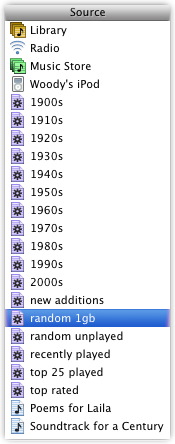
iTunes FoldersAnother meme that Kottke pointed out — iTunes usage methods.

How you organize your music can be as important to someone as what music they listen to. For me, with a personal CD collection currently somewhere around 1,200 discs, organization becomes extremely important. Luckly, iTunes has everything I need in order to keep track of what I have, find things easily, and discover music I hadn’t heard in a while (and at times, didn’t remember that I even had).

One of the godsends of iTunes is the “smart playlists” feature — I use smart playlists almost exclusively (they’re the purple-colored icons in the screenshot). Essentially, a smart playlist allows you to set certain criteria that determine what songs are in the playlist, which is then automatically updated by iTunes. For instance, I keep three smart playlists synced to my iPod at all times: “new additions”, “random unplayed”, and “random 1gb”.

  • Random 1Gb: the single most important playlist, for me. This randomly grabs one gigabyte’s worth of music that 1) I haven’t listened to in the past 2 months, 2) is rated three stars or above, and 3) isn’t in the “Christmas” genre. Whenever I listen to a song, it removes it from the playlist, and grabs another one. This syncs with my iPod, and as the iPod tracks what I listen to each day, the playlist is automatically updated at night when I get home from work, and in the morning just before I leave. The end result — roughly 20 hours of songs that I know I like, but haven’t heard in a few months.

  • Random Unplayed: this playlist grabs one gigabyte’s worth of music that I’ve never listened to. This comes in handy when I’m importing a lot of music (like now, as I re-import all 1200 CDs to AAC rather than .mp3) — as long as there’s something in this playlist, then I know that there’s songs that I haven’t listened to yet (either just to listen, or to check to ensure that the rip was completed successfully).

  • New Additions: this is, quite simply, any songs that have been added to my library within the last two weeks. Great for being able to explore a new album right after buying it.

Other smart playlists that come in handy: “recently played” (anything I’ve listened to in the past two weeks, handy for tracking down something I know I heard recently), “top 25 played” (a pesudo-best-of list), “top rated” (any songs rated four or five stars), and the various by-year playlists (listening by era can be quite interesting sometimes).

The only two “normal” playlists I have at the moment are one for Poems for Laila (from when I was making CDs for Prairie last weekend), and one for Sony’s excellent Soundtrack for a Century collection. Other than those two, it’s all smart playlists for me.

Meme 1: The Dock

My dock

There’s a meme propagating around the OS X corner of the ‘net right now, started by this O’Reilly article, propagated by Jason Kottke, and since picked up by many others, looking at how different people keep their dock arranged. Bottom, left, or right? Hidden or visible? Magnifying or not? And so on.

So, not being one to let a silly pointless meme pass by, I give you my current dock! I’m sure you’re all thrilled. It’s actually fairly boring at the moment, but that’s partly because I don’t use the dock as a launcher at all, instead preferring to use it only to show currently running applications. As I’ve had this machine for all of five days now, and there were a few restarts as I got things installed and configured, my list of running applications hasn’t grown terribly much yet.

I’ve gotten into the habit of keeping my dock on the right hand side of the screen. I’m right handed, so it’s a very natural movement for me to swing over that way to switch from app to app when I’m mousing around (which is actually a little odd, as on my Windows box at work, I keep the taskbar anchored to the left hand side of the screen — one of them is backwards). Keeping it on the bottom never really worked for me, as it takes up screen real estate that I’d rather have useable for windows — I’m far more likely to want as much vertical space as possible for reading pages than horizontal space.

Here’s what I’ve got running right now, top to bottom: The Mac OS X finder, Pathfinder (a finder replacement), Mail (email), iPulse (system monitoring), iTunes (music), iChat AV (.mac/AIM IMing), System Preferences (not usually open, but I’m still tweaking things), GraphicConverter (excellent graphic manipulation program), Safari (web browsing), NetNewsWire (news aggregator), QuickTime Player (had to watch the Return of the King trailer a couple times last night), and iCal (calendar/secheduling).

Exciting, huh? ;)