End of 2012

Well, a fair amount went on in my life this year…not that you’d know from this blog. This is one of those things that I hope to change for 2013. While it isn’t one of those things that I’d call a formal “new year’s resolution”, I do hope to spend a little more time babbling on here than I have over the past year or two.

We’ll see how I do. It’s a good goal, at least…and since I only made four posts in 2012 (this will make five), beating that shouldn’t be terribly difficult.

I have tweaked the design of the site a bit. New year, new look, though still focusing on a nice, clean, simple presentation. Black text, white background, not a lot of flash to get in the way of the content. Just the way I like it.

Trolling Middle Earth

First off, the gorgeous new trailer for the first part of The Hobbit has just been released:

Now, a slight digression. Back when the internet was new (and I’m not entirely exaggerating with that), the Jargon File was created as a living encyclopedia of words, phrases, terms, and events common to the geek communities of the day. In that document are the original definitions for the term “troll” as used in the electronic world.

  1. v.,n. [From the Usenet group alt.folklore.urban] To utter a posting on Usenet designed to attract predictable responses or flames; or, the post itself. Derives from the phrase “trolling for newbies” which in turn comes from mainstream “trolling”, a style of fishing in which one trails bait through a likely spot hoping for a bite. The well-constructed troll is a post that induces lots of newbies and flamers to make themselves look even more clueless than they already do, while subtly conveying to the more savvy and experienced that it is in fact a deliberate troll. If you don’t fall for the joke, you get to be in on it. See also YHBT.

  2. n. An individual who chronically trolls in sense 1; regularly posts specious arguments, flames or personal attacks to a newsgroup, discussion list, or in email for no other purpose than to annoy someone or disrupt a discussion. Trolls are recognizable by the fact that they have no real interest in learning about the topic at hand – they simply want to utter flame bait. Like the ugly creatures they are named after, they exhibit no redeeming characteristics, and as such, they are recognized as a lower form of life on the net, as in, “Oh, ignore him, he’s just a troll.” Compare kook.

Where today, “troll” is almost universally understood as the second of the above quoted definitions — a person solely out to provoke annoyance — I’ve always preferred the first definition. In that sense, a properly constructed troll is something I’ve always respected.

The comments for yesterday evening’s io9 post about the Hobbit trailer contain a beautiful example of trolling in the old sense (“…a post that induces lots of newbies and flamers to make themselves look even more clueless than they already do, while subtly conveying to the more savvy and experienced that it is in fact a deliberate troll. If you don’t fall for the joke, you get to be in on it.”). This comment gave me a good laugh this morning:

Yawwwn, sequelitis strikes again.

Hey Hollywood, how long’d it take you to come up with yet another unnecessary backstory?! Do we really need to go with Frodo’s dad on his quest to find the ring?

I bet they’ll dumb it down and make it all kiddy too. Hard R or I ain’t watchin!

How much you wanna bet they’ll figure out a way to shoehorn half-a-dozen giant spiders to compete with the one they had in LOTR2.

Now that, ladies and gentlemen, is how a troll is supposed to be done.

Markdown is the new Word 5.1

From Markdown is the new Word 5.1:

There’s a way out of this loop of bouncing between cluttered word processors and process-centric writing tools, a way to avoid having cater to Clippy’s every whim while not having to hide your own work from yourself in order to concentrate. People have been saying for years that Word 5.1 needs to be ported to Mac OS X; that having that program running on current hardware would be the ideal solution to all of these problems with writing tools.

The truth is, there’s a solution now that’s most of the way there: Markdown and a good text editor. That’s the new Word 5.1. Think about it: a program like TextMate (I use TextWrangler. –mh) has almost no window chrome, and opens almost instantly. You start typing, and that’s all you have to do. I bring up Gruber because he invented Markdown, which lets you do basic formatting of text without really having to sweat much else. The types of formatting you don’t need aren’t even available to you when writing Markdown in a text editor, so you never have to deal with them.

Markdown will never be unreadable by a program, because it’s just ASCII text. It’s formatted, but if you’re reading the raw text, it’s not obscured the way a raw HTML file is. Any decent editor will give you a word count and can use headings as section and chapter breaks. With MultiMarkdown the options get even crazier: render your text file as a LaTeX document, or straight to PDF, or any number of other things. All from a text file and an editor with a minimal interface.

Almost all of my writing for many, many years now has been in a text editor using Markdown-formatted text. I’m using Markdown formatting for this blog post (which WordPress then automatically translates into HTML), I’ve written many, many discussion board posts for school in Markdown format before pasting them into BlackBoard, and I use Markdown formatting whenever I’m writing email messages.

I’m in that set of people who fondly remember Word 5.1, and miss the days of having a word processor that was actually a word processor, not an overblown attempt to do absolutely everything ever related to desktop publishing all at once (even Apple’s Pages, while far preferable to any post-5.1 version of Word, is far more than just a simple word processor). My senior year of high school, I booted my Mac Classic into Mac OS 6 with one 1.44 MB floppy; another 1.44 MB floppy held Word 5.1 and every paper I wrote that year.

Those days will never come again, admittedly. But a simple text editor and Markdown formatting is all that’s really needed.

A Real First-Class News Experience

From Business Class: Freemium for News?:

I had a perspective changing talk on the subject of pay walls with the chief executive of a big publishing company…. He asked me what I think about pay walls. I told him what I always say: The main currency of news sites is attention and not dollars and that I believe that it is his job, as a publisher, to turn that attention into money to keep the attention machine running. He nodded and made the following, astonishing statement:

I can’t see pay walls working out either. But we need to do something before we lose all of our current subscribers. Sure. It’s a tough business environment, but… But the flight industry is a tough environment too, and they found ways. So tell me: Why do people fly Business Class? In the end, an airplane brings me to the same place regardless of whether I fly Economy or Business Class and the massive price-increase I pay doesn’t compare the difference in value.

People pay for Business Class because they don’t want to be tortured in Economy. They get faster lanes at the terror check. They get an extra glass of champagne. The stewards are more attentive. They get off the plane more quickly. They get the feeling of a higher social status.

He asked whether I knew of a way to apply this logic to online news. What would a Business Class news site look like?

Good stuff here. Since moving to Ellensburg, I’ve been frustrated with my lack of online access to local news. The one local paper is the Ellensburg Daily Record, which only posts a (very) limited number of stories on its website. If you want access to the full paper without subscribing to the dead-tree edition, they offer $5/month access to the full edition. However, from what I can tell, it’s presented in a specialized, locked-down format similar to a fancy .pdf file, through the Active Paper Daily service.

Now, I’m not a die-hard “information wants to be free” crusader, and I really don’t have a problem with paying a reasonable fee for media that I’m interested in. However, I do want to be able to use the information that I pay for, and a specialized browser system like Active Paper, which presents an “exact replica of [the] print edition”, which forces me to “browse through the pages just as if [I] had the newspaper in [my] hands”, is not something I’m willing to pay for. Give me text on a webpage, RSS feeds for my newsreader…information I can use, not something that locks it away.

If the Daily Record (along with many other news sites) were to move to the “Business Class” idea as proposed in the linked article, I’d find a subscription fee for access to a better-presented, ad-free (or ad-light) version of the site entirely reasonable. Let them slap as many ads as they want on the free version of the site, break their stories into as many pages as they want to increase click counts and ad impressions for the free readers, but give me the ability to subscribe to a premium version without all the crap. That’s a model for news sites I’d love to see gain traction.

My First and Only Online Handle

From The Eternal Shame of Your First Online Handle:

Those of us who came of age alongside AOL must contend with something even more incriminating than a lifelong Google profile: A trail of discarded online aliases, each a distillation of how we viewed ourselves and our place in the world at the time of sign-on. The dawn of the Internet was an open invitation to free ourselves from the names our parents gave us and forge self-made identities divorced from our reputations IRL.

(via kottke)

I’m actually kind of lucky in this respect. I’ve only ever used one online handle, and while I’ve deprecated it a bit these days in favor of my real name, I still actively use it as a login name and occasional identifier. Most anyone who’s interacted with me online for any appreciable amount of time will recognize my online alias of djwudi.

A long time ago (though not in a galaxy far, far away), I was over at my friend Royce‘s house when his dad remarked that I “looked like a young Woody Allen.”

For a time, this little nugget of trivia was known only to Royce’s family and my own. At some point during my later high school years, though, a few things (namely, frustration at their being so many other Michaels in my age group, and a teenage-angst fueled desire to be “someone else”) led to my deciding to adopt the nickname of “Woody” full-time. It started with the yearbook and theater crew (both of which I was very involved with), and began to spread from there.

In the post-graduation years, I used “Woody” almost exclusively, in the social world and at my jobs. It wasn’t long before there were more people who knew me by “Woody” than by Michael.

Round about 1992 or so, the Anchorage alternative scene was somewhat in hibernation, especially for those under 21. I talked my way into a DJ spot at one club, then moved on to another, and then another, eventually spending around eight years DJing alternative/goth/industrial/retro/anything-but-pop for the Anchorage scene. My “DJ name” was obvious: DJ Woody, or, depending on how I felt when writing it out on flyers, DJ Wüdi, playing off Royce’s pseudo-Germanic version of my nickname.

The DJing eventually moved on into past tense rather than present, but as the world of the Internet grew, I soon found that short, unique names were both desirable and valuable, and that smooshing everything together into “djwudi” produced a string that, to date and to my knowledge, has not been used by anyone other than myself.

As the years have gone by, I’ve returned to using my given name in the real world and online, but I still claim djwudi on any site I sign up for.

My first computer: The Osborne 1

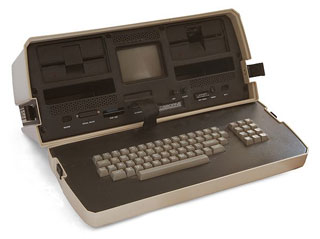
This Sunday marks the 30th anniversary of the introduction of one of the first “portable” computers, which also happens to be the first home computer that my family had. This was the machine that first got me into much of the geekery I’ve been into for years.

From Osborne!:

The Osborne 1 had a Z-80 processor (like Radio Shack’s TRS-80 and many other early systems) and a generous-for-the-time 64KB of RAM. It had two single-density floppy-disk drives, each of which stored a relatively skimpy 102KB of data, plus a handy pocket for extra disks. And it ran Digital Research’s CP/M, the popular operating system that was very much like Microsoft’s later MS-DOS.

Even by 1981 standards, the Osborne 1′s 5″ monochrome CRT was puny; today, there are smartphones with displays as big. It could display only 52 columns of text at a time–less than the eighty you really wanted for word processing, but more than the Apple II’s forty. The screen size was chosen in part because 5″ displays were readily available, having been engineered for a 55-pound behemoth that IBM had optimistically marketed in 1975 as the IBM 5100 Portable Computer….

Osborne 1 (Image via Wikipedia)The sewing machine-sized Osborne 1 weighed 24 pounds (slightly more than ten modern-day 11″ MacBook Airs) and sported a handle; it created a class of PC that would forever be known as “luggables.” It was famously touted as fitting under an airplane seat, but you couldn’t actually use it on an airplane–not only because you would have busted your tray table, but also because it had no battery. Just getting it from place to place involved effort. Felsenstein has written that “carrying two of them from my car four blocks to the [West Coast Computer Faire] had nearly pulled my arms out of their sockets.”

The fact that the Osborne 1 was a fully-functioning personal computer in a portable case captured the imagination of techies in 1981. But it was only the second most innovative thing about the system. The most impressive part of the deal was that the computer gave you absolutely you needed to be productive for one remarkably low price: $1795 (about $4370 in current dollars).

I spent hours entranced by the machine. I learned to type (with the help of my mom’s vintage typing class book from when she was in school), I figured out the intricacies of the WordStar word processor (which gave me a leg up in learning HTML a decade and a half later, as the printer control codes used to create bold and italicized text in the not-even-close-to-WYSIWYG interface of WordStar mapped very closely to HTML tags), and I used BASIC to translate entire Choose Your Own Adventure books into simple text-based command line video games.

Not only did our family have one of these, but we eventually ended up with three. A few other families that we were friends with had had Osbornes, and as newer, smaller, more powerful computers from competitors like IBM and Compaq came on the market, they upgraded and gave us their old Osbornes as hand-me-downs. Not only did this let us upgrade ours with some goodies that we hadn’t added — like the state-of-the-art 1200 baud modem — but I was able to keep one working for quite a few years by cannibalizing pieces from the other two.

Eventually, of course, the machines either died out or simply got shoved away into storage as the family upgraded. I saved up and got myself my own computer — a Mac Classic, with 1MB RAM and no hard drive, just a single 1.4MB floppy disk drive — in 1991, and though I’ve occasionally pieced together a Frankenstein PC, Macs have always been where I feel most comfortable. Interestingly, the same article excerpted above points out that the Osborne itself may have influenced why the simplicity and “it just works” attitude of the Mac has always appealed to me.

Price was only part of the appeal of the Osborne 1′s all-in-one approach, Thom Hogan, an InfoWorld editor who became Osborne Computer’s director of software, says that the company’s greatest achievement was:

Something that Steve Jobs eventually learned from us, actually: simplicity of customer decision. At the time the Osborne 1 was launched, your choices at that level of capability were basically CP/M based systems from a number of vendors or an Apple II. In both cases, those other choices required you to make a LOT of decisions as a customer. For an Apple II: memory, drives, monitor, sometimes boards to add those things, plus software. A typical customer had to make five or six, sometimes more, decisions just to get the boxes necessary to build a useful system, and then they had to put it all together themselves…So Osborne not only saved the person money, but time and agony on the decision-making. Note how iPads are sold: two decisions: memory and communications. And they work out of the box, nothing needing to be assembled by the user.

The Osborne 1 was the first personal computer product that really did that (even the Radio Shack TRS-80 forced you into a number of decisions). Basically, plop down US$1795, take the box home, unpack it, plug it in, and start using your computer. One of the things that was integral to that was a stupid little <1K program I wrote. Previous to the Osborne, the user had to CONFIGURE CP/M. Even once configured, you’d boot from CP/M, then have to put in your word processing disc and execute from that. When you got an Osborne, you put the WP disk into the computer and you ended up in WordStar. In other words, we booted through the OS to the task the user wanted to do. Again, simplification of both process and pieces. As a result of that the Osborne was a no-brainer in terms of selling it against any other computer that was available in 1981: any sales person could demonstrate “put in the disc, turn it on, start writing” compared to “assemble the computer, configure the software, start the software program, start writing.”

(via /.)

Flare

A fun new piece of photo editing/post-processing software was just released yesterday evening. One of the features that’s become very popular in many of the iPhone photo apps like Camera+ or Instamatic is the easy ability to apply post-processing filters and special effects. Often designed to mimic the analog effects of toy plastic cameras, old film, faded prints, and other imperfections, these filters have become a popular way to add an artistic touch to digital photos.

However, such effects haven’t been that easy to mimic in desktop apps — not impossible, but not one-click simple, and that’s where Flare comes in.

Satyr Dance

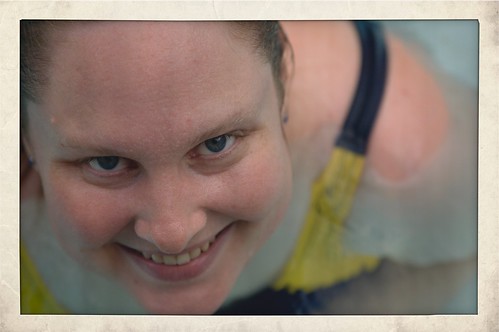
Flare makes adding these kinds of retro effects to any photo incredibly simple: just drag a photo into the window, choose a filter to apply, and export the finished photo to email, a new file, or Flickr. Flare comes with 24 filter presets, and has a small selection (which will apparently be expanded over time) of extra presets that can be downloaded and added to the lineup.

i love you (again)

Not content with that, though, each preset is completely editable. The presets are created by mixing together and adjusting combinations of color, texture, border, and effect, and each preset can be adjusted to tweak the final output, or new combinations can be built from scratch. Once the final look is chosen, the settings can be saved as new presets for use on other photos later on. Presets can even be exported from Flare and shared with others (here’s a sample of that effect).
Swimming

This is a 1.0 release, and while I’ve been enjoying playing with Flare and haven’t run across any bugs, there are some things that I’d love to see in future releases. At the top of my list is image importing: At the moment, the only way to bring an image in to Flare is either a standard “open file” dialog or by drag-and-drop. While this is great for initial simplicity, I tend not to have image files lying around in directories. Rather, they’re all stored in iPhoto or Aperture libraries. While dragging from another program is easy enough, that requires me to have both applications open and taking up screen space. Integrating the standard Mac OS iPhoto/Aperture image browser would make selecting photos to work with much easier.

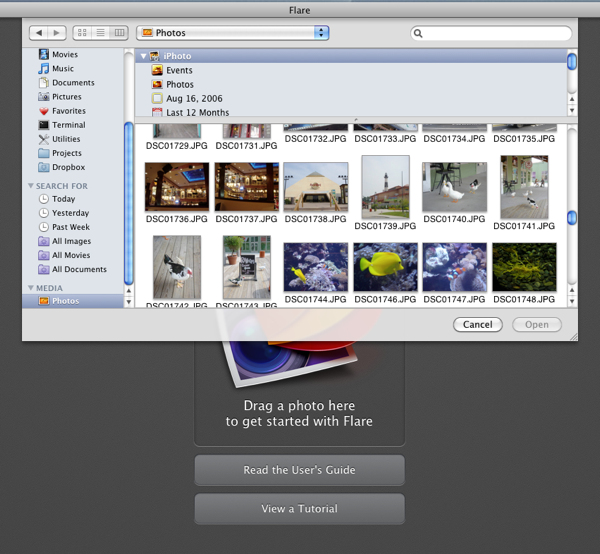
Update: Thanks to @talosman for pointing out that Mac OS X already has image library support built directly into the “open file” dialog. Just select “Media” from the left hand sidebar, and your iPhoto and Aperture libraries pop right up. Slick! Funny how features like this can easily go overlooked, I’d never stumbled across that before.

I’d also love it if Flare could be more tightly integrated into Aperture. Right now, Flare doesn’t work as an external editor for Aperture (when saving a file after making adjustments, Flare writes to a new file rather than to the file that Aperture created, so the changes don’t get pushed back to Aperture) — and even if it did, I prefer having Aperture tied to the more full-featured Photoshop as an external editor. As Flare is essentially a one-trick pony (admittedly, a very well-trained pony), I’d love to see it available as an Aperture plugin. Happily, there are hints that this is something that may be coming in the future.

Flying High

All in all, I’m really impressed with Flare, and had a lot of fun playing with it and exploring different filters and combinations of effects. Flare is $20, and is on sale for half off ($10) for its first week (until March 18th) if bought through the Mac App Store. It’s definitely worth checking out.

New Design

During my between-homework breaks today, I snagged bits of time here and there to see if I could slap together a new design for my site. Initially I was just hoping to find a decent temporary placeholder theme until I had time to really dive into a full redesign, but as it turned out, I think I’m happy enough with this to simply declare it my new look (until I get bored again).

I’ve wanted to simplify things and remove some of the clutter for a while, so I went looking for a nice, clean, single-column theme. After experimenting with two or three, I’ve settled on Satorii, by Felipe Lavin, slightly modified to fit my taste (adding the graphic in the background, switching to a serif font, and using my handwriting font for the site and post titles). I may do other tweaks here and there — I’m not thrilled with the footer at the moment — but that will come as I have time and inspiration strikes.

For the most part, though, this is what I’m going with from here forward. Nice, simple, clean, and easy to read.